


A Stranger
Members
-
Joined
-
Last visited
Everything posted by A Stranger
-
You can still use PoliceSmartRadio if you disable all of Traffic Policer's ambient events and so on.
-
Sounds like you did not use a mods folder. Whenever you edit files in / with OpenIV, you need to use a mods folder.
-
Remove RichsPoliceEnhancements; Arrest Manager; AttemptedCrimeCallouts; OfficerStatusPlugin; I also see you have a scripts folder. Do you have anything in it? (Besides a speedometer)
-
Remove UnitedCallouts and WoutersCalloutsV. You may also wanna update ScripthookVdotNet.
-
Pretty sure DLS counts it as an extra. In the vehicles.meta; locate the police slot; find the <FLAGS> section. Make sure it has: FLAG_EXTRAS_ALL
-
That's the wrong file. Please send your RagePluginHook.log (located in your GTA V folder).
-
Rename the LSPD:FR folder in /Plugins to _LSPDFR.
-
Remove AmbientAICallouts. Also; make sure your commandline.txt only say -windowed .
-
Rename your mods folder to _mods; then retry. If you're using LML, do not forget to update your gameconfig.
-
It's your mods folder. If you recently (or before the update) installed dlcpacks for cars or something else; make sure you install these: (Same applies for LML) Gameconfig; choose 1x Traffic 1x Peds or 1.5x: https://www.gta5-mods.com/misc/gta-5-gameconfig-300-cars Heap Limit Adjuster: https://www.gta5-mods.com/tools/heap-limit-adjuster-600-mb-of-heap Packfile Limit Adjuster: https://www.gta5-mods.com/tools/packfile-limit-adjuster
-
Try renaming your mods folder to _mods.
-
Have you updated your mods folder via OpenIV yet? Open OpenIV -> Mods folder -> Update -> Update.rpf -> Click on "Edit Mode" -> A green banner should pop up. Click on it and your Update.rpf will automatically be updated & overwritten. This is the said green banner: If the green banner doesn't appear, you may have to update your update.rpf manually; like this:
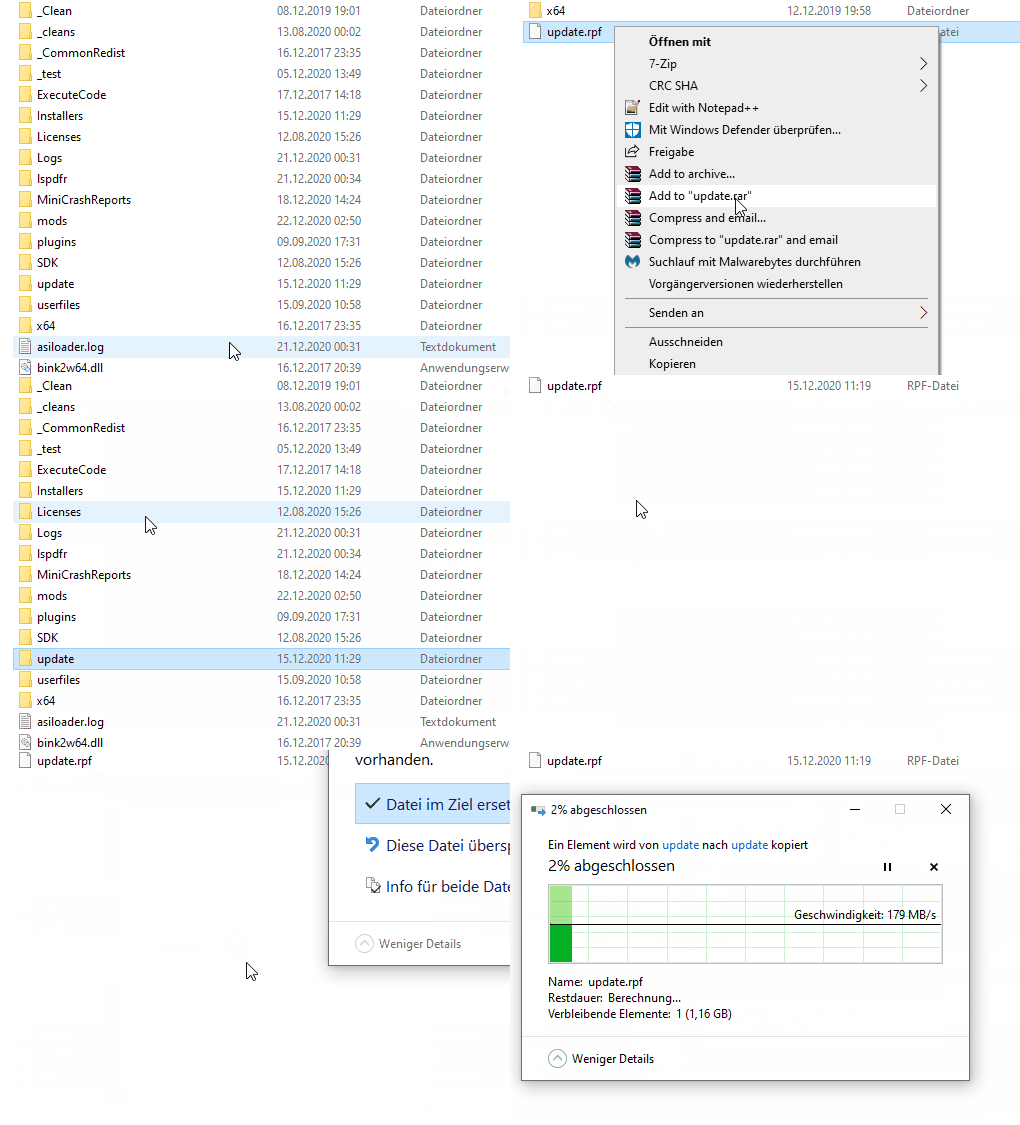
-
It is definitely your mods folder crashing your game. I assume it's AI TRAFFIC Fluidity & Discipline 6.0, try taking it out.
-
Please attach your RagePluginHook.log.
-
1. Make sure EUP Menu is being loaded by RagePluginHook. 2. If you updated your mods folder, you need to re-add EUP back to dlclist.xml. (mods/update/update.rpf/common/data)
-
Rename your mods folder to _mods and then verify your game files. Also, if you have LML, disable it for the meantime. Also check the date on your SHV.
-
Please, next time send the RagePluginHook.log from your main GTA V folder, not /logs. Also, you may wanna disable your mods folder, (scripts folder if you have it) and remove ScripthookVdotnet if existent.
-
Disable Game.Blips in your LSPDFR.ini, located in GTA V/LSPDFR. Then, change the plugin timeout threshold from 10000 to 60000 in the RagePluginHook.ini file and change Main.PreloadAllModel in GTAV/LSPDFR -> LSPDFR.ini to false.
-
Scroll up to the car above and make sure you closed the audioNameHash tag.
-
First off, Traffic Policer is outdated. Secondly, it's a LSPD:FR plugin. It is not supposed to show up in RPH.
-
Rename mods to _mods. If you have LML, either disable it or install the updated gameconfig.
-
Did you update your mods folder? If so, you need to reinstall the gameconfig, it was updated not too long ago. I know you said you installed it, but did you install it into /mods? Or with LML?
-
Did you update your mods folder?
-
Can you show me /Plugins?
-
That is not how you update your mods folder. In order to update your mods folder, please do the following: Open OpenIV -> Mods folder -> Update -> Update.rpf -> Click on "Edit Mode" -> A green banner should pop up. Click on it and your Update.rpf will automatically be updated & overwritten. This is the said green banner:

