


Creators: Due to background reprocessing of files, approvals and file security checks may be delayed. Thanks for your patience.

BlaineBug
Members
-
Joined
-
Last visited
Everything posted by BlaineBug
-
 Ok. How would one go about disabling the "Police Warning" priority/phaser tone so that all vehicles only had two siren tones? Also, is the electronic air horn shared for most of the emergency vehicles, just as the third siren tone is? I assume that the air horn is referred to as the bull horn, for the sake of the siren pack? Thanks!
- 316 comments
- 31 reviews
-
Let me get this straight. Is "POLICE_WARNING" the phaser tone or the airhorn? Is "Generic Bullhor" the airhorn? And are these shared by all of the vehicles? I notice that the primary and secondary tones are different for FBI, Fire, Ambulance, Granger, Police Bike, and Police, but the phaser (third siren tone) and airhorn seem to be shared by all Emergency Vehicles. Is my observation correct? Also, what is "AMBULANCE_WARNING"? Is this a third tone available for the Ambulance only? How would one be able to fit in a tone? Seems like it would take you over the 15.7 mb file limit.
- 316 comments
- 31 reviews
-
I'm not sure. I think that it recently changed with the latest GTAV update. I am still confused on where to re-install some of the other cars as well, because the existing location is non-existent.
- 316 comments
- 31 reviews
-
I can't help you there. I didn't change those either because I didn't know either. For instance, I use the Code 3 Mastercom tones for all sirens, Police and FIB. Do you notice that the FIB siren makes the tones deeper and slower compared to when they are used in a regular Police slot?
- 316 comments
- 31 reviews
-
Wouldn't you know it, the minute I get done doing about two hours work of carvariations.meta and vehicles.meta work, I go to start the game, and it updates, and now my update folder in OpenIV is outdated! GRRRRRRRR!
-
Basically, you have to delete the siren that you want to replace, find the siren tone that you want, copy it into the folder with the siren tones to be used, and replace the file name with the correct file name that was originally used for that siren tone. I know that it's confusing to describe, but it's the best i can do for almost 11pm.
- 316 comments
- 31 reviews
-
Yes. It all gets confusing when you are merging three files into one, though. Picking and choosing and copying and pasting. Have to get it right! I am being adventurous now... The suck happens when you change a model in the future and they don't provide any corresponding flags or .metas!
-
I am finding that there is no direct way to edit .meta files in OpenIV. You must export and then edit, and then replace. Is my assumption correct?
-
I suppose it does. Adding vehicles was a pain. Now it is easily accomplished. At first I had issues with the same thing regarding patches. Like there is an FBI2 model in various locations, but only the one in the patchdayx location works. Ghey!
-
What a pain! Meh!
-
Isn't it possible that one carvariation.meta and/or vehicles.meta file will contain information for various cars, and if you install the one that came with the custom model, it may overright your other custom settings for another vehicle? Which I believe is what happened when it changed the LED pattern to rotating light pattern for my Police Taurus.
-
So how many "default" vehicles.meta and carvariations.meta files are there? From some of the custom models I have seen, there are various locations for these files scattered about the gtav directory. I would like to know that I am on a "clean" slate before modifying, if that is possible. Is it?
-
Can anyone provide me with some insight and knowledge regarding Carvariations.meta and Vehicles.meta? I understand that these files are associated with spawning various liveries, vehicle options, light patterns, and vehicle handling. However, I am a bit confused. I recall inserting a carvariation or vehicle file for one different vehicle, but then the LED light patterns on the dash and deck changed to the halogen rotator style flash pattern for my Ford Taurus in the Police3 slot. I can't be too specific because I don't remember the details, but since then, I have not bothered to install any of the carviarations.meta and vehicles.meta files that are sometimes included with custom vehicle models. As a result, my FBI2 Ford Explorer still handles like the bulky Grainger from vanilla GTAV, and the Police3 Ford Taurus never spawns with the lightbar on the roof unless I spawn it from the Rage console. Any information would be appreciative. I am still learning the modding process. I have successfully accomplished installing custom vehicle models, liveries, and custom sounds using the correct mods folder and OpenIV. I am using a retail DVD set of GTAV as well, NOT the Steam version. Thanks :D
-
The ultimate fix was to re-install the default E450 ambulance model and then add less custom liveries. Verifying GTAV game data was not the fix, apparently, because OpenIV was using the custom ambulance model every time I loaded GTAV with or without RagePlugin.
-
As I already mentioned, the problem is fixed. I had inserted too many custom textures for the E450 ambulance and was unable to spawn the ambulance vehicle through the console. However the odd thing is, is that this also affected vanilla GTAV when being run without Rage as well. How many custom textures can you add through OpenIV? Is there a limit? After I exceeded 10 (I forget the specific number) OpenIV would crash upon attempting to import them all. It didn't matter if I added them as a batch or if I added the textures one by one. And by textures, I mean liveries.
-
Operating System Windows 10 Pro 64-bit CPU Intel Core i7 4790 @ 3.60GHz 91 °F Haswell 22nm Technology RAM 32.0GB Dual-Channel DDR3 @ 798MHz (11-11-11-28) Motherboard Hewlett-Packard 2B36 (SOCKET 0) 83 °F Graphics HP 27xw (1920x1080@60Hz) 4095MB NVIDIA GeForce GTX 745 (HP) 115 °F Storage 2794GB Seagate ST3000DM001-1ER166 (SATA) 90 °F Optical Drives hp BDDVDRW CH30L Audio Realtek High Definition Audio I'm too lazy to type it out, so I just copied from Piriform's Speccy.
-
I fixed the problem. When I was taking a shower I remembered that I was attempting to add a magnitude of liveries to the Ford E350 ambulance. To the point where it was making OpenIV crash. Then I remembered not being able to spawn the Ambulance, while the missing textures phenomena was occuring. I deleted the references of the E350 ambulance and then re-installed. I only installed 4 "custom" liveries for it, not adding any additional liveries beyond the four liveries that come stock with the custom model. How many liveries can you safely install for any particular emergency vehicle? Needless to say, my problem is GONE and everything is back to normal.
-
For the past week, my GTAV has been missing textures. What I mean is that, everything will start out great, but then roads and buildings will disappear to the point where you are in sort of an invisible environment. I have the DVD version of GTAV. I first noticed this issue after adding a few call out packs for LSPDFR. This issue also occurs in GTAV vanilla when not running RagePluginHook. I verified all game files and GTAV downloaded quite a bit of files, but the issue remains. Besides re-installing GTAV, do you have any other suggestions? If your suggestions IS, in fact, to re-install GTAV, be aware that I will not follow your suggestion and will seek alternative methods. I do mod my game, yes, but that just includes vehicles and sirens, using a mods folder and OpenIV. None of my default GTAV files have been altered by me outside of OpenIV. Perhaps I am being too vague. Maybe I'll take a screenshot next time I load in. We'll see. For now, this is the best I can do to describe my problem.
-
.thumb.png.5fbbb989547defaeeb5c22864df62b54.png) Are there any other textures that are compatible with this model? I love the Sheriff texture but it would be great to have a variety of textures that randomly spawned. Maybe even some CHP thrown in for this slot as well.
Are there any other textures that are compatible with this model? I love the Sheriff texture but it would be great to have a variety of textures that randomly spawned. Maybe even some CHP thrown in for this slot as well.- 174 comments
- 47 reviews
-
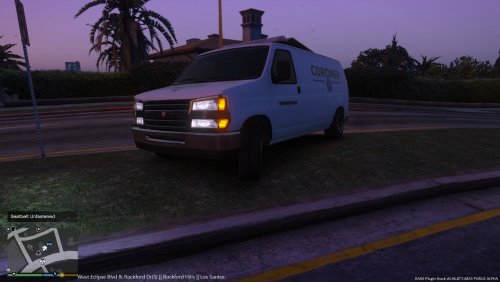 Would it be possible to change the amber lighting configuration to blue/red just like the Police? Any coroner vehicle that I have ever seen featured a full Police lighting package.
- 8 comments
- 3 reviews
-
Superb car. The interior is spot on for a 2006+ CVPI. I'm not sure why I can't leave a review, but oh well.
- 174 comments
- 47 reviews
-
.thumb.png.e436e916367dd5b950520057d9057b55.png) This car would be even better if it had the same interior as your Sheriff CVPI.
This car would be even better if it had the same interior as your Sheriff CVPI.- 50 comments
- 23 reviews
-
Nice :)
-
I saw a video earlier today. It had the traffic adviser in flash/warn mode on two vehicles. One was alternating amber with the blue, and the other was alternating amber with red AND blue. Seems to be varied. I miss the old days with the halogen Vision lightbars with rear oscillating mode: https://www.youtube.com/watch?v=i6bGjAjFLgw More LED flash patterns: https://www.youtube.com/watch?v=fNTO2m2YCt4
-
The CHP has some of the most odd flash patterns. Like their steady burning rear blue with the traffic advisor, but no red. I watch a lot of videos on YouTube, like from LoudLabs about "raw" videos involving CHP/LAPD shootouts and car crashes. Not every single CHP unit features the same flash patterns, though.
.thumb.png.5fbbb989547defaeeb5c22864df62b54.png)
.thumb.png.e436e916367dd5b950520057d9057b55.png)
