




RobertTM
Members
-
Joined
Everything posted by RobertTM
-
Just place modded vehicles in the latest patchday so it will overwrite the older files.
-
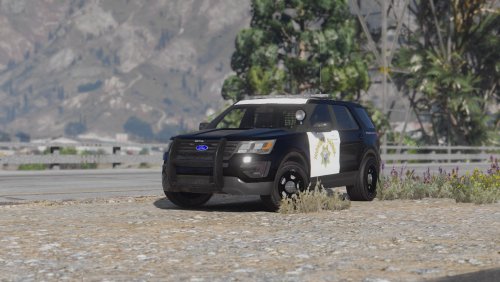 Today I made CHP and SAHP skins for Thehurk's new Explorer! ___________________________________________________ Download Contents: (2K&4K) -Three regular patrol CHP 2016 Explorer liveries -One Polar Bear CHP 2016 Explorer livery -Three regular patrol SAHP 2016 Explorer liveries -One "Polar Bear" SAHP 2016 Explorer livery ____________________________________________________ Enjoy!
 -
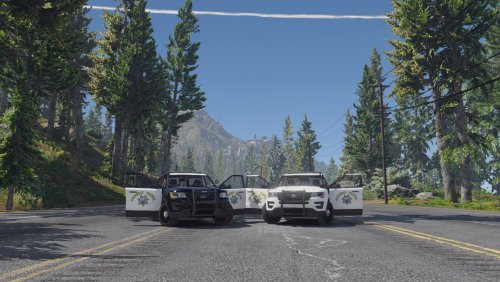 I am planning on doing CHP and SAHP textures for Thehurk's new FPIU definitely, maybe a charger some time in the future when I am not as busy.
- 11 comments
- 4 reviews
-
The corona is the "ball" of light, not the actual texture. EDIT: Heres an example:
-
The carcols file is what controls the flash pattern and the reflection of the lights of a car, and is configured by each "siren" which is added to the car by the modeler to set up the lights. Each siren can have a different color (for the corona and reflection), so depending on how the sirens are configured on the actual vehicle model it could vary.
-
Due to the way the carcols is set up I believe that the color is set per siren so it would have to do with the way the lights of the vehicle are set up, and the reflections correspond somewhat to their siren.
-
Is good for LEDs but I am not sure how it would effect rotating lights. Brightens the actual textures of the lights (Good for LEDs as well)
-
These are some good ones:
-
Pranger should be in this one: update.rpf>common>data>levels>gta5
-
-
 Are you using the LSPDFR garage, because if you are you will not see them because LSPDFR does not recognize addon police cars, so you have to spawn them in using the trainer or rage.
- 779 comments
- 187 reviews
-
You need to install the gameconfig.xml file because the game is only configured to accept a certain amount of cars, and these addons exceed the limit, so the gamconfig.xml needs to be changed to this one: https://www.gta5-mods.com/misc/gameconfig-for-patch-1-0-757-2-update-at-each-r-update which supports more cars.
- 779 comments
- 187 reviews
-
-

- 1
-
-
If you are using steam you can verify came cache and it should redownload the stock files.
-
I know what you mean, but it might be that whatever vehicles folder that you are using, or the oac, may have something wrong with it such as missing or misnamed file or some other error that could be causing this issue. I have personally done something like this before with a CHP siren in the sheriff granger siren and a SS2000 in the normal siren slots.
-
Maybe it is something from a specific sound that is/is not in your vehicles folder. Maybe you can try to take your siren sounds and only overwrite the siren sounds of a pack that you have downloaded that you know works correctly.
-
What happens when you try to? Sorry didnt see the rest of your post. Is your vehicles.oac in the same main folder with your vehicles folder or is it in the vehicles folder with the sound files? And do other sirens work for importing?
-
You don't need to modify the oac, you just need to make a folder with it and the "vehicles" folder in it. The vehicles folder should have all the sounds that usually come with a siren in it (as well as the actual siren of course)
-
Try going into the trainer and changing the color of your car to black
-
To make it that you arent the only officer using your addon car you can add it as a backup vehicle in the backup.xml file for LSPDFR
-
No problem
-
Thats because the gameconfig.xml is only accepting a certain amount of vehicles and the 6th is too many. To fix this you can do a modified gameconfig.xml from gta4mods or do it yourself with this thread:
-
Since the car you replaced was not intended to be a police vehicle it did not have a sirensetting. You need to change it's sirensetting to whichever one the vehicle model you are using supports and change the audionamehash in the vehicles.meta to that of a police vehicle so it would have a siren.
-
-
-
.thumb.jpg.1db0be3e377ccefdd47e57a95ec56762.jpg) Use control+f to open the search feature and search police4 and scroll down to the first flag line you see which is police4's
Use control+f to open the search feature and search police4 and scroll down to the first flag line you see which is police4's- 239 comments
- 70 reviews

.thumb.jpg.1db0be3e377ccefdd47e57a95ec56762.jpg)