




RobertTM
Members
-
Joined
Everything posted by RobertTM
-
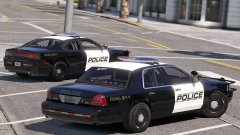 Yeah I was originally thinking that, but I'm very limited by what parts are available and I don't want to have a setup too similar to someone else's.
 -
Thanks for the feedback, i'll try raising the rear bar. I may edit the livery further, but i'm undecided if I'll add unit numbers, theres a good chance I will.
-
From the album: Robert's GTA V Endeavors
I don't know what I was thinking with that livery before... and the charger's almost done. New livery much simpler and likeable. Feedback? More: -
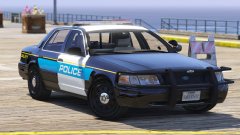
From the album: Robert's GTA V Endeavors
Back to the present :D Will add a few antennas and work on the texture colors. Will turn into a pack with a 2014 Charger and maybe a FPIS if I can find a wraparound for it. I will get to updating my sheriff pack, but needed a break from it because I've exhausted the idea. Feedback welcomed More pics: -
@RyWilson Thank you so much for using my sheriff pack and all the kind words!! It really meant the world to me :D If you ever want to use any of my other mods feel free. I'm also working on a modern LSPD pack which I may be able to send to you soon ;D Once again a huge thanks to you, that seriously made my day
-
Change the dashboard type in the vehicles.meta, try VDT_GENTAXI instead of what it's using now.
-
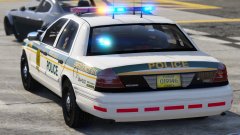
From the album: Robert's GTA V Endeavors
A suspect is in custody after leading Miami Dade Police on a wild pursuit on airport property, leading to long flight delays. No injuries are reported at this time. -
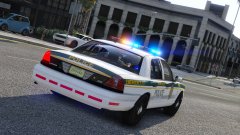
From the album: Robert's GTA V Endeavors
I'm in love with these cars. -
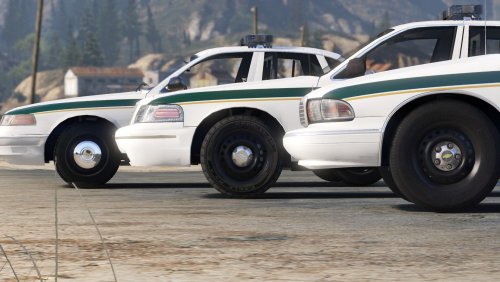 I'm not saying it's not gonna happen, just not now. i will do my best try to work on it in the future though, and maybe sooner than you'd think if I can find the time :)
- 60 comments
- 14 reviews
-
-

- 1
-
-
I may add hubcap versions of these cars in the future, but a MX7000 I would save for possibly another differently themed pack in the future.
- 60 comments
- 14 reviews
-
-
- 1
-
-
Maybe when I have more time i'll work on adding a hubcap version, but im currently pretty busy so it will be in some time.
- 60 comments
- 14 reviews
-
-
- 1
-
-
-
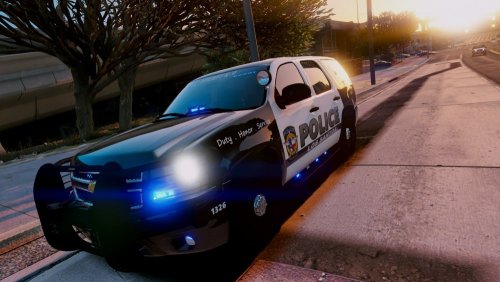 Thanks for making a skin for my '96 CVPI, one thing I noticed is that in the download the '96 CVPI is mislabeled as a '92 caprice. Still very solid work though, keep it up it looks great
- 4 comments
- 3 reviews
-
-
- 1
-
-
Thank you, I'll be sure to check it out! I can't seem to figure it out, it has to be something on your end. In OpenIV can you see through the lightbar glass?
- 60 comments
- 14 reviews
-
-
- 1
-
-
From the album: Robert's GTA V Endeavors
LAPD unit on scene of a shoplifting in western Los Angeles. The suspect was caught by store security trying to sneak out of the store with approximately $130 worth of merchandise. -
Here: It allows you to mimic pulled over cars to where you want them.
-
Yeah I just tested the red and blue textures again and they work fine on my end. make sure you didnt mix up the glass texture and the emissive texture.
- 60 comments
- 14 reviews
-
The lights that are shown on in the first screenshot can be turned amber with a texture change due to their different texture mapping if you like, but the glass would have to stay blue unless you made the whole lightbar clear, due to the way that the entire lightbar's glass is one texture. I'm not sure, maybe if there are some more older lightbars around that look good with ELS.
- 60 comments
- 14 reviews
-
Alright I'll add antennas and spotlights for the next update. Thats really strange. Make sure that your visualsettings is installed correctly as it is fine on my end with only mid level radiance. Thats strange, I tested them right before release, I'll give it a look.
- 60 comments
- 14 reviews
-
-
- 1
-
-
If I can find some more antennas sure, but I'm pretty overloaded right now, so it will be a bit!
- 60 comments
- 14 reviews
-
Thanks! I'll do my best, I try to switch it up a bit with my models when i can!
- 60 comments
- 14 reviews
-
-
- 1
-
-
From the album: Robert's GTA V Endeavors
I said no more teasers... and this isn't one! Have at it: Enjoy! -
This pack is very old, therefore the quality isn't very good. Check out my newer stuff for much better quality! Hello 😄 After working on this pack for a while it is finally released! It includes: -1995 Chevrolet Caprice 9c1 -1996 Ford Crown Victoria Police Interceptor -1998 Ford Crown Victoria Police Interceptor All vehicles have takedowns and all three lighting stages. (RED & BLUE VERSION INCLUDED) _________________________________________________________________________________________________________________ To install: 1. Make backups! 2. Drag all files included in the "models" folder into: gtav/mods/update/x64/dlcpacks/(LATEST PATCHDAY)/dlc.rpf/x64>levels/gtav/vehicles.rpf, using OpenIV in edit mode. 3. Drag the vehicles.meta included in the "vehicles.meta" folder into: gtav/mods/update/update.rpf/common/data/levels/gtav, using OpenIV in edit mode. 4. Drag all VCF files in the "ELS" folder into Grand Theft Auto V/ELS/pack_default. 5. (All following steps are for Red & Blue users only) Drag all ELS VCFs in the "Red and Blue" (from "ELS" folder) into Grand Theft Auto V/ELS/pack_default (Replace the files we placed there in step 4). 6. In the "Textures" folder (in Red and Blue folder) there should be the files; "whelen edge 9000 lights" and "whelen edge 9000". Go to the YTDs of the vehicles we installed in: gtav/mods/update/x64/dlcpacks/(LATEST PATCHDAY)/dlc.rpf/x64>levels/gtav/vehicles.rpf. (they should be very near the bottom in each YTD). 7. in each YTD, replace the Blue textures for the red and blue textures named in the previous step. __________________________________________________________________________________________________________________ Special thanks to OfficerFive0 for the huge help on the lighting and emissive textures! Special thanks to Lundy for the amazing DEV models! __________________________________________________________________________________________________________________ Known bugs: -1998 CVPI has North Yankton plates. __________________________________________________________________________________________________________________ Video: __________________________________________________________________________________________________________________ If I missed anyone in the credits please notify me! Enjoy!
- 60 comments
- 14 reviews
-
-
-

-

- 22
-
-
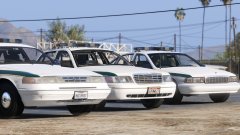 I wish, but i haven't even assembled the credits or finished the red and blue setup and it's getting late. Unfortunately the texture for the front license plate was corrupted whenever i exported it so the plate wouldnt show up, only the frame.
 -
From the album: Robert's GTA V Endeavors
Alright, this is the last teaser. Packaging the pack for release and setting up the red and blue variant. Expect it in the coming days!

