SuperPyroManiac
Community Team
-
Joined
-
Last visited
Everything posted by SuperPyroManiac
-
 You did it wrong. Please read the Readme.txt file I wrote that says exactly where to put things.
- 1,023 comments
- 63 reviews
-
 With full armor and headshots disabled, it should be impossible to die from 1 shot. If you could send me a log with the debug mode on when it happens it will help me see what happened.
- 631 comments
- 56 reviews
-
Yeah so will cause issue. Use my callouts end feature to properly clean them up. This is actually something I will look into as well, think I may have a solution in the future for it.
- 1,023 comments
- 63 reviews
-
-

- 1
-
-
Ensure you end the callouts by pressing END or in the Y menu as they do not automatically end to prevent scenes from despawning early.
- 1,023 comments
- 63 reviews
-
-

- 1
-
-
ELS has updated and includes a new AdvancedHookV.dll which fixes the issue.
-
ELS is broken with the most current ScriptHookV update. Remove ELS.asi from your main GTA folder. We have to wait for SHV to update again.
-
GTA updated, and old mods folders are cooked. You will want to remake it with the new version.
-
ELS is broken with the most current ScriptHookV update. Remove ELS.asi from your main GTA folder. We have to wait for SHV to update again.
-
 ELS is broken with the most current ScriptHookV update. Remove ELS.asi from your main GTA folder. We have to wait for SHV to update again.
- 2,685 comments
- 236 reviews
-
-
- 1
-
-
ELS is broken with the most current ScriptHookV update. Remove ELS.asi from your main GTA folder. We have to wait for SHV to update again.
-
ELS is broken with the most current ScriptHookV update. Remove ELS.asi from your main GTA folder. We have to wait for SHV to update again.
-
 Truly an informative description. Thank you for all of that useful info. Like someone will sue you for medical issues for your GTA mod.
 -
 The assembly info in your callout is wrong. The name does not match, and the version is set to 1.0.0.0. I would recommend fixing that as it makes it confusing to recognize in people's logs.
- 19 comments
- 3 reviews
-
I've seen this issue a few times with many different plugins when they spawn vehicles. Me and some other devs have not been able to pinpoint what causes it. Regardless thanks for bringing it up and I will keep trying to find the cause! For now it should just be a 1 off issue.
- 1,023 comments
- 63 reviews
-
-
Update DeadlyWeapons and SuperEvents. Issue was already fixed there. You also need to update RPH and GTA.
-
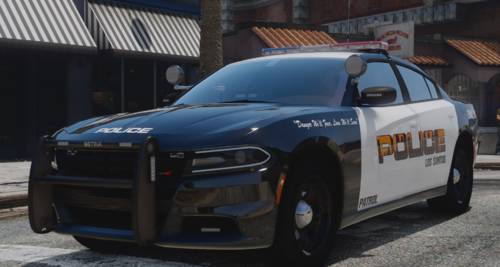 I understand it's not to your taste, and commenting that it could be improved there is totally valid. But commenting "Pretty bad liveries, could do better on Microsoft Paint. " has 0 constructive value.
 -
Please be respectful. If you are going to call something bad ideally you should explain why.
-
Yeah if there is a crash please post a log so I can see the cause. Most often it's due to it being installed incorrectly.
- 1,023 comments
- 63 reviews
-
 Here they're not super common, but the ones that do exist in my area just make the intersection entirely red instead of green.
- 112 comments
- 19 reviews
-
-
- 3
-
-
Unique and useful content? I thought this was LSPDFR. Where is my united copy pasta? 😤
- 112 comments
- 19 reviews
-
-
-

- 6
-
-
This crash was not caused by any of your plugins. This likely was either a 1 off, script issue (If you have SHVDN), asi issue, or mods folder issue. Best bet would to be to rename the mods folder and play for a bit (Custom vehicles, EUP, etc will be disabled) and see if you get more crashes. If not, likely something in there is broken. Not much I can do to help you there but you can try undoing any recent changes there. If that isn't the issue, then i'd check your scripts and asi mods to see if they are the problem.
-
Well honestly the issue looks like a 1 off problem. A person got deleted while my events were using it. As for why it may be unstable, there are some callouts you should update. 686Callouts Beachfront Callouts MCCallouts You also have some plugins that are known to cause issue. If I was in your shoes id remove them, but it's your call as they can cause the instability. CountyCallouts Jurisdictions+ AmbientAICallouts VarietyCallouts IGCallouts belicCallouts CalloutManager (You have callout interface which has these features. Remove this.) Pragmatic_Callouts (I made this, replace it with SuperCallouts) DangerousCallouts Wilderness Callouts Typical Callouts BaitCar EmergencyVehicleTheftCallouts Once you clear this up, try playing for a while and if you continue to have crashes often post a new log and I can take a look again for you.
-
-
They need to update PyroCommon.dll