


SuperPyroManiac
Community Team
-
Joined
-
Last visited
Everything posted by SuperPyroManiac
-
Looks like you edited your backup configs, and something is broken in them so the game fails to spawn them. Plugins that spawn backup then crash because it failed.
-
 Great feedback, I will be sure to improve what you mentioned. I wish more people could provide such helpful information.
- 1,023 comments
- 63 reviews
-
-

- 1
-
-
 You can use the report feature for concerns like this instead. This is something I am already looking into.
- 76 comments
- 5 reviews
-
-
- 2
-
-
I pushed a silent update, redownload this and use the new PyroCommon.dll and it is fixed.
- 1,023 comments
- 63 reviews
-
-
-
-
 Seeing as the model is mainly made by top mods. I don't really have an issue with them posting the original model as well.
 -
Jeremy Dewitte would love this.
-
 Those announcements on the different Discords were because I brought up the original issue. I have been keeping a close eye on this, and have been given the source code. I've reviewed the new version and confirmed it's safe. Author also poorly handles authentication by using randomly generated tokens, they do not mean your Discord token, it's just a way for him to manage access to the server. It's not the best solution, but that is their choice. There is no more IP logging or anything like that, and I will ensure it remains that way.
 -
Yep, I was making a custom audio folder so there would be support for Benzo's mod. I mean to not upload those changes yet as they're not done.PyroPlugins.zip Put this PyroPlugins folder into your lspdfr/audio/scanner folder and it will fix it. Sorry about that.
- 1,023 comments
- 63 reviews
-
SuperCallouts is an LSPDFR plugin - NOT rage. It goes into plugins/LSPDFR. If the folder doesnt exist, create it. It should not show in this list, it loads when you on duty with LSPDFR.
- 1,023 comments
- 63 reviews
-
-
- 1
-
-
Update PyroCommon.dll. Latest is 1.14 you're on 1.13. There have been significant changes to it that my plugin updates require.
-
You have some serious security flaws in your webhook. Anyone can send JSON to it. I sent a few messages which I assume you saw as a point of proof. Best to fix security holes like that with public plugins like that.
-
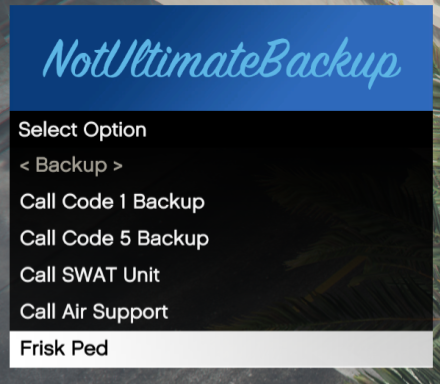 You set the version manually in your assembly info, where you set the plugin name. [assembly: AssemblyVersion("0.0.0.0")] [assembly: Plugin("NotUltimateBackup", Description = "Backup menu with vehicles, behavior, air support, frisks and status tabs", Author = "YourName")] [assembly: CompilationRelaxations(8)] [assembly: RuntimeCompatibility(WrapNonExceptionThrows = true)]
 -
No need to include RagePluginHookSDK.dll, as well as your assembly version is 0.0.0.0 and does not match what you put for LSPDFR.
-
This plugin does not look like it actually will load? I'm also confused why you included it twice in plugins and /lspdfr.
-
There are only a couple streets that you don't fall through the map. A lot of callouts and other things will also have issues there. It's a pretty area, but it's not really good for gameplay.
-
It's a 10-foot radius, shouldn't be related to an angle at all. Which callout are you having issues with?
- 1,023 comments
- 63 reviews
-
I am not sure, I know I add vehicles every now and then. Since 2023 I have for sure. Just with how outdated your game is I don't really think I can help.
- 1,023 comments
- 63 reviews
-
This issue is often from a faulty addon pack. Though it's possible your version is so outdated that vehicles I spawn do not exist in your version.
- 1,023 comments
- 63 reviews
-
 The AHV included with ELS 1.05 is now the working version for the current GTA update at the time of this post. We have kept the old fix for people who have not updated their game but moved it to the bottom of the download list.
- 2,686 comments
- 236 reviews
-
.thumb.png.0200451ef64202c333e4f45d6d8ad902.png) We allow FiveM mods here. Vehicles can be converted to LSPDFR fairly easy, FiveM configs are pretty much the same as addon vehicles for LSPDFR. Lookup addon vehicles for guides. Things like Albos addon DLC is a good help for starting out too.
We allow FiveM mods here. Vehicles can be converted to LSPDFR fairly easy, FiveM configs are pretty much the same as addon vehicles for LSPDFR. Lookup addon vehicles for guides. Things like Albos addon DLC is a good help for starting out too. -
You can create a file by clicking the menu at the top near your profile.
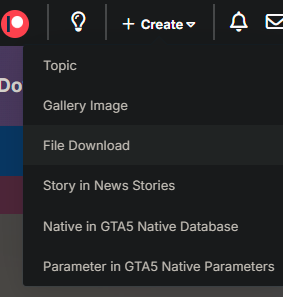
-
 I don’t mean to sound rude, but the user’s feedback is valid. The version checker displays incorrect data and sends disruptive flashing notifications, which understandably makes the plugin frustrating to use. The user took the time to explain their concerns, and ideally, this feedback should be used to improve the plugin. Your responses, however, came across as dismissive. Rejecting constructive criticism discourages users from providing feedback in the future. Since this is ultimately up to the developer to address, I’ll step back—but ignoring valid issues (like a broken update checker) isn’t productive for improving the plugin.
- 72 comments
- 8 reviews
-
-
- 2
-




.thumb.png.0200451ef64202c333e4f45d6d8ad902.png)
