


SuperPyroManiac
Community Team
-
Joined
-
Last visited
Everything posted by SuperPyroManiac
-
This crash was not caused by any of your plugins. This likely was either a 1 off, script issue (If you have SHVDN), asi issue, or mods folder issue. Best bet would to be to rename the mods folder and play for a bit (Custom vehicles, EUP, etc will be disabled) and see if you get more crashes. If not, likely something in there is broken. Not much I can do to help you there but you can try undoing any recent changes there. If that isn't the issue, then i'd check your scripts and asi mods to see if they are the problem.
-
Well honestly the issue looks like a 1 off problem. A person got deleted while my events were using it. As for why it may be unstable, there are some callouts you should update. 686Callouts Beachfront Callouts MCCallouts You also have some plugins that are known to cause issue. If I was in your shoes id remove them, but it's your call as they can cause the instability. CountyCallouts Jurisdictions+ AmbientAICallouts VarietyCallouts IGCallouts belicCallouts CalloutManager (You have callout interface which has these features. Remove this.) Pragmatic_Callouts (I made this, replace it with SuperCallouts) DangerousCallouts Wilderness Callouts Typical Callouts BaitCar EmergencyVehicleTheftCallouts Once you clear this up, try playing for a while and if you continue to have crashes often post a new log and I can take a look again for you.
-
-
They need to update PyroCommon.dll
-
 "you will face consequences" is truly a heartwarming description.
 -
-
 The RagePluginHook.log will show exactly why its throwing this error. Please send that. I am almost 99% sure this is due to an outdated Pyrocommon.dll or RageNativeUI.dll
- 1,023 comments
- 63 reviews
-
I see, thanks for letting me know. This will be fixed in the remastered update here soon.
- 1,023 comments
- 63 reviews
-
-

- 1
-
-
I've brought this up into https://www.lcpdfr.com/forums/topic/139883-lspdfr-api-requests/
-
I've been speaking to @Cyan about adding a specific API request, she suggested we add a post where people can post requests and the community and upvote ones that are important. My request is on behalf of @Echooo@MarcelWRLD@AstroBurgers for an API method to unarrest a ped, also freeing it of any of the tasks and animations that are applied. This would allow plugins like StopThePed and PR(WIP) to take control of a ped that's arrested without cloning it and deleting the original which causes a lot of null issues for other scripts. I do not foresee this causing any issues with existing plugins or scripts, and in fact would probably fix a lot of issues on older plugins that don't check if a ped is null when these plugins are installed. Echo mentioned this here already as well. If you have API suggestions I recommend posting them below so we can keep track of them!
-
 I noticed a flaw with your callouts where they never can end or cleanup without a 3rd party script that ends callouts. You may want to fix this as a lot of people may just use your pack and not understand why they cannot end a callout. Thanks for fixing that! Keep up the good work.
- 17 comments
- 2 reviews
-
-
-

- 3
-
-
 Well the plugin works and does what it says it does. I understand the input, but let's stop bashing please.
 -
-
Hit and Run has a known bug that causes the callout to not continue at a certain point. It will be fixed in a future update that I am currently working on.
- 1,023 comments
- 63 reviews
-
-
- 1
-
-
BETA TESTERS NEEDED SuperCallouts is being remastered. I am going to be rewriting every callout from the ground up to feel much nicer and blend in with the world better. This is a huge undertaking and I need testers to help me on that front. Help me test and it'll save me more time than you realize. If you are interested in helping, you can join the Discord below! https://discord.gg/ulss
- 1,023 comments
- 63 reviews
-
-
- 2
-
-
 It's almost like this is fictional. 🤔
 -
LSPDFR has a single developer who is rather busy. Base LSPDFR works just fine for traffic stops and basic events. There are many plugins to expand on it further as well since it has a decent API. I see it as it's a modular system so you can make it how you want. The tickets and traffic stops not working is very much a you problem as they work for just about everyone else. You also need to realize it's a free mod, this isn't a triple A company that's making millions and not pushing new features. There are so many plugins and mods on this and other sites to expand on it more too. You will come to realize that this still tends to work better and have better mods than many other games out there. Another issue is GTA itself has become stale, it's old as dirt now. If you don't enjoy GTA itself lspdfr won't be very fun either.
-
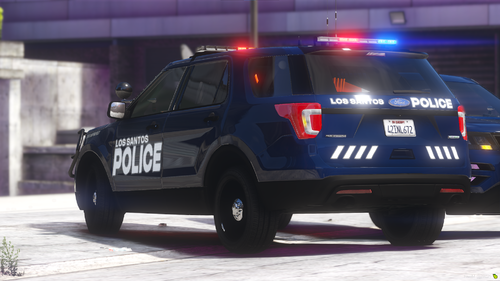 A description with gifs and nice quality? Imagine having proper credits and not having your description be full of legal jargon. Ill be featuring this pack as you clearly put more work than most devs.
 -
Hmm this is odd, it doesn't show any errors of it ending early. I will look into it further. I will say I am currently remaking all of the callouts including the swat callouts with a much much higher quality standard.
- 1,023 comments
- 63 reviews
-
-
- 2
-
-
-
 If this is what i'm thinking it is, it'll be huge! Thank you for the share!
 -
-
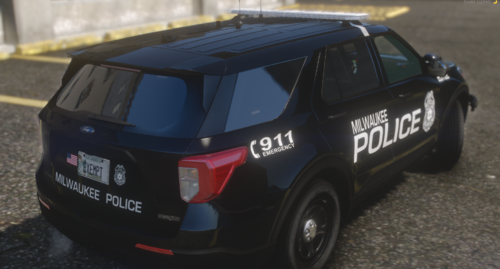 You are being very rude. Please have respect to the others on these files. If you personally don't like them, don't use them. Before you try and claim it's criticism, calling something garbage and someone delusional is not criticism.
 -
.thumb.png.216a145c4d4b3a47b27ec2355da9add5.png) Because we had to manually approve it.
Because we had to manually approve it. -




.thumb.png.216a145c4d4b3a47b27ec2355da9add5.png)
