




Kilyin
Members
-
Joined
-
Last visited
Everything posted by Kilyin
-
<3 Albo
-
 Forgot to mention, I used the 1x traffic 1x peds (Means Gta Base) folder version.
- 501 comments
- 104 reviews
-
you need another updated gameconfig. try this: https://www.gta5-mods.com/misc/gta-5-gameconfig-300-cars
- 501 comments
- 104 reviews
-
-
.thumb.jpg.bfad1c193dd40b9d539eefd7c5187a5a.jpg) you need to redo the line for the dlc in dlclist.xml in \mods\update\update.rpf\common\data
you need to redo the line for the dlc in dlclist.xml in \mods\update\update.rpf\common\data- 157 comments
- 46 reviews
-
-

- 1
-
-
Haven't updated yet, but this is the one I've been using and appears it was updated for the latest patch. https://www.gta5-mods.com/misc/gta-5-gameconfig-300-cars
-
 ./crickets
 -
 You can still do that with the included .xml file... and you can disable the UI.
- 246 comments
- 45 reviews
-
-
- 1
-
-
 During a pursuit it pops up in the upper left corner, by default press 1 for pursuit tactics menu. Make sure it's enabled in the .ini, by default it is. //Default: EnhancedPursuitAIEnabled=true EnhancedPursuitAIEnabled=true
- 176 comments
- 46 reviews
-
-
- 2
-
-
-
 ^^^ Actually take that back, only way to make it not crash is using the whole vehiclelayouts.meta file, which contains a huge amount of differences compared to the default one.
- 80 comments
- 19 reviews
-
You forgot the closing </EntryPoints> tag at the bottom there. Might be why some people say they're crashing.
- 80 comments
- 19 reviews
-
the nameHash line.
-
dunno then other than your setup2.xml looks like it might be missing a line. Maybe try this:
-
Your problem is most likely vehicles.meta You need to use a police car for the audio hash such as: <audioNameHash>police2</audioNameHash> and then in flags make sure you have: <flags>FLAG_LAW_ENFORCEMENT FLAG_EMERGENCY_SERVICE</flags> ...in addition to any other flags.
-
I don't have any of those in my mods folder except x64w.rpf because it actually has a modified file for a vehicle I use. Only dlcpacks I have in mods folder are patchday1ng, patchday9ng, patchday10ng, patchday11ng, and mpexecutive (and of course the eup dlc). Why would you need all that stuff in there? Seems like a huge waste of space. My EUP works fine, btw.
-
 Yeah, Simple Trainer V by sjaak (sp) check these options are set in trainerv.ini. EnableSnow=1 //Enable Snow VehicleTracks=1 //Enable Vehicle Tracks for Snow VehicleTrackDepth=1 //Enable Deep Vehicle Tracks for Snow PedTracks=1 //Enable Ped Tracks for Snow PedTrackDepth=1 //Enable Deep Ped Tracks for Snow You don't need EnableSnow to be set to 1 in the .ini because it can be toggled in the game. Just putting it there for reference.
- 85 comments
- 33 reviews
-
-
- 1
-
-
 I'll defer to alex, but only thing I see there is a game crash, no crashes in the RPH log.
- 302 comments
- 66 reviews
-
-
-
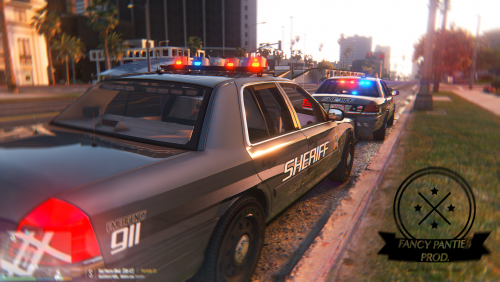 Cool, I managed to get it working with custom siren IDs thanks to your carcols_to_add.txt. The vector lightbar seems like it might need to be a little brighter? And is there any possibility you could document all the extras and trainer mods by part?
- 108 comments
- 11 reviews
-
-
-
-


.thumb.jpg.bfad1c193dd40b9d539eefd7c5187a5a.jpg)


