




Albo1125
Insiders
-
Joined
Everything posted by Albo1125
-
 You need to close all your Windows Explorer windows and GTA V and anything else that uses the GTA V folder you may have. That being said, fixing the errors yourself can also be easily done by reading the error message and modifications' readme files.
- 379 comments
- 113 reviews
-
-

- 1
-
-
 The site is undergoing download maintenance meaning some downloads may be damaged. This is outside my control.
- 1,915 comments
- 242 reviews
-
 Please just read the readme and documentation files before posting and asking for support. Everything is explained in detail there.
- 3,646 comments
- 306 reviews
-
-
- 2
-
-
You need to update Traffic Policer to the latest version. You're on a very old one.
- 1,915 comments
- 242 reviews
-
You need to update ALL of my modifications (Assorted Callouts, FOot Pursuit Aid, Traffic Policer etc.)
- 1,915 comments
- 242 reviews
-
-
- 1
-
-
-
It doesn't matter :) It has worked with both 0.37 and 0.38 for a while now. If it didn't work for you before you had made an installation error like @Kal74 mentioned. Glad you fixed it.
- 1,915 comments
- 242 reviews
-
-
- 1
-
-
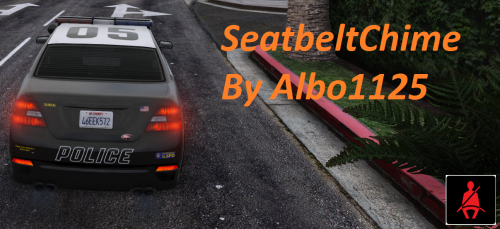 Seatbelt Chime Seatbelt Chime is a script modification that adds a fresh sense of realism to your driving. It enables a seat belt simulation, adding a realistic seat belt chime and a warning icon. It also securely straps you into your vehicle once you fasten your seat belt (Page Down by default), preventing you from being launched through your windscreen upon a collision. The seatbelt chime sound and the warning icon are customisable: this can be done by simply replacing these corresponding files in the installation folder. Now buckle up and drive safely! Files used: Belt Prompt.png source: http://roberts.com.ph/9-indicator-lights-find-vehicle-panel-board/ Chime.wav source: BMW Seat Belt Chime sound.
- 23 comments
- 13 reviews
-
-
- 10
-
-
Caused by the street race callout. If callouts are badly designed they will crash when something like this happens as they don't perform a simple if (ped.Exists()) check before doing something. Can't do much about it. For now I recommend sending your street racers to jail as the callout expects
- 3,646 comments
- 306 reviews
-
There are 2 main areas in the game - the city and the countryside. These are customisable through the INI file. If you want further customisation you will need to add transport regions for all the zones you want customised.
- 1,915 comments
- 242 reviews
-
-
@sneff97 Try downloading WInRAR. http://www.rarlab.com/download.htm Most of the time though these issues are caused by the LSPDFR website. If this persists after waiting for a while you can post a topic here: http://www.lcpdfr.com/forums/forum/875-website-problems-feedback-suggestions/
- 3,646 comments
- 306 reviews
-
-
It's probably best to let the author update their script for the latest RPH as that should only require a few function name changes to be implemented. I believe @alexguirre is the author of the original script? Correct me if I'm wrong here.
-
No need to do it so complicated with pointers and whatnot. I suggest doing what @Stealth22 suggested but have a check against Game.LocalPlayer.Character.GetOffsetPosition(Vector3.RelativeFront * 2f) which is a point directly in front of the player taking into account their direction&heading.
-
Please read the documentation pdf file before asking for support in future.
- 3,646 comments
- 306 reviews
-
 Cheers for that! Impossible unless the LSPDFR devs add support for this which I don't deem likely. You can go on duty everywhere by jumping (space) and pressing F9 at the same time though.
- 9 comments
- 2 reviews
-
-
On a side note, if you need to check if a ped is a cop, just check their relationshipgroup. if (ped.RelationshipGroup == "COP") //ped is cop
-
This may actually well be the case. Thanks for highlighting this issue! I'll fix it in the next update. For now, drunk train drivers rejoice
- 3,646 comments
- 306 reviews
-
I've tirelessly looked into this for British Policing Script but haven't found any way to retrieve past notifications. And you're right it's not available in the LSPDFR API at the moment
-
I could write something like this up but I've got too much on my list at the moment. If it's not done when I get less busy I'll happily make it reality. I wouldn't realistically rely on something like this though as users have extremely varying experiences with windows like these (due to GPU issues, perhaps?). Some can't even see them at all, while extreme flickering is also a common issue that really reduces the appeal of having a window like this to rely on.
-
You have two instances of LSPDFR running. Make sure you only go on duty once.
- 3,646 comments
- 306 reviews
-
Most of those keyboard shortcuts are hidden. It's definitely not caused by Traffic Policer though so can't help you there. If you can't find out what's causing it I suggest changing the speed checker key.
- 3,646 comments
- 306 reviews
-


