


OJdoesIt
Members
-
Joined
Everything posted by OJdoesIt
-
-
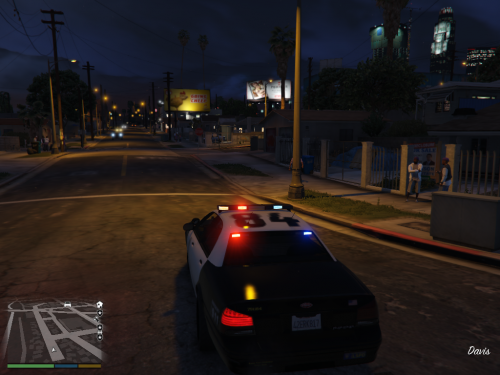 This callout pack will feature callouts that I was inspired to make at the given moment. The first callout is Officer In Distress. There are 3 random scenarios that play out. For each, the AI will try to handle everything. No player interaction is necessary. I plan to develop callouts that require little to no player interaction, i.e. the player supplements the call instead of controlling it. Much thanks to @DiamondTKG for testing and showcasing the mod. Make sure to SUBSCRIBE to her channel for great LSPDFR content. Make sure to put InspiredCallouts.dll and InspiredCallouts.ini into \Plugins\LSPDFR folder. Take a look at the INI at least once to make sure you are satisfied with the settings. Special Thanks: @DiamondTKG @AndersForPresident2020 @EchoWolf LSPDFR Developer Discord
 -
 Try to use the mod in the police2 vehicle model. And make sure you are pressing the ToggleMenu and ToggleMenuModifier keys.
 -
You have RageNativeUI installed?
-
 I suggest removing them to see if the problem persists. You don't have to keep them removed, I just want to see if they do cause issues.
- 242 comments
- 18 reviews
-
-
-
You have to press the InitiateFelonyStop and InitiateFelonyStopModifier keys.
- 242 comments
- 18 reviews
-
To initiate the stop, you have to press and hold the button. Those keys can be found inside the pause menu while in-game. Go to Keybindings and then Vehicle General.
- 242 comments
- 18 reviews
-
-

- 1
-
-
.thumb.png.9d0943161b37f863c291d6d6664edefb.png) The spotlights, via this mod, are currently not supported for Rockstar Editor.
The spotlights, via this mod, are currently not supported for Rockstar Editor.- 369 comments
- 33 reviews
-
That should be enough. Maybe even do 2 cops vs 1 ped, at least one of the cops will stand still until fired at.
-
With LSPDFR unloaded, it works fine. With it loaded and off-duty, the issue occurs. Likewise with on-duty.
-
Here's a section of the log [5/14/2020 10:22:17 PM.446] LSPD First Response: [TRACE] Allowed non-ambient ped to shoot due to flag [5/14/2020 10:22:18 PM.242] LSPD First Response: [TRACE] Combat target is shooting at us, returning fire [5/14/2020 10:22:19 PM.266] LSPD First Response: [TRACE] Allowed non-ambient ped to shoot due to flag [5/14/2020 10:22:20 PM.289] LSPD First Response: [TRACE] Combat target is shooting at us, returning fire [5/14/2020 10:22:21 PM.362] LSPD First Response: [TRACE] Allowed non-ambient ped to shoot due to flag [5/14/2020 10:22:22 PM.677] LSPD First Response: [TRACE] Combat target is shooting at us, returning fire [5/14/2020 10:22:23 PM.807] LSPD First Response: [TRACE] Allowed non-ambient ped to shoot due to flag [5/14/2020 10:22:25 PM.678] LSPD First Response: [TRACE] Combat target is shooting at us, returning fire [5/14/2020 10:22:26 PM.739] LSPD First Response: [TRACE] Allowed non-ambient ped to shoot due to flag [5/14/2020 10:22:28 PM.050] LSPD First Response: [TRACE] Combat target is shooting at us, returning fire [5/14/2020 10:22:29 PM.092] LSPD First Response: [TRACE] Allowed non-ambient ped to shoot due to flag [5/14/2020 10:22:30 PM.003] LSPD First Response: [TRACE] Allowed non-ambient ped to shoot due to flag And I also constantly get this, which I believe is causing the officers to stand still most of the time [5/14/2020 10:22:36 PM.444] LSPD First Response: [TRACE] James McTavy (S_M_Y_SHERIFF_01) entered combat with target: Gregory Salvagente (A_M_Y_STBLA_02) [5/14/2020 10:22:36 PM.947] LSPD First Response: [TRACE] James McTavy (S_M_Y_SHERIFF_01) left combat. I've never gotten the "not allowed" output.
-
They are. I essentially create a random ped and a cop. I use the Fight task for each ped. The random ped is actively shooting and seeking cover while the cop may shoot for one second then stand still, then start shooting again after 3 seconds and basically repeats this loop.
-
-
Interesting. Is there any way to override this? I want to orchestrate a shooting scenario, outside a pursuit, but the cops won't continuously be in combat. The issue I dislike is they'll go into combat and quickly disengage and stand still until being shot at. I want to override this for a callout.
-
I want to have a cop ped to consistently stay in combat with a ped, whether it's melee or shooting, but the cop keeps leaving combat, per the Rage log. Is this a proper implementation of LSPDFR to only allow cops to stay in combat if they are being shot at, even with SetAsBusy=true? @LMS
-
Typically, UB or STP causes the issue because they constantly try to have ownership of cops. I have no fixes for this.
- 242 comments
- 18 reviews
-
-
It will disable when you get into a callout/pursuit/pullover. The playful siren will make the siren more random when clearing intersections. As of now, this only properly works when using a non-ELS vehicle.
-
This mod does not alter suspect behavior. You either have another mod controller suspect resistance or it's a callout controlling it.
- 242 comments
- 18 reviews
-
There won't be integration with STP because there are too many nuisances with trying to integrate it. I can work on adding a menu option for allowing the user to mark the vehicle as cleared.
- 242 comments
- 18 reviews
-
-
I won't be adding resistance chances because other mods do it. I expected people to use this within callouts and such. So for that, I didn't want to control the suspects too much within this mod as it could interfere with the theme of the callout.
- 242 comments
- 18 reviews
-
I haven't paid attention to how peds react. I think peds do ignore sirens though.

.thumb.png.9d0943161b37f863c291d6d6664edefb.png)

