


OJdoesIt
Members
-
Joined
Everything posted by OJdoesIt
-
 Make sure you have the latest version of RageNativeUI: https://github.com/alexguirre/RAGENativeUI/releases/tag/1.9
 -
 Install the latest of RageNativeUI: https://github.com/alexguirre/RAGENativeUI/releases/tag/1.9
 -
-
It loads addon vehicles for me.
-
 Read through the descriptions of each plugin you download and install to make sure you have all the dependencies needed to properly run the mods. Install the Spotlight mod:
- 242 comments
- 18 reviews
-
Install the latest version of RageNativeUI: https://github.com/alexguirre/RAGENativeUI/releases/tag/1.9 If it still crashes, upload RagePluginHook log
- 242 comments
- 18 reviews
-
Looks like you need to install the latest version of RageNativeUI v1.9 https://github.com/alexguirre/RAGENativeUI/releases/tag/1.9
-
Upload your RagePluginHook log
-
I'm still not understanding. Get it to crash again and send me that log file.
-
You never described the problem.
-
What compatibility were you testing for with ultimate backup?
-
-
Install the latest version of RageNativeUI: https://github.com/alexguirre/RAGENativeUI/releases/tag/1.9 Send me the RagePluginHook log
- 242 comments
- 18 reviews
-
.thumb.png.9d0943161b37f863c291d6d6664edefb.png) Either set EnableSearchlight to false in the INI or menu, or download the Spotlight mod:
Either set EnableSearchlight to false in the INI or menu, or download the Spotlight mod:- 369 comments
- 33 reviews
-
For now, install the HeliAssistance plugin. If you don't want to actually use the mod, you can clear the key values in the INI.
- 242 comments
- 18 reviews
-
What was the issue?
-
I'm not sure. I only do testing with just bare LSPDFR. The addon cars may work. However, may not with EUP as it uses whatever models are defined in the INI. I can make updates as necessary to get it to work with addon cars and/or EUP if they don't work.
-
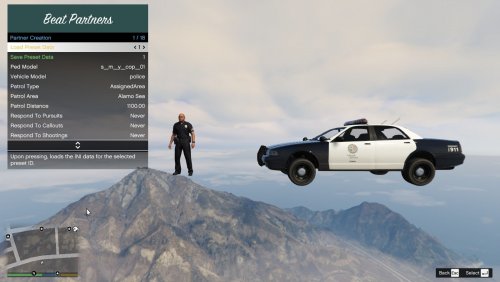
This plugin beta allows you to spawn units that will act as your beat partner. They will persistently patrol given the selected parameters in the creation menu. This allows for further immersion, realism, and ambiance. The goal of this plugin is to create autonomous AIs that will patrol, in a close-to-similar fashion as a human player and eventually eliminate the need of needing to manually request backup units during certain situations. Scenario Example: You can assign multiple units to patrol Grapeseed while you patrol Sandy Shores. If you get involved in a shooting, the Grapeseed units can automatically respond to assist. Or if you get in a pursuit, the Grapeseed units will only join the pursuit if the suspect enters the Grapeseed area. If the suspect exits the Grapeseed area, then those Grapeseed units will disengage from the pursuit and return to patrol. Various features and customizations: Assign a partner to patrol a specific zone (e.g. Vinewood) Give the partner a name and a call sign (call sign will be displayed on the partner's blip on the map) Assign a partner to patrol within a specified distance from the player (partner will try to stay within distance X from the player's position) Assign a partner to respond to pursuits/callouts within their assigned zone Display either the name tag or call sign tag above partners that are driving by the player Have partners always respond to player-involved shootings If a partner gets into a shooting away from the player, they will report it to dispatch If a partner gets severely injured, they will radio "Officer down" If a partner's vehicle is badly damaged or destroyed, they will become "out of service" to go to the nearest police station to retrieve a new vehicle or repair their vehicle, then return back to service Partners will persistently be available to respond to calls / assist the player Take a smoke break with your partner at a specified location Proximal Pursuit Logic You can select for each partner to only engage in pursuits if the pursuit passes within their assigned zone (e.g. Vinewood). Once the pursuit leaves their zone, the unit will drop out of the pursuit and return back to patrol. You can also have it where the partner will only engage pursuits when it is within a certain distance of their location (regardless of their assigned zone). Make sure to put BeatPartners.dll and BeatPartners.ini and BeatPartners.pdb into \Plugins\LSPDFR folder. Make sure to have the latest version of RageNativeUI installed. Developer API Take a look at the INI at least once to make sure you are satisfied with the settings. You can also modify the INI values within the in-game plugin menu. If you are encountering crash upon ForceDuty, then install the latest version of RageNativeUI. FYI: This plugin has been tested on vanilla settings (no additional plugins, only LSPDFR). There were minimum amount of crashes experienced. Also, due to a specific lack of feature in the LSPDFR API, units will not respond to callout locations, but will respond to the player's location and follow the player. They should be able to respond to the callout location in a future update. Special thanks to: @NoNameSet LSPDFR Developer Discord
-
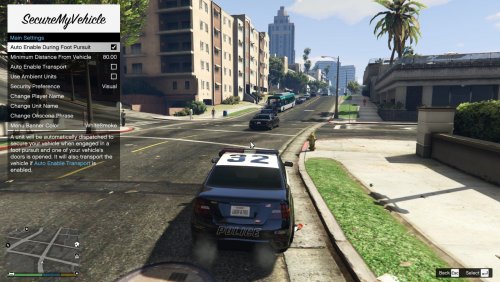
This mod adds enhanced functionality by allowing you to request a unit to secure your vehicle, primarily when you get into a foot pursuit. Make sure to put SecureMyVehicle.dll and SecureMyVehicle.ini and SecureMyVehicle.pdb into \Plugins\LSPDFR folder. Make sure to have the latest version of RageNativeUI installed. Take a look at the INI at least once to make sure you are satisfied with the settings. You can also modify the INI values within the in-game plugin menu. Special thanks to: @DiamondTKG LSPDFR Developer Discord
-
 Thanks for letting me know. Attention Users: Please use the INI file from 1.1.0 download ZIP.
 -
The crash is from Heli Assistance mod. Are you using the latest version of that mod?
- 369 comments
- 33 reviews
-
 More than likely no.
 -
The Code 3 option. You would probably have to uncheck Respect Intersections option though.
-
Did you want assistance? If so, provide more information on your crashing.
-
It should drive faster than 45mph. Are you trying this with an AI driver or with the player driving? In the INI, you can change the ped models. There are 8 slots (iirc) and you just put the appropriate model name in one of the slots. I believe ELS sirens only work when the player is in the driver seat. There is no workaround for this, so you are unfortunately out of luck with operating ELS while as a passenger. For the Code 2 High/Cali, from my experience, the default Code 2 response in the LA area is this, as compared to Code 2 in other states. I don't plan on implementing a partner-type mod where the AI will follow you. That will require more research and development to create a competent mod. There should be mods out there that should allow you to enter a vehicle as a passenger. Maybe something like this: https://www.gta5-mods.com/scripts/passenger-mod-0x7 Do you have RagePluginHook and RageNativeUI installed? Did you install this mod in the \Plugins\LSPDFR\ folder?

.thumb.png.9d0943161b37f863c291d6d6664edefb.png)


