


OJdoesIt
Members
-
Joined
Everything posted by OJdoesIt
-
-
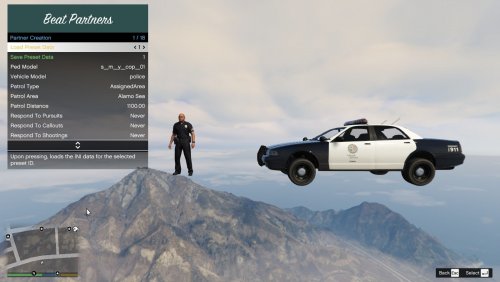 No EUP support as of yet. It is fixed to where it won't crash, but the units will not drive to the callout location since LSPDFR doesn't have the support to give that position to developers. So they units will just drive to and follow the player.
 -
 Let me know what you find. I test these plugins on vanilla settings and don't encounter any issues. I had beta testers as well who didn't have any fps loss.
- 242 comments
- 18 reviews
-
Any plugin can cause fps loss depending upon their internal code. I think I resolved the fps loss with all of my plugins. I know when using the menu of plugins, you can encountered fps loss while the menu is active.
- 242 comments
- 18 reviews
-
 I just tested it and it works for the pranger.
 -
.thumb.png.9d0943161b37f863c291d6d6664edefb.png) This crash is caused by Felony Stop Plugin. The traffic stop driver got abrupted deleted.
This crash is caused by Felony Stop Plugin. The traffic stop driver got abrupted deleted.- 368 comments
- 33 reviews
-
There are two keys in the INI and one of them is a modifier, e.g. Ctrl + G. Are you pressing the modifier key as well? See if the menu will show if you enter cheat code toggleautopatrolmenu while in the vehicle.
-
I'll have to see because others may not use the in-game callsign format, so then the audio won't really match.
-
-
You know you can modify the callsigns yourself to whatever you want them to be.
-
You can use IsAirUnitAlive to check that an air unit is alive and persistent, and also use IsAirUnitInService to determine whether it's currently attached to a player/plugin request or whether it's roaming around. So to check if idling, do if (IsAirUnitAlive == true && IsAirUnitInService == false) I'll also be adding an API function for this specific check, along with two other functions: Entity GetCurrentTarget() Vector3 GetCurrentTargetPosition() bool IsCurrentlyRoaming() You do not have the latest version, which is 1.4
- 368 comments
- 33 reviews
-
-

- 1
-
-
Actually, correction: it does return the exact position. That was a typo on my original response.
- 368 comments
- 33 reviews
-
It becomes enabled once you get in a pursuit, traffic stop, callout, or shooting.
-
The plugin doesn't clamp or round values. I did a quick test and the heli doesn't return the exact position that you give it. Replicate it again and save and upload the Rage log. Per the description at the top of this page, And make sure you have Spotlight installed.
- 368 comments
- 33 reviews
-
It's crashing because of the missing Heli Assistance. This bug will be resolved in the next update. For now, install HeliAssistancePlugin and the latest RageNativeUI and Spotlight.
- 242 comments
- 18 reviews
-
It's stores whatever Vector3 you give it. So you assign it a target position X Continue to do IsCurrentTarget(X) to verify that no new target was given to it. If it returns true, then the heli is still doing the task that you assigned it if it return false, then the user or some other plugin updated the heli task If it returns true, then give it a new target position and jump back to number 2
- 368 comments
- 33 reviews
-
Make sure you have Spotlight installed. If you're assigning a Vector3 as its target, you can use IsCurrentTarget(Vector3 posToCheck) to verify it's still targeting whatever you last assigned it. Do you think that'll work?
- 368 comments
- 33 reviews
-
-
If it's a bug, then you'll have to describe it here. If it's a crash, then upload the RagePluginHook.log file
- 368 comments
- 33 reviews
-
For now, just set RespondToCallouts to Never. This crash will be resolved in next update. Also, just an FYI, they won't respond to the callout locations but to wherever the player is. The reason is that LSPDFR doesn't have the code for me to obtain the callout location. This should be fixed whenever LSPDFR does receive an update. So the workaround is to have them respond to the player. Them shooting at people has worked flawlessly for me. Try this: go to the grove street area at night and start shooting at a random gangmember. You should start seeing every nearby gangmember attacking you. See if the units will engage those gangmembers.
-
Make sure to have the latest version of RageNativeUI installed. That's controlled internally by GTA. In my code, I do have it enabled for Normal, Aggressive, and Urgent to use the blinkers/turn signals. If they aren't working in Normal, then GTA is controlling it.
-
Yes, however if you let a unit from Felony Stop arrest an occupant, then STP might not let you perform a ped search on them.
- 242 comments
- 18 reviews
-
Make sure you have RageNativeUI installed. And make sure you have Spotlight installed.
- 368 comments
- 33 reviews
-
Make sure to have latest version of RageNativeUI: https://github.com/alexguirre/RAGENativeUI/releases/tag/1.9
- 242 comments
- 18 reviews
-
I'm not understanding. Can you get a screenshot or video snippet.

.thumb.png.9d0943161b37f863c291d6d6664edefb.png)
