


OJdoesIt
Members
-
Joined
Everything posted by OJdoesIt
-
.thumb.png.9d0943161b37f863c291d6d6664edefb.png) Enter cheat code toggleheliassistmenu and see if the menu opens with that. Let me know results.
Enter cheat code toggleheliassistmenu and see if the menu opens with that. Let me know results.- 368 comments
- 33 reviews
-
-

- 1
-
-
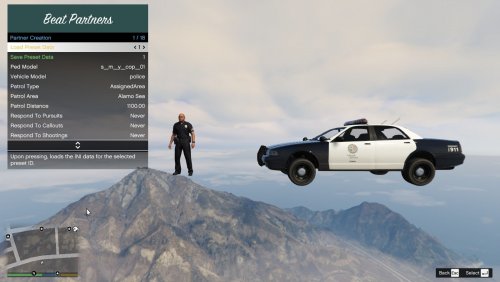 You must be selecting Create Partners Now option instead of the Create Partner option. The first one spawns all partners based upon the number of predefined presets. The second spawns the partner based upon the selected menu options.
 -
-
By default, keys are CTRL and R.
-
Yes, if they are assigned to the call, they will follow you to the call. If they are assigned to the pursuit, then they will pursue and search for the suspect(s).
-
Make sure you read the instructions: And make sure you have Spotlight installed.
- 368 comments
- 33 reviews
-
When I use it, I do it through the menu. Or you can use the hotkeys (SHIFT and H) which would call the heli without needing the menu. The heli is internally created within the plugin; it doesn't use LSPDFR or UB.
- 368 comments
- 33 reviews
-
Altitude and distance are in meters, GTA's default unit of measurement. The speed can either be mph or kmh; this can be changed in the menu. There will be no backwards compatibility support. So you have to continue using that version, or use the latest version without immersive dispatch support.
- 368 comments
- 33 reviews
-
So I think it's because immersive dispatch is using the old Heli Assistance API
- 368 comments
- 33 reviews
-
-
This will be looked in to.
-
 You can try entering cheat code togglefelonystopmenu If it works with that, then your key values in the INI are incorrect. Also try enabling the menu outside of the traffic stop to see if it is working.
- 242 comments
- 18 reviews
-
The crash will be fixed. I'm still not sure about EUP implementation at the moment. If you have a gun drawn, shooting, in a fight, or vehicle is code 3, then the backup will respond code 3. I will think about this. This will be fixed. That should not be happening. I'm curious if STP is affecting it. I will look into this. I will add the option to keep the partner blip during pursuit. I will look into this. You would have to do further testing to determine if there are frame drops. This will be updated. I will make a way to request a specific unit join the pursuit. I will consider making nametag text same color as blip color.
-
That was a typo on my end. You can change one to Model9. And yes, you can add Model10, Model11...Model99 and they will be usable in the game. This is too vague to provide any support.
-
Make sure the Spotlight plugin is getting loaded. Make sure you also enable the spotlight in the Heli Assistance menu, under Features Settings. In the Rage settings, make sure Spotlight plugin auto-loads while the game is initialized. If you don't know how to do that, then just make sure you load the Spotlight plugin before loading LSPDFR. Then try testing again.
- 368 comments
- 33 reviews
-
Are you trying to enable via the keys in the INI? By default, it's CTRL and T. That sounds like you're not even activating the felony stop mode. On a traffic stop, you have to initiate the felony stop and then request units, all through the felony stop menu of this plugin. From your description, it seems like you are using another plugin's AI.
- 242 comments
- 18 reviews
-
Yes, I will try to implement in the next update.
-
I'm not sure what's going on. And it seems to be isolated with just you since no one else has reported this issue. You could uncheck the Searchlight option within the menu. That should prevent crashing.
- 368 comments
- 33 reviews
-
-
Next time upload the actual file, not a paste of the file. And you don't have Spotlight plugin loaded. If you have it installed in the plugins folder, make sure you are loading it into Rage. Either have it auto-load via the Rage configurator tool, or load it within the game by opening the console and doing "LoadPlugin Spotlight.dll"
- 368 comments
- 33 reviews
-
-
It says it's crashing upon plugin termination. The crash is with LSPDFR itself. I do see something in regards to the missing Spotlight plugin. Try installing Spotlight:
- 368 comments
- 33 reviews
-
By default, it's CTRL and R
-
The texture question would have to go to alexguirre. I have no clue on how feasible (if possible) to implement that feature. There is some shakiness to it, but not similar to the video. I can probably add a feature to that allows you to modify the shakiness. You pasted everything after the crash. Probably best to just send the log file.
- 368 comments
- 33 reviews
-
This will be fixed in next update. As for now, just don't request backup during callouts.

.thumb.png.9d0943161b37f863c291d6d6664edefb.png)
