




CouthInk4
Members
-
Joined
-
Last visited
Everything posted by CouthInk4
-
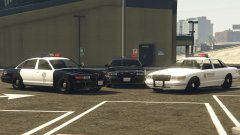 Just a thought.. Considering the LED setup on the 2nd gen Stanier is too modern, have you thought about putting the lightbar from the NYSP Esperanto onto the 1st Gen stanier? It's flash pattern is rotator.. but it looks more halogen rather than rotator or LED. i think it'll fit nicely with the Stanier.
 -
Are you sure you're logging into the right Social Club account? That's a pretty odd error to come up. considering it's an account issue, i don't think there's anything you can do other than contact Rockstar.
-
I never noticed the smiley face.. guess the LSPD was pleased she fell off. that Sheriff totally swerved on purpose.. although i guess that motorcycle cop did get his revenge at 2:42 considering that cruiser when flying
-
I play my game realistically, but i play it for fun aswell.. So i'll be recording gameplay from my sessions, editing out the crappy bits and leaving in the good crazyness. so sit back, relax and enjoy all the crazy things i do while playing LSPDFR. Also, i wasn't playing on releasing my "LSPDFR Hot Pursuit" video.. it was just a test, but i captured this and had to share.. what you see in the video is the type of stuff you should expect.. i maybe a horrible cop.. but i'm the Official Badass Cop so what do you expect?
-
There was a performance/fps drop/stuttering before, they managed to fix it.. i'm sure they can fix it again =) Well.. i hope they can fix it again.
-
Put your ideas in a topic here - http://www.lcpdfr.com/forums/forum/891-suggestions-requests/ as there's no RL car models around to work on, most modelers are working with stock cars.. so your request might get noticed and made =)
-
I believe that's possible, i know there is a screenshot floating around of an all-blue lightbar, and there is one of an edited lightbar with orange sections. So it's possible.. how you do it though, i have no idea.
-
This topic has been closed by G17 Media Community Team Staff as it is a topic regarding support for the RAGE Plugin Hook. We are unable to provide support for the RAGE Plugin Hook, and require all support topics pertaining to this be posted over on the official RAGE Plugin Hook forums: http://forums.ragepluginhook.net/ If you feel this topic has been closed in error, please report this post.
-
Your thread has been moved to the GTA IV Support Requests forum, as it is not an LCPDFR support request.
-
I don't know why.. but this version looks better than the ones in IV, i don't know if it's because of the lightbar or texture.. but they look beautiful compared to IV's LCPD ones.
-
This topic has been moved to the appropriate forum. Please post in the correct location in the future.
-
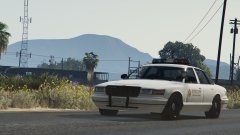 Not sure if i should use the Esperanto or this.. it's the only problem i have with V right now Keep up the awesome work!
 -
Mine updated last night, and haven't had a problem with mods and what not. That being said, i have been testing out screen recorders and i do notice a little performance drop (this could be due to the recorder itself) when i'm not recording. But modding related, there shouldn't be a problem. RPH,LSPDFR,Callouts,Vehicles and everything else should work fine. it was a 50mb patch so i doubt it changed anything, it was most likely related to their maintenance they a night or 2 ago.
-
uninstall GTA IV, reinstall it, download and install the patch that willpv23 linked, then install LCPDFR 1.1 and run the game as admin and you're done.
-
That will yes, LCPDFR is desgined to only work on legal copies of the games, cracks will break LCPDFR (have no idea how LMS managed to do it). But if it's a legal copy with no cracks then it will work.
-
Can you take a screenshot of your GTA IV directory. You shouldn't be using a crack on legal versions of the game.
-
Are you using a cracked or pirated version of the game?
-
Your topic has been moved to LCPDFR Support Requests. Please post in the correct location in the future. Hello there -- welcome to LCPDFR.com and thanks for trying out LCPDFR! Please do the following: Make sure you aren't using a crack - We don't support cracks or people using pirated software Update GTA IV to 1.0.7.0 (the latest version of the game, or 1.1.2.0 for EFLC) - These patches are needed. Make sure that you run the game as an administrator. Make sure that your GTA IV root folder (and every subdirectory) is not set to "read-only" Ensure that AdvancedHook.dll, ScriptHook.dll, ScriptHookDotNet.asi and Dsound.dll OR Xlive.dll are in the GTA IV ROOT folder Ensure that there is a folder titled 'LCPDFR' in the ROOT GTA IV folder. Check that all the above files exist, if they do not, reinstall LCPDFR with the MANUAL installation. Ensure that you are using up to date versions of every LCPDFR dependency and LCPDFR itself. Install these: https://www.microsoft.com/en-us/download/details.aspx?id=30653 , https://www.microsoft.com/en-us/download/details.aspx?id=30679 In some cases, your issue is resolved after following the above steps. If it did help, please let everyone know in the topic that your issue is resolved. If you do have to post a topic, do the following; Give a clear, detailed description of the problem. Explain any circumstances surrounding the problem. State what solutions you have tried. Post ALL relevant logs (LCPDFR.log, Scripthook.log, ScriptHookDotNet.log, AdvancedHook.log). Include as much information as possible. Post your system specifications. Post what other mods you are using. This includes car and script mods. Post a screenshot of your GTA IV or EFLC game directory. Please note that failure to follow these instructions may cause this thread to be closed.
-
This topic has been moved to the appropriate forum. Please post in the correct location in the future.
-
A Traffic Accident callout has already been done and is in CalloutsV if i remember correctly
-
If you don't already download and install Razer Cortex, it has a game booster which comes in handy.. I use it and stay at a solid 60fps, if i don't then it drops to 25-30
-
Nope, the only time backup will not come, is if the callout has ended.
-
Those are just standard things the CT asks, which in this case, you're not using a crack. Uploading your log will help.
-
Open the log file, copy and paste it in a comment (please add a spoiler for the log file, it can be done by highlighting the text and pressing the eye icon)
-
Theres heaps, but here is one with an author in the description so it'll be easier to track him down - https://www.youtube.com/watch?v=msstaWS9cvU


