


Sgt.Kanyo
Members
-
Joined
-
Last visited
Everything posted by Sgt.Kanyo
-
Or you could ask f5544 for his Driver SF crown victoria. Less polygon, more accurate car. Basically it's better then the old model. Simply the light setup is not like on the real crown vic, but that can be fixed.
-
Well for me vehicles with a higher .wtd size of 1 Mb, will cause texture bug. What I do is, use open iv to scale their insanely huge .wtds into normal size .wtd I'm not saying after that you can use as many cars as you want, but it sure helped me. Once I installed an M4 with a .wtd size of 16 MB (what the fuck man...) I couldn't even spawn it, I got the texture bug immediately.
-
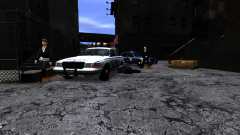 lol did that NHP officer break the 4th wall? Or how did he end up in LC or even if it's NY, he had to travel quite a lot :D
 -
Well I did some research and according to these guys they use pretty much the entry models, with 4 liter diesel and 6 cylinder diesel. So I'll be making the 6 cyl 3.0 liter diesel with 245 Hp. Source: http://www.gutefrage...en-polizeiautos EDIT: BMW 530d F10 handling released in 3rd post. Also the Vauxhall Vectra handling has been moved to 3rd post.
-
Ah I'm not gonna put a corvette engine or whatever engine in a BMW lol. I meant what engine you want from the engine choices. Like the BMW 5 series comes with: 2.0L 184 hp/199 lb-ft I4(520i) 2.0L TwinPower Turbo 245 hp/258 lb-ft I4(528i) 2.5L 204 hp/180 lb-ft I6(until 2011)(523i) 3.0L 268 hp/229 lb-ft I6(530i) 3.0L TwinPower Turbo 306 hp/295 lb-ft I6(535i) 4.4L Twin Turbo 407 hp/442 lb-ft V8(550i) 2.0L Diesel 184 hp/280 lb-ft I4 3.0L Diesel 204 hp/332 lb-ft I6 3.0L Diesel 245 hp/398 lb-ft I6 3.0L Diesel 313 hp/460 lb-ft I6 3.0L Diesel 381 hp/546 lb-ft I6 I already made the 4.4 liter Twin Turbo, that's the M5.
-
Why would you wanna convert the Charger? The charger we have is converted from NFS, which is known for low polycount, very accurate models. Sounds perfect to me. Besides Driver SF only has the SRT8 version.
-
You mean the Land Rover? The author said he'll reupload a new version which will work, since some1 else had the same problem as I did. Anyway you still haven't told me which engine types do you want me to do. Since I base my handlings on real cars, what engine does a car have matters. The best would be if someone could find out what the metropolitan police uses.
-
From the album: NYPD
-
So whose car is it? Also the Vectra has FF layout, which is Front engine Front wheel drive.
-
Anyone managed to get the Land Rover working? As soon as I spawn it, I get RC20. As for the 5 series F10. I made an M5 F10 handling for smokey's 5 series, and I think it's the same model. If you want a normal 5 series, please tell me what engine you want in the car. And also please tell me what engine does the metropolitan police use in their cars. I'm guessing they use the TDV6 in the Discovery, instead of a 4.0 V8 petrol. EDIT: Just released the Vectra handling on first page. I have no idea what the police are using, but according to clarkson they have diesels, so I gave it the 1.9 TDCI engine.
-
The other brand would be vauxhall, but can you put the DL links here for each car, I'll see what I can do.
-
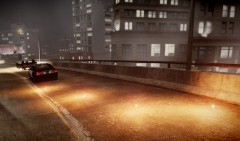 The flare models look nice, but they should be red:
 -
Yeah truth be told I haven't checked it in game, I like to stick to my LAPD theme, but I will check it out now. I was judging from the pictures. Also forgot to mention rear indicators are the same as the tail light / brake light. EDIT: well unfortunately I gotta say I maintain what I said before about the lights. It's how Ubisoft imagined the crown vic's light not how it actually is.
- 24 comments
- 7 reviews
-
Nice but please change the horrifying lights to the real one: headlights: parking lights / front indicators: brake lights /tail lights: http://farm3.staticflickr.com/2723/4098085048_356875cf2f_z.jpg?zz=1 Basically the same as the old crown vic we had for IV, with the rear lights a bit changed.
- 24 comments
- 7 reviews
-
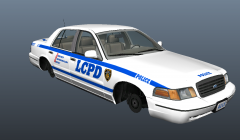 Yeah that's why Driver SF models are great. Take a look at the town car, it looks perfect in game, it's pretty much perfectly accurate, so what else do you need? :D
 -
Yes! Finally an accurate crown vic. Is it already in game?
-
![International JERR-DAN Wrecker / LCPD [WIP]](//s3-gallery.int-cdn.lcpdfrusercontent.com/gallery/album_657/sml_gallery_8683_657_259851.jpg) Holy shit that looks nice
Holy shit that looks nice -
You have to change the center of mass' z coordinates. On the crown vic's handling, it's this number here: 1777.0 0.33 85 0.0 0.0 -0.25 0.0 4 0.128 1.0 260 0.52 0.67 0.7 33.0 1.45 0.95 14.0 0.11 0.47 2.5 1.7 1.7 0.1 -0.08 0.0 0.49 2.0 1.0 2.2 2.5 0.0 25000 400010 0 0 That number shouldn't go over -1.0, it can but if your car rolls over usually by giving it -0.6 or -0.7 will fix it. If you had to use -1.0 the car would flip even at 10 km/h with original handling lol
-
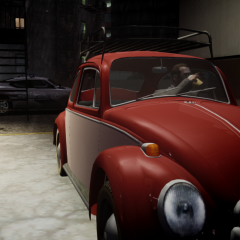 lol reminds me of LOST, where John Locke was having some coffee in the morning in his beetle near his father's house.
 -
-
Ah thanks, so it's confirmed it's the model then. I can't do anything about that, if you get that suspension bug, you guys should contact the converter.
-
Thanks for all your work. Good luck.
-
Aren't you talking about ambient noises? I think that's part of the city noise. The ai cops don't use their airhorns.
-
It's not the manual siren, they are just using their horn, and I guess they made it like, they could use the siren too, not just the horns. Also notice how ai police never use airhorn.
-
I think it's easier to just tap the horn button. When I'm driving with lights only, and arrive at the intersection, I just spam the h button, resulting in the same thing.


![International JERR-DAN Wrecker / LCPD [WIP]](http://s3-gallery.int-cdn.lcpdfrusercontent.com/gallery/album_657/sml_gallery_8683_657_259851.jpg)
