



Jedahdiah
Members
-
Joined
-
Last visited
Everything posted by Jedahdiah
-
 These were just practices. I mean, if I was going to make an accurate vehicle, I would, but I just produce what I enjoy
 -
From the album: Jed's Models
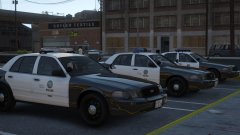
As some know, I get a real hard on for halogen lightbars, and so I've been looking into more DRO2 options with ELS. I put together these three CVPI's as a bit of an experiment whilst I was practicing DRO and LED lightbars. The arjent came out really well, and whilst the halogens are fully functional, with the mx7000 featuring steady-burn lights, I just don't know if the colour scheme fits in with the lore LSPD liveries. Went with all red and blue for the vector, as when there was a white rotor, it just didn't look right. Looked more like CHP. So I took inspiration for Mightnight Club: LA's cop cars. More photo's below: Vector light bar: Mx7000 lightbar: Arjent lightbar:© Jedahdiah
-
From the album: Jed's Models
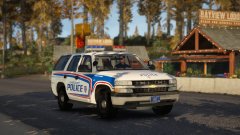
'Blaine County Police Department assisted in locating a missing person last seen within the Mount Chiliad State Wilderness. The person was last seen heading out of the Bayview Lodge in Paleto Forest for a hike. The person was later found by Sheriff's Deputy's on Cassidy Trail. He was extracted by Med-Evac and was flown to L.S For treatment.' Returning to the winter pack, put together a '06 Tahoe with a MX7000 lightbar mounted on it and a small rotor beacon at the back of the vehicle. Everything is DRO2 ELS enabled. Full interior, equipment and boot stuff included.© Jedahdiah
-
From the album: Jed's Models
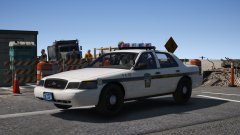
"A State Trooper stands watch for speeders and reckless driver's on the Miriam Turner Overpass. The junction to the port has been closed for repairs, giving an ideal spot for his surveillance." After getting back into this stuff yesterday with the Charger, found some nice pictures of the old style Pennsylvania State Police, and decided it would be nice to have the lore version as state patrol. I want to do either a FPIU or a Tahoe and a FPIS. Can't decide whether to upgrade them to LEDs (probably a Liberty II) or just stick with vectors. Eh, we'll see. -
From the album: Jed's Models
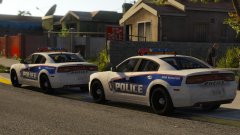
Got really stuck this week with work, the modelling software being a bitch and on the whole, I lost the will to model and when I did want to, I had no ideas on what to model. So, I sat down and forced myself today to do something, so I revisited the old LSPD vector models I did previously.... and deleted them. New and fresh, here's a 2014 Charger. Hopefully I'll maintain the will to finish the pack off. It will include door mirror lights when I remember to stick them on.© Jedahdiah
-
From the album: Jed's Models
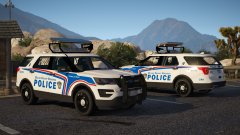
Happy Halloween! A '16 FPIU for the sheriff's pack I'm making for the upcoming winter (and snow!). Again, based of various Canadian departments. Features the same light bar as the CVPI, but has an arrow board. Fully functional, it's operated through ELS to raise and lower it, and comes complete with direction lights (right arrows). Whilst it operates fine in game, it doesn't seem to like R* editor when the lights are enabled/ the board is operational. (Arrow lights are bright due to my visualsettings.dat file. Gunna change it out later...)© Jedahdiah
-
From the album: Jed's Models
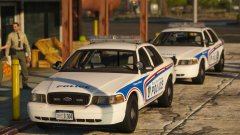
It's coming up to the snowy season and I fancied a bit of red and blue action in the County. I based these vehicles of a multitude of different Canadian Police Dept.'s, including London (Ontario), Toronto and some other's I've forgotten. The light bar is a based of Toronto's LED/ Halogen combo and is DRO2 enabled (as always). The red and blue you see are standard on real vehicles, and have been replicated in game. They are replaced with red and blue emissives when the siren is turned on. I think I'm going to make a San Andrea's Transit Pack based of their full halogen light bars too, as a stand in for the SA State Police. (I'll be swapping the vanilla sheriff's out for Canadian cops at some point.)© Jedahdiah
-
I've found this issue too, on an FPIU however, and with the bonnet ID. Rotated it like you did, assigned it the correct name in moth Z3D and ELS. I've found that the 'sound' you hear is in fact the correct sound as the 'part' is supposedly moving in game, but differently, that I found the arrowboard moved when the 'boot' was opened, not the bonnet. It also opened the wrong way. Quite bizarre. If you figure it out, do post it here so we all can use it?
-
Hello all, I'm trying to make an arrow board function in game. I'd like it to function a bit like NYPD high risers, where using the boot and bonnet on the vehicle has them rise up and down. I've experimented a little, but failed to make this work. Does anyone know how to make this function or has a tutorial on how to do this? Thanks guys - Jed
-
From the album: Jed's Models
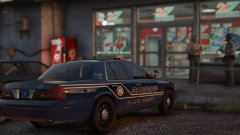
Two Sheriff Deputy's finish off their coffee at the Procopio Truckstop, Blaine County. The 2011 CVPI with the traffic unit livery from the Sheriff Pack I'm putting together for personal use. Hopefully I'll actually finish this pack this time.© Jedahdiah
-
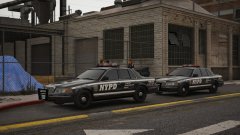
From the album: Jed's Models
Fixed the old Auxiliary units, so they're now displaying the correct plates. Added the other variant of the vector I was seeing in the reference pictures, which has white rotors on the end of the V, rather than two reds. However, inside the reflector is still red.© Jedahdiah
-
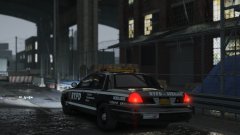
From the album: Jed's Models
New York Police Department Auxiliary Unit - 1998 Ford Crown Victoria Police Interceptor I've joined the New York Modification group, and I was tasked with creating the Auxiliary Division of the New York Police Department. I know LS isn't NYC/LC, but oh well. I'm a fan of the city and the department, and so I'm gunna build them. Oh, it's inaccurate atm, I am aware.© Jedahdiah
-
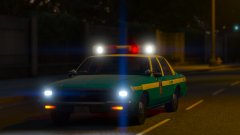
From the album: Jed's Models
More pictures, in one day?! Won't happen again, apologies. Just wanted to show off the 1985 Impala's lighting at night. Quite pretty imo. This project just started off as a practice using different materials and combinations for DRO2. Going to be making an accurate 1980's NYPD vehicle soon enough, which means scrapping the Impala for the 1988-89 Caprice. I'm sorting out my projects to the ones I'm actually going to try and release. The rest were just garbage imo.© Jedahdiah
-
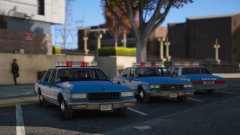 Clearly I've been talking to you too much, and I've developed some.....habits. They're alright, just not happy with them.
 -
From the album: Jed's Models
1985 Impala and 1988-89 Caprice. My projects are literally everywhere, like my life. Got bored today and put together some crappy 1980s NYPD shit. They're LSPD old styled though, cause you know... lore. Might piss around make some variants of these cars. No Niko or Roman in this one.© Jedahdiah
-
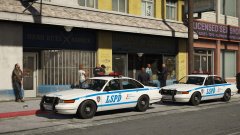 I'll swap the colours round and will post a picture to see if you guys like that better.
 -
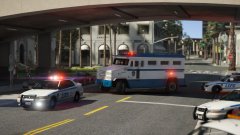
From the album: Jed's Models
LSPD units transporting a high risk offender to Davis Court House from Rockford Hills Police Station. I've added a couple more vehicles to my old GTA IV-style vanilla pack: a Feroci and a Prisoner Transport variant of the riot truck. Skins based off LCPD design, especially when it comes to the PT riot. The Feroci also has 'court' division liveries and black 'Auxiliary' liveries. The video editor is beginning to annoy me because I can never capture all the lights flashing.© Jedahdiah
-
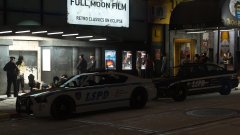 Looks like they're trying to get into a club. But I dunno. Visiting? Moving? *shrugs*
 -
From the album: Jed's Models
Dealing with a group of homeless males outside Tequi-La-La in Vinewood. You can see a LSPD Supervisor checking the health of a male on the floor. Security is also attempting to keep *undesirables* out of the club... The other two vehicles for the LSPD: the Bravado Buffalo and the Declasse Merit. The Merit comes with both auxiliary skins (as shown here) and standard LSPD skins. The Vapid Stainer also features both types of skins.© Jedahdiah
-
Categorically Unpalatable
-
u don't scare me matey
-
He was off losing in some back room poker game, so he wasn't around. You never know, he might make an appearance soon enough!
-
Indeed, he's found his way over to LS. Roman too Thanks man
-
Thanks for the heads up! I'll drop him a line now.
-
From the album: Jed's Models
Officers taking statements from shopkeepers in relation to a break-in reported to of occurred the night before. I got bored today so I made this. An old(er) school Los Santos Police Department Vapid Stanier, based of LCPD style. I quite like this. Might make it a pack... (Yes I know I have like 8 billion projects on the go.)© Jedahdiah


