


BogdanM
Members
-
Joined
-
Last visited
Everything posted by BogdanM
-
One of the best arrests done by the AI I've ever witnessed.
-
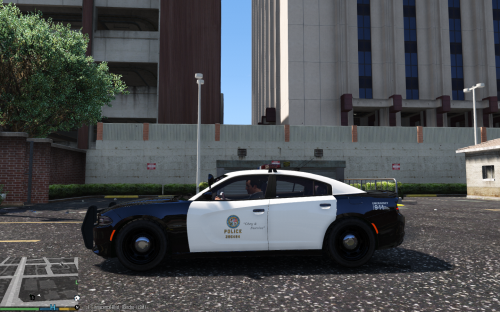 Since this pack only contains one texture and maybe some of you would like a different unit number, I can make custom ones for anyone who wants that. Just leave me a comment with the unit number, either 3 digits from 001-999 or the entire 6-digit shop number. When it's done I will quote your request and attach the new texture. The 404 number came to mind after spending 2 hours trying to understand why the game doesn't see multiple liveries, so "404 (livery) not found".
- 7 comments
- 3 reviews
-
Great! Thanks for letting me know about this issue, I'll edit the install instructions. Have fun!
- 7 comments
- 3 reviews
-
I looked at that car model and the exterior texture is inside crown.ytd (which you renamed to sheriff.ytd), it's called CVPI template (1). Do the same thing I said before, select it, then press the replace button and choose the new sheriff texture. But just so we are clear, you managed to replace the seriff car model right? You have the 2008 Crown Vic but with the LCPD texture. In that case just go to the sheriff.ytd and replace CVPI template (1).
-
If the texture mod only contains an image file, you have to manually replace the texture inside the police.ytd file. So OpenIV, enable Edit mode, go to vehicles.rpf inside x64e (best to use a mods folder) and double click on police.ytd to open it. You will see a bunch of textures but you only have to replace the one(s) that changes the vehicle exterior. So find that texture, click on it once and then click on the Replace button on the top of the window, then select the image file that came with the mod. If both files have the exact same name, you can just drag and drop the new texture, but it's safer to use the Replace button. Save and now you should see it in the game. You can follow these steps on any car mod but always read the install instructions so that you put the files in the right location, it's not always x64e. :)
-
Yes that was my general perception of the police baton, non-lethal but hurts like hell and probably leaves some nasty bruises (+/- other injuries). I'm in medical school and I remember one doctor giving as an example for the Monteggia fracture, football hooligans who arrive at the hospital with these kind of injuries after being hit with batons, usually when they raise their arm and try to protect from being hit in the face (unintentionally of course :D); so it can deal a lot of damage if it's not used correctly. Earlier I looked for some info on how to use a baton and came across this video, what the teaches makes a lot of sense but I don't remember seeing anyone use those techniques, but as you mentioned I've seen plenty of times police officers or gendarms striking the thigh when using the baton. https://www.youtube.com/watch?v=GruAdPZcBng
-
You're most likely right about that, I have no experience with them so I only see them as clubs but I've looked around and there seems to be an art to it. :)
-
Thanks for the answers! Is the Taser above or below the baton as a level of force applied? Since hitting someone with a baton will inflict quite a lot of physical injury, shouldn't the baton be used only as a last resort and only as a defensive weapon? What I want to say, are batons used to "soften" the suspect up before handcuffing or are only used for the officer to defend himself? I'm not judging, police officers love to use their batons on uncooperative citizens here in my country.
-
That's unfortunate... Can you check again if you put the textures in the right location (mods/update/x64/dlcpacks/patchday3ng...)? Also, copy the texture inside police2+hi.ytd also and see if it fixes the problem, it shouldn't be required but that's the only other place the game could still find the old texture. Do you remember copying the car files in any other location beside the one in the installation instructions? Do you have the Steam edition of the game or bought it directly from Rockstar? Can you check if you have the police2 files inside vehicles.rpf in either patchday4ng or patchday5ng? Finally,, can you try the file I attached? Simply replace the police2.ytd file just like you did when you installed the car model. (Sorry for the interogatory) police2.ytd
- 7 comments
- 3 reviews
-
Los Santos Police Department liveries for 2015 Dodge Charger RT Police 2.0 made by KAMELKFB. This pack only contains the LSPD texture, download the car model from here: http://www.lcpdfr.com/files/file/8466-2015-dodge-charger-rt-police/ Installation instructions: 1) Download and install the new car model following the instructions provided in the link, or do this: (Use OpenIV to replace "police2.yft", "police2.ytd", "police2_hi.yft", "police2+hi.ytd" in mods/update/x64/dlcpacks/patchday3ng/dlc.rpf/x64/levels/gta5/vehicles.rpf) - Don't forget to enable Edit mode. 2) Open police2.ytd then drag and drop all texture files from "LSPD Textures" folder, press Ok when asked (Choose import options window). Save police2.ytd and close OpenIV, start the game and you should see the new car textures. If you're still seeing the old texture after doing this, drag and drop the textures inside police2+hi.ytd as well. !!IMPORTANT!!: If you are running the game on NORMAL textures quality, you should use the textures from "1600px" folder. The ones from 2048px folder might look smudged. If you are running the game on High quality textures or above, use the textures from "2048px" folder. 3) I've also edited the lights_all texture to make the brake light red instead of white. If you want to use it, put it in the same police2.ytd with the other texture. Known bugs: - the car model doesn't support more than one livery at the moment. That means all Dodge Charger cruisers that are spawned will use the same texture (have the same unit number). You can check out similar textures for other vehicles here: http://www.lcpdfr.com/profile/17181-bogdanm/content/?type=downloads_file ---------------- Since this pack only contains one texture and maybe some of you would like a different unit number, I can make custom ones for anyone who wants that. Just leave me a comment with the unit number, either 3 digits from 001-999 or the entire 6-digit shop number. When it's done I will quote your request and attach the new texture. The 404 number came to mind after spending 2 hours trying to understand why the game doesn't see multiple liveries, so "404 (livery) not found". -Thanks Jeff Favignano for using the texture! http://www.youtube.com/watch?v=epoQnWB0hkA
- 7 comments
- 3 reviews
-
-

- 1
-
-
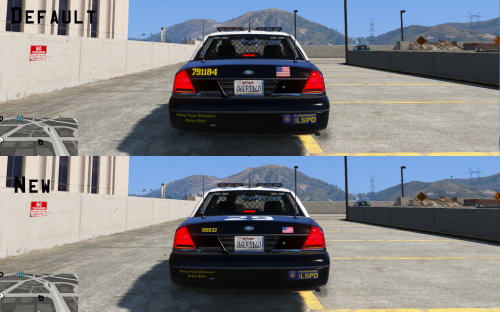 If you are talking about the CVPi with the ANPR system mounted on the trunk, I've seen that car model in some images and I've fairly sure it uses the 1999 model. If that's true then these liveries should work for it also. But make sure you back up your files before replacing the textures!
- 10 comments
- 1 review
-
-
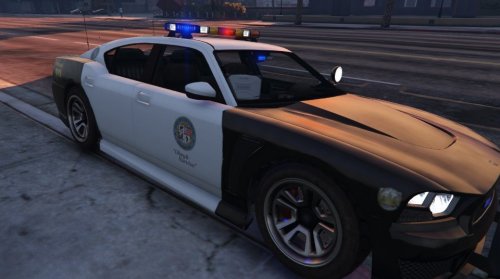 Is it possible to edit a file or something so the buffalo spawns with a different set of rims? I know I can change them with a trainer for my car but I'd also like the AI backup vehicles to spawn with use less pimped out rims. :D
- 54 comments
- 19 reviews
-
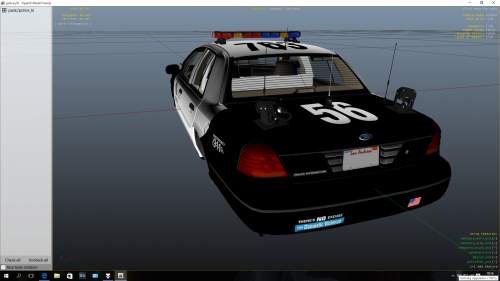 I'm sure the author had his reasons for taking it off the website so I hope people won't start uploading the model without his permission. It's his decision and we have to respect it. This comment is not aimed at you PimDSLR as you clearly stated that the model is not yours to share.
- 30 comments
- 2 reviews
-
Damn that sucks... Are those things (spotlight/cameras?) on the trunk removable?
- 30 comments
- 2 reviews
-
If it uses another car model then it probably won't work. Do you have a link for that car? I never heard of a 2011 version, only 1999 and 2008 CVPI.
- 10 comments
- 1 review
-
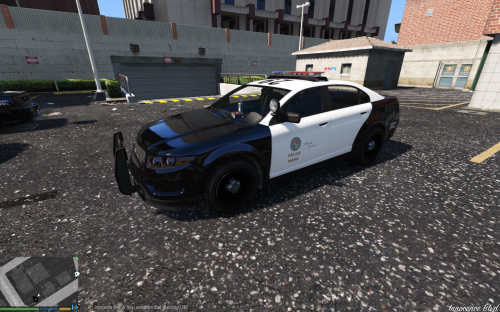 Los Santos Police Department liveries for Police Interceptor Fedsig Arjent made by F5544. This pack only contains the LSPD textures, download the car model from here: http://www.lcpdfr.com/files/file/8543-police-interceptor-fedsig-arjent/ Installation instructions: 1) Download and install the new car model following the instructions provided in the link, or do this: (Use OpenIV to replace "police3.yft", "police3.ytd", "police3_hi.yft", "police3+hi.ytd" in mods/update/x64/dlcpacks/patchday4ng/dlc.rpf/x64/levels/gta5/vehicles.rpf) - Don't forget to enable Edit mode. 2) Open police3.ytd then drag and drop all texture files from "LSPD Textures" folder, press Ok when asked (Choose import options window). Save police3.ytd and close OpenIV, start the game and you should see the new car textures. !!IMPORTANT!!: If you are running the game on NORMAL textures quality, you should use the textures from "1600px" folder. The ones from 2048px folder might look smudged. If you are running the game on High quality textures or above, use the textures from "2048px" folder. 1999 CVPI LSPD textures: Buffalo S LSPD textures: http://www.lcpdfr.com/files/file/8683-buffalo-s-lspd-textures/
- 3 comments
- 2 reviews
-
-
- 1
-
-
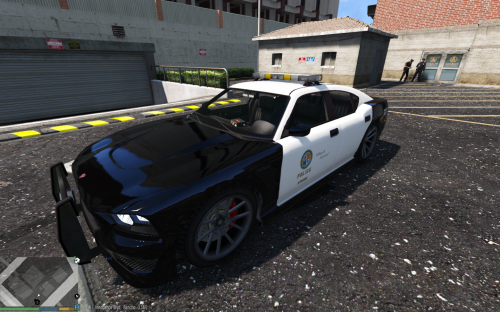 Los Santos Police Department liveries for "Buffalo S cop Whelen edge lightbar" made by F5544. This pack only contains the LSPD textures, download the car model from here: http://www.lcpdfr.com/files/file/8403-buffalo-s-cop-whelen-edge-lightbar/ Installation instructions: 1) Download and install the car model following the instructions provided in the link, or do this: (Use OpenIV to replace "police2.yft", "police2.ytd", "police2_hi.yft", "police2+hi.ytd" in mods/update/x64/dlcpacks/patchday3ng/dlc.rpf/x64/levels/gta5/vehicles.rpf) - Don't forget to enable Edit mode. 2) Open police2.ytd then drag and drop all texture files from "LSPD Textures" folder, press Ok when asked (Choose import options window). Save police2.ytd and close OpenIV, start the game and you should see the new car textures. IMPORTANT!!: If you are running the game on NORMAL textures quality, you should use the textures from "1600px" folder. The ones from 2048px folder might look smudged. If you are running the game on High quality textures or above, use the textures from "2048px" folder. 3) I've also added a clear glass lightbar texture. If you want to use it, put it in the same police2.ytd with the other textures. Known bugs: - part of the side view mirror and the front door frame overlap in the texture template so by coloring the mirrors in black, a small section of the door frame is also black instead of white. The black mirrors look much better so I'm willing to compromise. - minor color misplacements here and there. If you are using the 1999 CVPI made by YCA-RE, you can download a very similar texture from here:
- 1 review
-
-
- 1
-
-
 Very nice car model, I got so used to it I can never go back to the old police buffalo. I hope all the little problems will be fixed eventually but I also have a request to make. Can you update the model to use multiple liveries?
- 95 comments
- 38 reviews
-
Yep, small details are important for me too. Since I spend so much time driving around in a patrol car, it might as well look right. Let me know if you have any suggestions on how can I improve the texture.
- 10 comments
- 1 review
-
-
- 1
-
-
Yes I was thinking about the old style baton. It makes sense that if they switched to the telescopic one I probably just missed it looking at pictures since it's a lot smaller. Luckily somebody already made a mod for it. https://www.gta5-mods.com/weapons/asp-baton
-
Los Santos Police Department liveries for 1999 Ford Crown Victoria Police made by YCA-RE. I've redone the LSPD liveries for this car model and made them resemble more the LAPD markings scheme for the Ford Crown Victoria. These textures still use a low res Los Santos seal as I don't know how to make the model use textures from vehshare.ytd. This pack only contains the LSPD textures, download the car model from here: https://www.gta5-mods.com/vehicles/1999-ford-crown-victoria-police Installation instructions: 1) Download and install the new car model following the instructions provided in the link, or do this: (Use OpenIV to replace "police.yft", "police.ytd", "police_hi.yft" in mods/x64e.rpf/level/gta5/vehicles.rpf) - Don't forget to enable Edit mode. or (Use OpenIV to replace "police.yft", "police.ytd", "police_hi.yft" in mods/update/x64/dlcpacks/patchday3ng/dlc.rpf/x64/levels/gta5/vehicles.rpf) 2) Open police.ytd then drag and drop all texture files from "LSPD Textures" folder, press Ok when asked (Choose import options window). Save police.ytd and close OpenIV, start the game and you should see the new car textures.
- 10 comments
- 1 review
-
-
- 2
-
-
I'm not sure why the liveries aren't working in that mod, the only way I know to do it is to copy the liveries in the ytd file but it doesn't work like that for this unmarked cruiser. Maybe it's something to do with the code that lets you change the color of the vanilla car which doesn't have any liveries assigned to it.
-
I think only the U-boat (report car) is a one officer unit. Don't know the answer to the other questions, but I like to think that police cars don't just tag along without a purpose, for example a long column of police cars could be easier heard and seen and could provide on the scene assistance for a variety of situations. For example if the suspect vehicle hits another car and then drive away, one police car from the pack could stop and give first aid. Also police cars can get disabled during the chase and other officers might need to stop to assist the injured crew. Or if the suspect abandons the vehicle and runs through back alleys or through peoples gardens, you need a lot of units already on the scene to secure a perimeter so that the suspect doesn't slip by (that might be hard to manage if there is a police helicopter at the scene). Of course if everything goes well 5 cars are just as good as 15 but they have to prepare for the worst.
-
Thanks for the reply, you were very helpful! Also thanks for the youtube link, I love watching police chases.

