


BogdanM
Members
-
Joined
-
Last visited
Everything posted by BogdanM
-
Use vehicle.rpf inside: - x64e for police -dlcpacks/patchday3ng for police2, sheriff, sheriff2 -dlcpacks/patchday4ng for police3 I think these are the only cars I've replaced, I don't know about the rest of them. But you should always read the ReadMe file that comes with the mod, it will always say exactly where you have to replace the vehicle. If you change the name to something else, find another mod that replaces the car you want and read its ReadMe to see which is the right location.
-
 You can always watch videos of the car on youtube. Here is one: https://www.youtube.com/watch?v=Q0J6OhHrlHo
- 146 comments
- 24 reviews
-
-

- 1
-
-
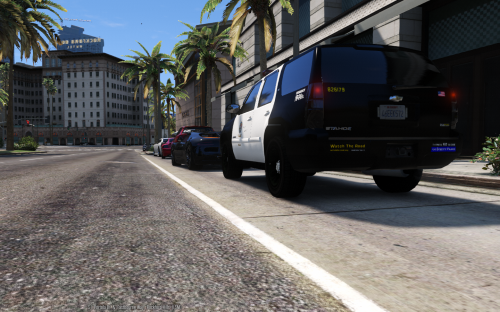 I don't think you need to merge them since they are installed in different dlcpacks. So the carvariations from the Impala won't overwrite the one from the Tahoe. But if one of them takes priority, open carvariations file from the tahoe and paste this under "<variationData>" (third row) Save the file then replace your old Tahoe carvariations file with OpenIV.
- 20 comments
- 6 reviews
-
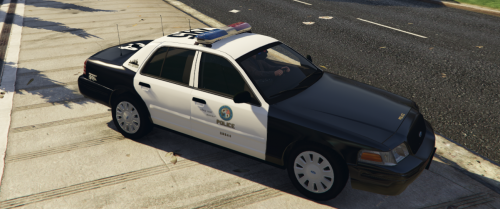 Great mod, I like it a lot! It's always nice to see other people pitch in to make a mod better. Minor but obvious details like these can always be addressed by other community members instead of burdening the mod author with a mountain of requests. I'm sure it's far more convenient to download a single mod instead of 2-3 but the time required to do it is still insignificant compared to the time a single person needs to fix everything and please everyone by himself (for free). /rant over
- 15 comments
- 5 reviews
-
Ok, I'll remember that next time.
-
I love reading these preview series, if this is the amount of new features implemented from 0.2 to 0.3, I get goose bumps just thinking about LSPDFR 1.0! I have a question, when we perform an arrest without a weapon, will there be a chance for the suspect to run away or resist/fight back when we attempt to put on the handcuffs? Or this is a 100% safe procedure to perform so if the suspect didn't ran away when we stopped him, he will always comply with the arrest?
-
Thanks for the reply, I didn't even consider buying a Radeon card before you mentioned those models. I ended up buying a R9 280x 3GB 384bits for 145 euros, anything newer and better was outside my budget. I have to wait a couple days to arrive but hopefully I will see an improvement in the pc performance.
-
 Our savior F5544, turning dreams into reality! It's not even a competition anymore, I just replace your old mod with your new one. (just a little joke; I acknowledge all the other modders who continue to release amazing content)
 -
So I'm thinking about buying a second hand graphics card with the sole purpose of playing GTA V with better graphics. I've found someone selling Gigabyte NVIDIA GeForce GTX 760 OC WINDFORCE 3X, 4096MB, GDDR5, 256bit for 170 euros, he bought it in December 2014 and the video card still has almost 2 years warranty. I've seen a couple of videos of people apparently playing the game on very good settings with this card but I'd like to hear the opinion of someone who knows this stuff. I also have a Intel Xeon W3565 3.2gb processor and 24gb DDR3. EDIT: I just noticed I posted in the wrong section, I had multiple tabs opened and wrote in the wrong one (meant to post in Computers, Technology & Gaming). Also the video card has already been sold, 5 hours after he posted the add so I'll have to look for something else.
-
 Are you chasing Magneto? :D
 -
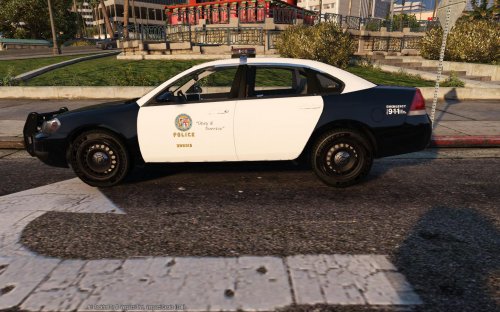 Los Santos Police Department liveries for 2014 Chevrolet Impala made by Bxbugs123. This pack only contains the LSPD textures, download the car model from here: -6x 4096x4096 LSPD liveries -6x 2048x2048 LSSD liveries Installation instructions: Open police2.ytd then drag and drop all texture files from "2048px" or "4096px" folder, press Ok when asked (Choose import options window). Save police2.ytd and close OpenIV, start the game and you should see the new car textures.
- 1 comment
- 5 reviews
-
-
- 5
-
-
Thank you! Merely a suggestion but take a look at F5544's Crown Vic as a possible replacement for the 1999 CVPI. I switched to it a while ago and never looked back. :) For this car I've also made 4096x4096 textures.
-
I actually did both a while ago. They are LSPD liveries but very similar to the LAPD markings. EDIT: By detailed you mean HD? They're 2048x2048 not 4096x4096.
-
I'm probably the black sheep of the European community because I can't stand having anything that's not LA inspired in my GTA V. I'd rather have 10 versions of Crown Vics, Tahoes and Chargers than LSPD Ferrari, Skodas or Volvos. An LSPD Dacia Logan would be my worst nightmare. :))
-
They are different versions of the same car and each version has been mapped differently. On this car will work any texture that was made for a car mod that uses F5544's [DEV] CVPI. @UnumProvident101, message the author of the texture and ask him if he plans on doing the texture for F5544's CVPI. Search for these 4 lines and replace the numbers with these: car.indicator.day.emissive.on 10.00 car.indicator.night.emissive.on 10.00 car.indicator.day.emissive.off 0.30 car.indicator.night.emissive.off 0.003
- 146 comments
- 24 reviews
-
That's really cool! This just for my own curiosity, but can you tell me what kind of material is used to cover the roof on the inside of the car? I searched a lot for a picture capturing the roof but couldn't find any.
-
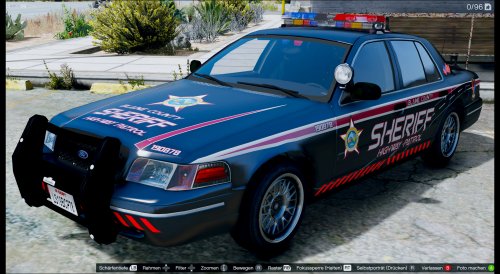 Very impressive skin! Btw, I think you credited the wrong person for the CVPI.
- 11 comments
- 5 reviews
-
Try increasing the Reflections quality in the Graphics menu. On Normal it will look grey but on higher settings it should look better.
- 20 comments
- 6 reviews
-
I replaced the police transport van with another Tahoe and put the LSPD liveries on it. Now the local SWAT arrives in Tahoes. To see it patrolling you have to replace police, police2 or police3. Those files will only work for policet (van) but you can do the same thing for any car. 1)Replace vehicles.meta in "update.rpf\common\data\levels\gta5" -> so the Tahoe has the right engine sound and other stuff. 2)Replace handling.meta in "update.rpf\common\data" -> so the Tahoe handles like a Granger not a van. 3)Replace carvariations.meta in "update\x64\dlcpacks\mpluxe\dlc.rpf\common\data" -> so the lights, textures work properly. MAKE BACKUPS of all the files you replace. I'm not responsible if these files break your game. Use at your own risk! carvariations.meta handling.meta vehicles.meta
- 20 comments
- 6 reviews
-
 Yeah I had a similar problem yesterday. If you replaced another car with it you should check if you changed this line "<txdName>tahoe</txdName>" in vehicles.meta with the name of the new car.
- 183 comments
- 38 reviews
-
-
I have everything set up to easily make more but at the moment the car doesn't support multiple liveries.
- 20 comments
- 6 reviews
-
This mod doesn't include any of the car files. You have to download them separately from the link in the description. Yes of course, that's the rule for everyone to get along nicely. :) Thanks for the car mod, it's awesome!
- 20 comments
- 6 reviews
-
I want to replace it with the new 2008 Tahoe. Replacing the model was straightforward but I can't figure out how to make it use the Granger handling and have the emergency lights work correctly. I already replaced Sheriff2 with the Tahoe so I can't simply change "tahoe" to "policet" inside carvariations. I tried adding the entire code one more time inside the carvariations using "policet" for the modelName but it didn't work. I tried something similar with handling.meta, I copied the code from the Granger and replaced Policet code (kept policet as the modelname) with it but that didn't work either. I replaced the handling.meta file in mods\update\update.rpf\common\data which afaik is the right location. Anyone know what I'm doing wrong? EDIT: I've fixed the lights but still can't get the handling to work... EDIT: Well I got it working eventually, my own inattention was at fault.
-
I totally love it! Only one bug I've found beside the ones already mentioned, the trunk seems to ignore the car model when it gets loose from damage. It will rotate through the car around the hinge when I accelerate or break. But to be fair I had to crash it multiple times to even get the door loose so it's not like you'll see it every often.
- 183 comments
- 38 reviews

