


BogdanM
Members
-
Joined
-
Last visited
Everything posted by BogdanM
-
I have a few questions about the LAPD and I hope this is the right forum section to post them. 1) I've seen pictures of officers wearing both short-sleeve shirt and long-sleeve shirt + tie. Are both of them used on patrol or the long-sleeve one is used for ceremonial purposes only or maybe when it's cold outside? Same question for the police caps, I rarely (if ever) see officers wear their caps outside parades or other official gatherings. 2) When is an officer allowed to use his baton? I don't see them wearing on them all the time and running back to the car to get it doesn't seem very practical. Is unholdering the weapon seen like a better way of showing authority and demanding compliance than wielding a baton which might make them look like thugs? 3) Which type of Glock is the standard issue firearm? Or are police officers allowed to choose any caliber (and maybe pay for the weapon)? 4) Do officers from one station always patrol the same neighboring areas? Or they are also patrolling other parts of town? 5) Are there any rules or guidelines as to when can police cars ram the suspects vehicle? I'm thinking mainly about financial reasons, will officers get in trouble if they damage their patrol cars too often, during chases of course. I know some of the questions sound silly but I'd like to play LSPDFR in a more accurate way than how I do it currently. If anyone else has questions about LAPD, you can post them here.
-
Sorry for the late reply, I went straight to bed after writing the post. I'm glad you got it working, it must have had something to do with the disk version, for the Steam edition the install instructions work: I have to replace "police" in x64e while for the other police vehicles (police2, police4 and sheriff so far) I have to replace them in x64/dlcpacks/patchday3ng. You can replace the sheriff stanier by simply renaming the .yft,ytd mod files to "sheriff" and "sheriff_hi", then put them in the same folder you put the "police" files when you fixed your problem. I've used the same process for "police4" (aka unmarked version) but now I see that a somebody made a mod for it. http://www.lcpdfr.com/files/file/8573-1999-ford-crown-victoria-slicktop-unmarked-unitcruiser-now-includes-white-cruiser/ Also for the K-9 LSPD texture: https://www.gta5-mods.com/vehicles/cvpi-1999-model-textures-lspd-high-res-and-unmarked-vehicle-1-0-0
-
While I won't say about any mod that it's crap, I do agree that the 1999 model is a better option at the moment. I used dblock's CVPI for a while but the vehicle has a bunch of problems, the model doesn't deform correctly (especially if you use a deform mod) parts of the model will crush while others will just float in the air, windows don't break and I get a lot of texture flickering on the front bumper guard. The 1999 model on the other hand works almost as well as the vanilla police cruiser. The model comes with two textures folder for the LSPD and LSSD and you can use those to replace the existing textures in the .ytd files. - I used this texture mod for the LSSD cruiser: https://www.gta5-mods.com/vehicles/ls-county-sheriff-1999-ford-crown-victoria - Took the black interior texture from this mod: https://www.gta5-mods.com/vehicles/orange-county-sheriff-chp-black-interior-crown-victoria-realism-textures - Fixed the speedometer using this mod: http://www.lcpdfr.com/files/file/8568-crowvictoria-speedometer-fixer-gta-5-mph/?tab=reviews#review-30504 I photoshoped the gauge textures from this mod and the one with the black interior to have a black color gauge with a the correct MPH. A few images of how they look: http://imgur.com/a/8ZOAt (I bet they would look a lot better on higher graphics, also never do photo shoots on a cloudy day)
-
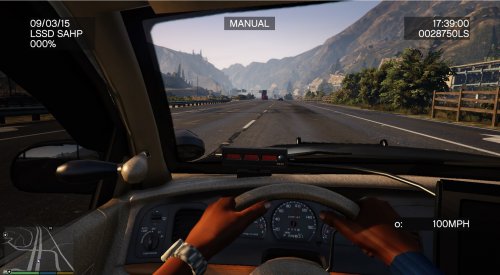 A solution to a problem I didn't even know existed. I've tested it with a speedometer plugin and it works as advertised up to 110mph, then the gauge needle lags behind by about 5mph, at 125 it shows 120, at 135 it shows 130. This is nitpicking though, at that speed who's got time to look at the dashboard anyway.
- 3 comments
- 3 reviews
-
 Yes. I see the animation and the blue blimp on the map and get the message that the car should be following me but it doesn't move (except teleport if I drive away) until I press T again.
- 3,646 comments
- 306 reviews
-
 Thanks!
 -
I'm having the same problem. I've also rolled back to v1.3 and v1.0 and the problem persists, even though I remember that it worked fine before so I assume it may be conflicting with another mod I added in the meantime (although I didn't really added any new plugins, only added new car models and textures). The target car does teleport behind me if I drive away or if I move forward, stop and press T to end the action the car will drive behind me, but at top speed and usually it rear ends me. I have RPH 0.22. I've attached the log file but it doesn't show any errors when using the FollowMe feature. RagePluginHook.log
- 3,646 comments
- 306 reviews
-
He asked for no pickles and he still got pickles, so I can't really blame him... Btw, is that unmarked CVPI released to the public?
-
Assault In A Fast Food Restaurant Leads To An Arrest.
© This Is Army's.... Bow Down
-
Good to know. Actually I just player for 30 min and the ambient events kept popping up. The only change I've made was to remove More Control plugin that isn't compatible with RHS 22. Maybe that was the problem but at the same time I might have been accepting multiple callouts one after the other and that's why I didn't see those events anymore. So everything seems to be in order once again. :)
- 3,646 comments
- 306 reviews
-
Seeing such positive feedback it makes me feel bad for mentioning a problem I have with it. The plugin loads just fine, never had a crash and for the first 5-10 minutes (maybe more), everything works without a hitch. But at some point the ambient events stop appearing on the map and I have no idea why. I use a whole bunch of plugins but afaik all of them are compatible with each other and I very rarely get a plugin crash. Does anyone else have this problem, ambient events disappearing entirely after a while?
- 3,646 comments
- 306 reviews
-
A really useful plugin, thank you for making it and sharing it with the rest of us! I posted a small issue I have with it in the comments section.
- 3,646 comments
- 306 reviews
-
-

- 1
-
-
 Bad news, it crashed again. I uploaded the log file in case you need it. Version 0.2.1 still works the best for me. RagePluginHook.log
- 1,915 comments
- 242 reviews
-
-
- 1
-
-
0.3.3 was also crashing the LSPDFR script for me but v0.3.4 seems to be working much better. No crashes so far. Good job, the script is very useful!
- 1,915 comments
- 242 reviews
-
The Highway Patrol officer is alive, he was knocked down while trying to arrest the suspect. The armored Kuruma comes with the Bank Callouts mod.
-
Thanks for the quick replies guys! @ineseri, thanks for pointing me in the right direction. I followed a youtube video tutorial to add the partner but they forgot to mention that you have to disable certain keys. @Kirigaya, thanks for the link. I will give that a try as well. EDIT: Everything makes sense now, the spawn key for attack drivers is Page Up, which is also a key for the Cruise Control mod. And I only use cruise control when I patrol so that why I didn't get attacked while playing as Michael.
-
I have tried Simple Trainer but for some reason whenever I spawned or recruited another officer, after about 1 minute half a dozen red cars spawn behind me and shoot me to pieces. When I spawned a bodyguard without going to the station, the red cars didn't appeared in the ~5 minutes I drove around as Michael. So the trainer seems to be conflicting with the LSPDFR mod, I don't know why and I didn't find anyone else that has this problem. Image of the red cars: http://i.imgur.com/f7r3GNg.jpg Are there any scripts right now that I can load to give me a partner when I go on duty? Or another trainer that will work better with the LSPDFR mod?
-
LSPDFR is the only reason I launched GTA V again after 2 months of not playing a single minute. A really good start and I hope it will become just as good or even better then the LCPDFR mod. I also have a suggestion/request to make. I would like an option to tell pedestrians to leave the area. For example in gang territory, when I id a group of people and only one of them is wanted, I would like to ask the rest of them to leave the area so I can deal with that guy without risking a shootout when his friends jump me.

