


The Loot
Members
-
Joined
-
Last visited
Everything posted by The Loot
-
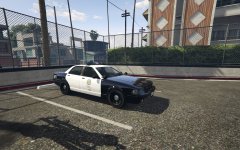 Looks good. Do you plan on sticking with the default LED bar or trying for something like an Arjent? Also, with the Unmarked Stainer, are you going to do the more modern LAPD setup, or one more accurate to what their CVPIs used? And speaking of accurate, I know Lundy did something with it on at least one of his classic vehicles, but steady burns?
 -
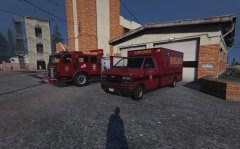 Man, I can't wait for the day when scenario spawns, map areas, and other hidden away stuff becomes available, so correctly representing the different jurisdictions without out-of-place spawns becomes possible.
 -
Well, that'd be an edited model file, which would also be placed in the same archive file.
-
Many vehicle models and textures have updated versions in the various patchday DLC archives. If there are, anything in the original files and previous patchdays will be overwritten. Best advice is to install all models and textures to the vehicles.rpf in the newest patchday.
-
Update.rpf is usually the only file outside of the dlcpacks that ever gets updated, because it overwrites things in the original files, and so do the patchday DLC files. SO every update you'll have to copy that new file to your mods folder, and then re-add any changed files inside of it, if they are still compatible.
-
I've never even seen a carjacking in GTA5, let alone because of LSPDFR. You guys must have mods and scripts installed that causes it.
-
Off-hand, I believe it uses the police2 handling since it's the same vehicle. You can probably add a new entry to handling.meta and use it.
-
 Did you reinstall the mods after the update. They add needed entries to a file in update.rpf, and that file is overwritten every patch.
- 2,341 comments
- 236 reviews
-
 Scenario spawns like that are still hidden away in files that can't be accessed yet, most likely. Perhaps in the future those can be edited and changed to new vehicle sets.
- 1,509 comments
- 85 reviews
-
Well, I'd suggest your graphics card, to at least a 4GB card. More RAM wouldn't hurt, either, most likely a max of 16GB depending on your version of Windows.
-
Awesome work! 3.0's system was a great improvement, but finer control is even better!
-
You have to reinstall the mod after updates, since the files it puts in update.rpf will be lost.
- 1,509 comments
- 85 reviews
-
-

- 1
-
-
-
-
Yep, the latest patchday that includes a vehicles.rpf should always guarantee your modified models are loaded.
-
 Well, I knew it was a feature, but kind of an unintended effect of it. Other than checking to see if the player is moving slower than the suspect, I suppose there's not much that could be done.
- 176 comments
- 46 reviews
-
I noticed one video where the suspect making contact with your car authorizes PITs. I assume it's feasible to check if the player is moving slower to avoid that, though I suppose it could be considered a feature.
- 176 comments
- 46 reviews
-
 Good to hear! Odd bug. Some suggestions: Multiple Sets of Start and Stop times, so we can define several shifts without needing an entirely new entry when nothing else changes. Define random vehicle and ped models, with spawn chances. Spawn chance for an entry in general so a spawn might not happen every time for some variety.
- 270 comments
- 19 reviews
-
-
- 1
-
-
Is there a way to force vehicles to spawn on a "major road node", since I think those are a thing? It would help Zone patrols spawn better for sure.
- 270 comments
- 19 reviews
-
Yeah, patrolling vehicles have way too high of a speed they try to drive for sure.
- 270 comments
- 19 reviews
-
Seems the ped spawning issue might not be related to LSPDFR at all. I removed LSPD First Response.dll from my plugins directory, and the issue is still happening. Affects all added peds, plus the game's three base female officers. Also affects the base SWAT ped.
-
I notice at least one male belt doesn't seem to be recognized by the CopHolster script, the one used on the short-sleeve SAHP outfit and possibly an FIB one. Anyone know what to add to that script to get it working with those?
- 2,341 comments
- 236 reviews
-
-
Ped model editing in not yet possibly, as far as I know.
-


