




Iconography
Members
-
Joined
-
Last visited
Everything posted by Iconography
-
On the public release, NOOSE has been known to crash.
-
You could also use Simple Native Trainer to switch to a voice you would like better. Personally, I would prefer "pull over to the side of the road" rather than "pull over, asshole!"
-
use Simple Native Trainer is what Break means.
-
Do you get an "Access Denied" error when trying to save the ELS.ini file?
-
Check Sniper296's signature. He has the beta on his server. never mind. Downloads are still being worked on. They were working earlier. Sniper removed the link from his sig.
-
http://www.lcpdfr.com/cops/forum/index.php/forum-20/announcement-5-need-support-read-this-first/ Try doing the things on that page. From now on, let's make this about getting 0.91 working. Don't mention 0.95 at all.
-
[betasupport] Does 0.91 work for you? If so, use it.
-
1GB VRAM? Ok, that's plenty for GTA so that isn't the problem. just go to "C:\Program Files (x86)\Steam\steamapps\common\grand theft auto iv\GTAIV" and move the Scripts folder, advancedhook, scripthook, dsound.dll, and scripthookdotnet. Removing just the Scripts folder may even be enough. If you don't have the game on Steam, go to C:\Program Files (x86)\Rockstar Games\grand Theft Auto IV\
-
-
Can a hurricane really, possibly hit Maine.... ALIENS!!11!!!
-
Break with his usual sense of humor +1 though.
-
So, who is ready to get annihilated by Irene? Where I am, I have about 24 hours before the first rain starts to fall. Anyone have survival tips to share to others in the path? I understand a lot of users are overseas, but I know there are some New Englanders here. EDIT: Actually, make that about 12 to 24 hours.
-
Does it return to normal if you move First Response, and all the script hooks, to a different folder on your desktop so that they aren't part of GTA (basically uninstalling it)? How much VRAM do you have?
-
I believe an i5 (or AMD version) plus a GTX 550 or maybe 540 will be able to run LCPDFR. EDIT: Hell, I have even seen a person with a core 2 DUO @ 2GHz running this mod. It looked terrible but it ran. A mid-high range system can handle a few mods.
-
You're thinking of a different thread I believe. No where here did you mention an average computer. EDIT: Disregard this transmission
-
On a mid–high range computer? I have no problems.
-
On low settings they can. That list above was for good graphics like with ENB et cetera.
-
He must have wanted to try being superman... And failed miserably. Maybe a car or debris landed on him and the game tweaked.
-
read the announcement in the support forum. Should read "Want help? READ THIS FIRST." Don't forget .NET framework.
-
Would you people stop recommending those high poly cars of death until you at least learn their system specs? If you have a mid to high range computer, you can download some extra police cars from modding sites as well as ELS, whose link can be found in the GTA discussion forum.
-
There's no official specification list. Really, I recommend Core i7 or AMD equivalent At least 6GB of RAM (preferably 8, it is cheap now. Also, 6GB is awkward to achieve since it usually comes in 2GB dimms) GeForce GTX 560 Ti or ATI equivalent At least a 600W PSU to safely run all that. GTA on the latest patch, 1.0.7.0, is demanding. LCPDFR on top of that requires a good machine. This may be a little more than you will need but if you want good graphics as well, any lower than what I listed really will be a bottleneck.
-
I'm sorry, but: [betasupport] It is still in development right now. Things will be different upon release.
-
http://www.lcpdfr.com/cops/forum/index.php/forum-20/announcement-5-need-support-read-this-first/
-
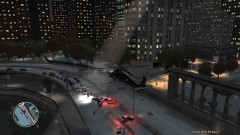
From the album: Psychology of Liberty City
I decided top try my luck following a pursuit world event in an Annihilator police helicopter. I called in a couple of other pursuit helicopters for an extra cool look and got this as a result. -
He probably just meant "perform immediate CPR on persons X, Y, Z" and block traffic for T amount of time.


