




Iconography
Members
-
Joined
-
Last visited
Everything posted by Iconography
-
It really isn't difficult to get it working. You just have to install gta like normal, and then you need the latest Games for Windows Live client. The one that normally comes with GTA is outdated and doesn't work with Win 8. However, I would be very hesitant about trying to play GTA on they laptop. That's not a gaming laptop in any sense of the word and it doesn't have a dedicated graphics card, from what I could see online. You'll have to settle with running GTA on the lowest settings, and you probably won't be able to mod it much.
-
A little late, but: MODERATOR NOTICE Moving to GTA IV Suggestions and Requests.
-
MODERATOR NOTICE '?do=embed' frameborder='0' data-embedContent>> Moving to GTA IV Support Requests.
-
MODERATOR NOTICE '?do=embed' frameborder='0' data-embedContent>> Moving to GTA IV Suggestions and Requests.
-
MODERATOR NOTICE Moving to GTA IV Support Requests.
-
MODERATOR NOTICE Moving to GTA IV Suggestions and Requests.
-
Not sure if you could call it a port per sé, but I remember Need For Speed: Rivals was terrible on PC until someone figured out that it's possible to disable the frame cap. It still has a 3/10 rating by members on Metacritic.
-
MODERATOR NOTICE Moving to GTA IV Discussion.
-
MODERATOR NOTICE Moving to GTA IV Suggestions and Requests.
-
MODERATOR NOTICE '?do=embed' frameborder='0' data-embedContent>> Moving to GTA IV Suggestions and Requests. I highly recommend you remove your email address, for your own safety and security.
-
MODERATOR NOTICE Moving to GTA IV Support Requests.
-
MODERATOR NOTICE Moving to LCPDFR Suggestions.
-
MODERATOR NOTICE '?do=embed' frameborder='0' data-embedContent>> Moving to GTA IV Suggestions and Requests.
-
When using GFWL all of your savegames are stored on your local computer in your appdata folder, I believe. However, it's tied to your GFWL account / profile so if you use a new one I believe that your saves will fail to load. You'd have to use xlive.dll instead of dsound.dll, and then move your saves into your documents folder. It's been a while since I've played GTA so my memory is a little hazy, but that should be correct.
-
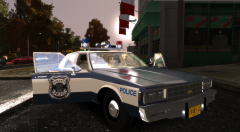 I think it looks great as well. Good work!
 -
Given the security camera and the men in suits in the background, it's probably a government building of some sort. Being from the States and not London I may be dead wrong, but that would be my estimated guess.
-
"Heal" is the correct command I believe.
-
MODERATOR NOTICE Moving to GTA IV Support Requests.
-
You've been releasing a lot of cars in a short period of time. You might want to slow down some and spend more time on each one. Spending 3x more time on one model is often better than spending 1/3 the time on 3 different ones.
-
MODERATOR NOTICE Moving to LCPDFR Discussion. No, that looks normal to me. If you have an LCPDFR issue, you should make a post in the LCPDFR Support Request forum.
-
MODERATOR NOTICE '?do=embed' frameborder='0' data-embedContent>> Moving to GTA IV Support Requests.
-
MODERATOR NOTICE Moving to GTA IV Development Tutorials and Questions.
-
MODERATOR NOTICE '?do=embed' frameborder='0' data-embedContent>> Moving to GTA IV Support Requests. You'll need to use OpenIV (preferred) or SparkIV. With one of those, you can replace the texture(s). See this for more information: http://www.lcpdfr.com/page/tutorials/index.action/_/vehicle-modification-tutorial/how-to-import-skins-onto-a-vehicle-r28
-
MODERATOR NOTICE '?do=embed' frameborder='0' data-embedContent>> Moving to Suggestions and Requests.
-
MODERATOR NOTICE '?do=embed' frameborder='0' data-embedContent>> Moving to Suggestions and Requests.


