




Iconography
Members
-
Joined
-
Last visited
Everything posted by Iconography
-
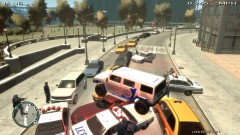
From the album: Psychology of Liberty City
Tried to pin a vehicle in but rather than crashing into them I ended up on top of four different vehicles. -
Mind you, most siren mods only include a HORNS.ivaud, NOT a new resident.rpf. So you STILL need to use SparkIV. Hence why I mentioned it. No need to get a little snappy (just how it seemed). EDIT: Yes, I get tired of stupid questions as well but that still is not a reason to give someone a half baked answer just to get it over with (like "replace horns.ivaud").
-
It's actually a max of 1%. So 1% of the traffic will be a cop (or so the column name leaves me to believe).
-
Download SparkIV. Open it, hit browse, and then go under ...\pc\audio\Sfx\resident.rpf and replace HORNS.ivaud with a downloaded HORNS.ivaud containing the siren you want. EDIT: Sometimes guys, just saying " inside resident.rpf" isn't enough.
-
Spike strips would be a cool thing to have. Maybe the suspect could either give up after hitting it, somehow turn around, or keep driving on flats. Would it be difficult to code, though?
-
I'm not saying it's impossible for the trafficflow mod to solve it, I'm just saying it is generally meant for removing the taxi bug. It is definitely possible that it replaces cop cars as well.
-
I told you that this was where the data was found...
-
No, it only controls taxi cabs as far as I know. However, when it loads other vehicles into the game memory it MIGHT replace some cop cars.
-
Try this.
-
There's a data file that controls how many vehicles of what kind spawn. I'll grab the file name for you. EDIT: It's the popcycle.dat file under ...\common\data. Forgot the name, sorry. You'll want to change the perccopcars column (could be a pain).
-
I don't use teamspeak. Maybe someone else on here does that can help.
-
make sure to run GTA as an admin as well. Run the diagnostic tool if it won't work.
-
Read the get support page. Download and install C++ and .NET framework.
-
Not sure. It's doubtful.
-
You're uninstalling it because you can't use taxi cabs....... Well, anyways, removing the scripts folder should have done it.... I've never had to uninstall it before so I'm not fluent with that area yet. EDIT: Try removing all of your script hooks (advancedhook, scripthook, scripthookdotnet, etc) and then reinstalling the ones that came with any mods you might have (like SNT). Just guessing here.
-
Try clearing your browser cache and running the command in command prompt ipconfig /flushdns
-
If in doubt.... http://www.downforeveryoneorjustme.com/
-
Reinstall the mod, make sure to select dsound.dll and not xliveless.
-
Yeah. Maybe someday there will be a solution. In the mean time you could always use SNT (simple native trainer) to teleport to a waypoint. It's a rudimentary solution, but a solution nonetheless. And it doesn't cost money like a cab
-
Possible. I'm not sure what the real cause is, but there is no fix that I know of.
-
I really think it is a GTA IV glitch and it doesn't know how to handle different models.
-
This is just a GTA IV glitch from what I can tell. Try doing this so I can make sure: start GTA IV like usual but DON"T start the mod, and then try to hail a taxi.
-
Not a problem.
-
Check out this website. EDIT: To address the problem of the installer not finding your GTA folder, this happens if you have EFLC rather than GTA IV original. There is no difference in how the mod runs, and no fix for it.
-
And if it doesn't work, read the Get Support page before posting on the forums...

