Skip to content
View in the app

A better way to browse. Learn more.

LCPDFR.com

A full-screen app on your home screen with push notifications, badges and more.

To install this app on iOS and iPadOS
  1. Tap the Share icon in Safari
  2. Scroll the menu and tap Add to Home Screen.
  3. Tap Add in the top-right corner.
To install this app on Android
  1. Tap the 3-dot menu (⋮) in the top-right corner of the browser.
  2. Tap Add to Home screen or Install app.
  3. Confirm by tapping Install.

I benchmarked 60 fps, but get dreadful stuttering and periodic crashes in game
Featured Replies

Figured I'd kick a support post to see if anyone with a higher end system found a fix for it. I benchmark at 60fps with everything put pretty high (90 on the 0-100 scales, very high on all settings, though I keep water at medium because I don't care about it. V-sync on) 

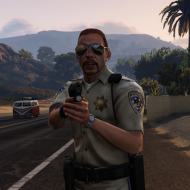
However, in game play is sub-par. I'm not expecting GTA XVIII with icEnahncer and 4th dimensional depth of field, and I honestly don't care about frame rate unless I can actually see the difference, but I was hoping my system would be capable of running the game stable. I've been testing out a uniform mod I'm working on, and to do so I turn on god mode, then shoot some things until the police show up, so I can judge their uniform. However, the game micro-stutters every 10 seconds on foot and every 3-5 in a car. Textures will flicker and occasionally not load until the last minute, just like objects, which sometimes won't load until I bump into them. Just moving the camera around will make textures pop-in and whole backgrounds disappear and reappear. 

Also, and I'm putting this in the "really weird" category  when I use teleport or simply drive in excess of 100 m.p.h., object stop loading and instead are replaced with... basketball hoops and those washer things from car washes. It got so bad once that I was surrounded by a few buildings, the sidewalk, and about 100 basketball hoops.

And to top it all off, the game will crash after 10-30 minutes of game play if anything more intense then eating a hotdog or hailing a cab happens. Sometimes I can keep prolonged shootouts going in times square, other times it'll crash when I break into a car and get noticed.

System Specs:
Gigbyte Z68AP-D3 Motherboard (on board sound)

Intel Core i5-2400 CPU @3.10GHz
8 GB RAM
GeForce GTX 660ti 2gb 'Superclocked' with latest drivers
Windows 7 professional 64bit
GTA IV Disk version, patched to v0.7

GTA IV Specs:

DAT Mods
A couple ped mods, mainly Custo's stuff, nothing intense
A popcycle mod combing 3x as many peds with less cops

Script:
SNT
LCPDFR 0.95 RC2 (not the cause, I am not on duty.)
SpeedometerIV
FirePatrol.net (the ambient fire inspector)
Less overtaking
Bravehearts policing script
Strobes mod
Traffic Flow (latest addition)
Traffic Lights are solid mod
vdH_Medical Examiner, PoliceHelper, and TowService
FirstPerson.asi (v0.7)
xliveless.dll

Vehicle Mods
Low Poly:
The ram-bar addition of Sam's CVPI for police and police2
Sam's charger for Noose
High Poly:
2012 Tahoe non-els from gta-modding-chest for polpat
slicktop CVPI non-els for FBI
Lenco-Bearcat non-els for nstockade
Luxart non-els Ambulance

I went with the autoconfig setting (basically just lowered the scales a little bit and turned off night shadows) but had even more dreadful performance. 

Any idea's?

These stutters are sometimes caused by low graphic settings, I know a guy who had a much more stable game when he changed to higher settings. When I had this problem, using an ENB or specific timecyc mods fixed it for me. There're quite a lot graphic mods that increase performance without losing quality.

After I replaced my GTX 570 with an AMD card, I had to change a lot of the settings in the game profile to get rid of those stutters, you could also try playing around with yours.

Your vehicle mods might also cause lag, especially the Charger and the CVPI you titled as low poly have around twice as much polygons as for example Lt.Caine's ambulance, the Tahoe or the Bearcat. When the game spawns several 3mb vehicles, your hardware needs much more power as when using the 500kb default vehicles.


I guess your crashes might be caused by all those scripts. Vehicle mods or changes to the data files usually don't cause crashes. SNT, xliveless and Traffic Flow shouldn't cause problems, at least I never heard of that. I'm not sure about the other scripts.

I had problems with the less overtaking mod but I can't remember if I had crashes or if it simply didn't work.

Edited by Cj24

For what I've read, you are using the mod to make traffic lights solid, I have a high end system and I run a lot of mods, like LCPDFR, real traffic mod which is an asi mod and a popcycle.dat, and another ones. I also run sometimes the fire inspector mod... I don't have any issues on those but when I started using the solid traffic lights modification, my game was lagging as hell, like 17 to 8 FPS, and then have crashes every 10 minutes. Try to run the game without that script, and if it doesn't work I suggest you to remove all the other ones and try playing with one by one until you find the script that is probably giving you the problem. In my opinion, it must be a script issue.

Have you experienced any problem before making that ped modification? Or are you using a command line?

Also, always remember that it doesn't matter if you have the NASA computer, GTA IV is badly optimized for PC since it came out.

Its my personal opinion. Lemme know if I helped you with this, and sorry for my bad English.

SIGNATUREFBI_zps97540d36.png

CJ24 is correct.  Until I used RTCv4 (Real Time Cycle...not ENB) to enhance my graphics, I had same issues (although very intermittent..not a game killer) until I upped the graphics using the enhancement.  I found it counter-intuitive that I would be getting much better FPS, no texture pops, and no crashing once I increased the graphics.  Odd but it worked for me.  I did lower my water setting to LOW, water still looks good and gained like 10-15FPS.


Good day,


DrDetroit

  • Author

Well, it appears that the solid traffic light mod was the culprit. Removed it, and flew a helicopter around at max speed, no basketball hoops or stuttering. However, once I closed out and tried to come back in, my game started SMPA30 erroring. I've got a new support thread for that, as I consider this issue solved. Thank you all for helping, and feel free to chip in on my new problem.

Thanks for posting this.  I will have to stay clear of the solid traffic light mod... even though I thought that would be pretty cool   things fall too easy in GTA.. and figured it would be better if they were stationary.  Oh well.  Cant have everything.  :)   Glad you figured out the problem.


NYCMedic

Edited by NYCMedic

This is a support topic.
Only reply here to offer help or assistance to BroCop. Off-topic or "me too" replies will be removed.

Need support yourself? Make a new topic instead.

Join the conversation

You can post now and register later. If you have an account, sign in now to post with your account.

Guest
Reply to this topic...

Recently Browsing 0

  • No registered users viewing this page.

Account

Navigation

Search

Search

Configure browser push notifications

Chrome (Android)
  1. Tap the lock icon next to the address bar.
  2. Tap Permissions → Notifications.
  3. Adjust your preference.
Chrome (Desktop)
  1. Click the padlock icon in the address bar.
  2. Select Site settings.
  3. Find Notifications and adjust your preference.