
Skip to content
View in the app

A better way to browse. Learn more.

LCPDFR.com

A full-screen app on your home screen with push notifications, badges and more.

To install this app on iOS and iPadOS
  1. Tap the Share icon in Safari
  2. Scroll the menu and tap Add to Home Screen.
  3. Tap Add in the top-right corner.
To install this app on Android
  1. Tap the 3-dot menu (⋮) in the top-right corner of the browser.
  2. Tap Add to Home screen or Install app.
  3. Confirm by tapping Install.

V Interceptor Default-Type V1.01

(15 reviews)

3 Screenshots

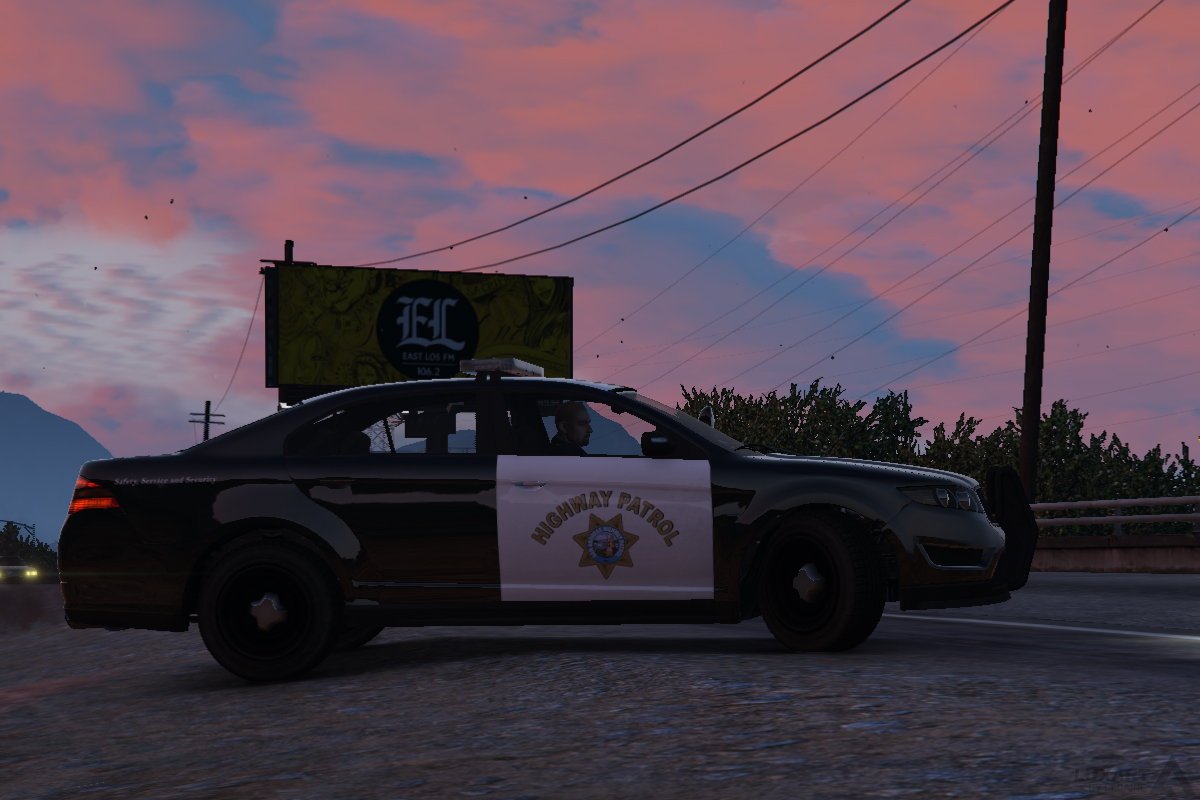
This is the default V Interceptor, remapped to accept custom decals and with some slight adjustments.

DESCRIPTION
− A modified version of the default Police Interceptor (police3) vehicle model.
− Features a completely mapped body with template for custom decal textures.
− Features 4 custom CHP/LAPD inspired SAHP and LSPD textures.
− A texture template is provided in the download.

CHANGELOG
− Vehicle glass collision issues fixed by Yard1.

NOTES
− N/A

INSTALLATION
− Always make sure to create backups before overwriting any original game files.
− To avoid the need to overwrite original game files, use the “mod” folder method provided by OpenIV.

− 1. Using OpenIV, open the file “update/x64/dlcpacks/patchday4ng/dlc.rpf/x64/levels/gta5/vehicles.rpf”.
− 2. Once inside, find and replace the vehicle files with the corresponding ones provided in the download.
− 3. Close OpenIV.

CREDITS
− Base GTAV vehicle model made by Rockstar Games and modified by Lt.Caine.
− Vehicle body remapped by Lt.Caine.
− Vehicle glass collision issues fixed by Yard1.

What's New in Version V1.01

Released

Vehicle glass collision issues fixed by Yard1.

User Feedback

Recommended Comments

Bxbugs123

Members

Nice.

Boz

Members

0.0

Now I actually want to use the Interceptor. Amazing work!

Yard1

Friends of LSPDFR

Excellent work!

Shame glass shatter is still impossible - I hope Oleg fixes that soon.

The Loot

Members

Beaut!

PhillBellic

Members

Now the Vapid Torero PI looks AMAZING! :smile::thumbsup:

Element

Members

Epic! Nice work Lt, 

thegreathah

Friends of LSPDFR

Actually usable now. Thank you so much!

Lawdy

Members

Awesome!

thegreathah

Friends of LSPDFR

(edited)

Very good. Just one bug: there seems to be a corona in the middle of the windshield.

Edited by thegreathah

tkdwnsehtk

Members

When rammed hard, lightbar falls off.

Other than that, it's awesome :) I'm using interceptor for patrol for the first time thanks to this lol

JWillMac51

Members

When rammed hard, lightbar falls off.

Other than that, it's awesome :) I'm using interceptor for patrol for the first time thanks to this lol

To fix that you can add "FLAG_EXTRAS_STRONG" (minus quotes) into the police3's "<flags>" line in vehicles.meta.

And great job Caine! I'm loving the slick-top feature, it gives the car a real nice profile when viewed from the side. However, would it be possible to have the spotlight work again? I noticed that it's no longer an extra as the lightbar is "extra1" now, not sure if it needs to be an extra in order to function. Maybe if the spotlight was made "extra1" again and the lightbar "extra2" it could be solved. Regardless, fantastic mod, the game has sorely needed this.

olddutch7

Members

Very nice!! I really like how you made it like the strainer so you can remove the lightbar and make it a slicktop. Can I suggest that you do that with the granger? I've been trying to make a slicktop sheriff granger.

HulaRula

Members

Followed your install instructions however, in game I still have the old textures? Any ideas? I have the disc copy, not steam if that's any help.

Nice model though!

OfficerGermany

Members

Followed your install instructions however, in game I still have the old textures? Any ideas? I have the disc copy, not steam if that's any help.

Nice model though!

You have (maybe) the old files in the .ytd file (police_sign_1, with numbers and LSPD decals on back and police2_new.png).
Or: You forgotten to paste the files in the patchday files (patchday2/3/4-ng). :)

Mercuri

Members

Hi, Im using this as a Add-on car placed in mpchristmas2 and the car looks like black matte. Do you know why?

bravozero

Members

(edited)

Finally, I use the Interceptor more than any other vehicle and I'm glad to finally be able to use one that I can have custom skins with.

HOWEVER, I did notice an issue.

I have a custom Interceptor saved in the trainer that is all modified with in-game custom components to give it a unique look and have performance mods, a "true" Interceptor. I also have custom wheels on the car as well.

The first picture is how my vanilla custom Interceptor looks, the second is Caine's with my custom mods as well. As you can see, it looks like the wheels have been pushed inward on the model. The car sits at the same height in both pics, but you can see Caine's model the wheels sit inside the car more. At first I thought the brake calipers had been moved, but it does look like the wheels are off alignment.

Maybe this can be addressed in the future? Thanks.

GTA5%202015-08-27%2023-21-37-60_zpsiprpz

GTA5%202015-08-27%2023-28-14-02_zpsba4mi


Edited by bravozero

HypoGamer

Members

So do the skins shown in the screenshots come with the mod? Or is it a seperate mod somewhere else.

StarScream

Members

Is this going to be the Ford Taurus? Or just something to hold us over until the real one comes along?

HypoGamer

Members

To fix that you can add "FLAG_EXTRAS_STRONG" (minus quotes) into the police3's "<flags>" line in vehicles.meta.

And great job Caine! I'm loving the slick-top feature, it gives the car a real nice profile when viewed from the side. However, would it be possible to have the spotlight work again? I noticed that it's no longer an extra as the lightbar is "extra1" now, not sure if it needs to be an extra in order to function. Maybe if the spotlight was made "extra1" again and the lightbar "extra2" it could be solved. Regardless, fantastic mod, the game has sorely needed this.

Where is the vehicles.meta located?

Betarays

Members

Where is the vehicles.meta located?

Inside whichever update folder you're putting the vehicle in.

Such as: Grand Theft Auto V\mods\update\x64\dlcpacks\mpchristmas2\dlc.rpf\common\data\levels\gta5\vehicles.meta

GCVFD CAPTAIN4

Members

Major major issues with lights...

GCVFD CAPTAIN4

Members

Idk what it is but ever since I downloaded this mod my lights have been majorly fucked up... Can anyone help?

ricearoni

Members

Is there  a way to use this as  sheriff?


DLM3

Members

It is pretty neat but the spotlight is not functional (I mean being light up when you cycle the lights)?

This is actually the only reason I drive an Interceptor.

Modsha

Members

The model is really cool but can someone explain to me why the lights textures are in the bullbar ?

20160426220151_1.jpg

We can see the texture when the bumper is a bit broken

20160426220840_1.jpg

Create an account or sign in to comment

Latest Mods

Account

Navigation

Search

Search

Configure browser push notifications

Chrome (Android)
  1. Tap the lock icon next to the address bar.
  2. Tap Permissions → Notifications.
  3. Adjust your preference.
Chrome (Desktop)
  1. Click the padlock icon in the address bar.
  2. Select Site settings.
  3. Find Notifications and adjust your preference.









