


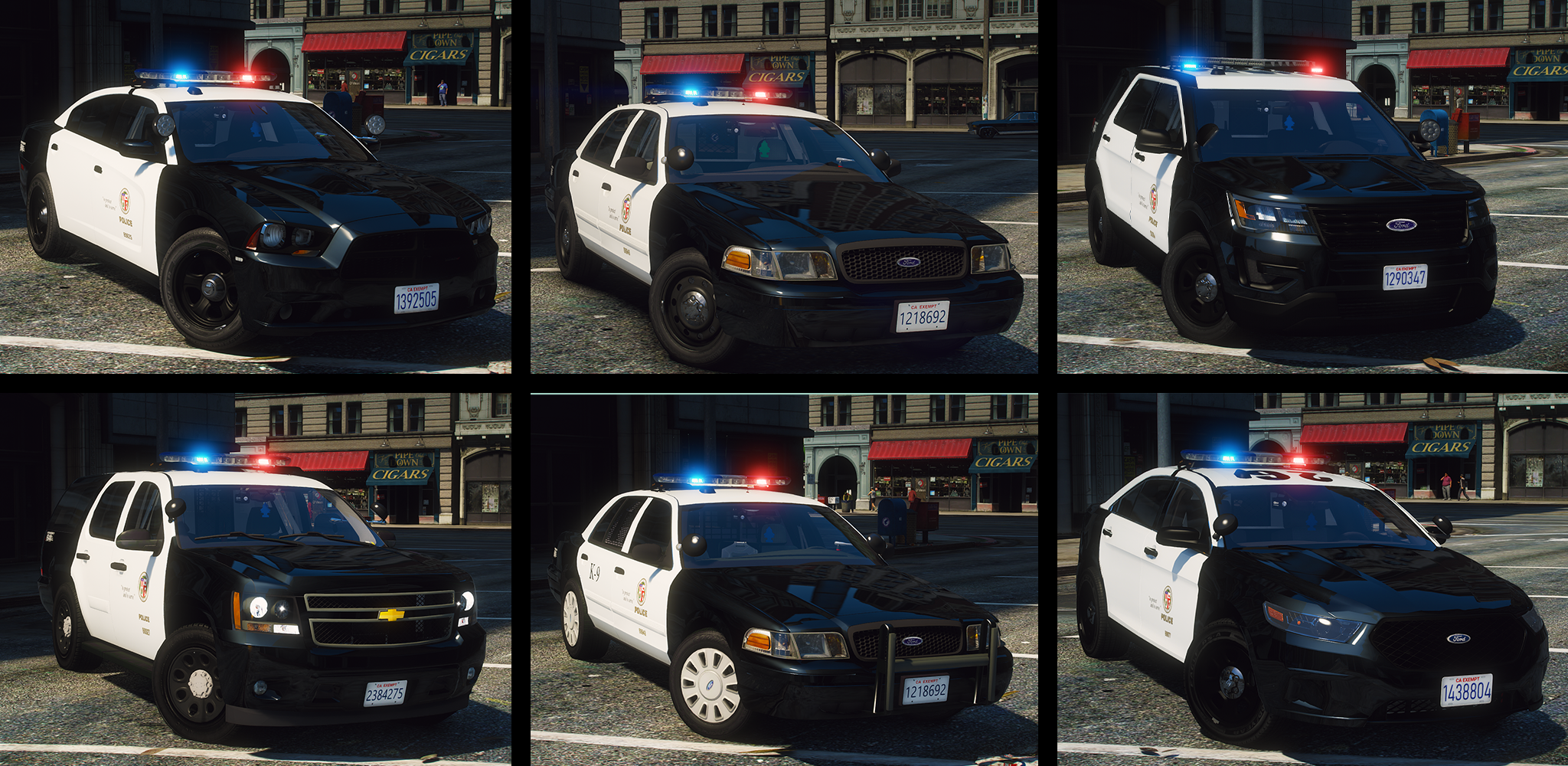

I introduce too you guys my L-A-P-D Pack featuring 15+ vehicles.I know this might not be 100% accurate but I've spent alot of time on this and thought it was good enough to release,any bugs etc please leave in the comment section and I will ty to get back to you if I have time.Hope you guys enjoy.
***GLASS DOES NOT BREAK FOR SOME VEHICLES IF NOT ALL,I WILL TRY TO RESOLVE THE PROBLEM !SO PLEASE DON'T COMMENT THAT THE WINDOWS DON'T SHOOT OUT,IT WILL BE FIXED WHEN I GET TO IT.***
Q-Car spawns with spotlights,Pushbar etc
A-open simple trainer>vehicle>vehicle mods>components>change extras to your liking.
Q-Car spawn with window tine
A-go to openiv>mods/update/update/common/data/level/gta5 vehicle.meta >policeslot>diffuseTint value>set to ="0x00FFFFFF" />
I know everything is not 100% accurate.Just be greatful and download it 🙂
Huge thanks to my beta-testers as well
ADD-ON -
^Does not work as of now
ADD-ON -
^Does not work as of now
ADD-ON -
^Does not work as of now
Discord for updates and information about future and current projects-https://discord.gg/DX8rDbc

Recommnded mods:
Edited by ALLENjr12
What's New in Version 1.1
Released
Minor updates to some cars
Fixed xmls
add-on -7/10/20
Short Description
2010 DODGE CHARGER-
-Original Dodge Charger Model by EVERMOTION. Model Optimized, UV-Mapped, Templated & Converted to GTA V by PSource.
-Body L2 & L3 from Forza 4 SRT8 2010 Charger. Textured and Templated by PSource
-Body Polyfilling from Original GTA V Models and Forza 4, Fitted by PSource. Door Jambs Modeled by PSource.
-2009-2010 Taillights & Reverse Lights from NFS MW 2012 Charger. Fitted and Texture Editing by PSource .
-Dials and Dial Emissive Textures by PSource.
-Door Trim, Gear Lever, Interior Mounted Mirror and Steering Wheel from Forza. Converted, Fitted and Textured by PSource.
-Driver & Passenger Front Seats from Simraceway. Converted by PSource.
-Tire Tread from Original GTA V Models. Fitted by PSource.
2011 Crown Victoria-
- 2011 Forza CVPI Base Extracted by DMN
- Optimized, Converted, Textured and stuff by Thehurk
- Realisim Edits and more optimization by Lundy
- Major support with screenshots, feedback, IRL pictures, etc by Steinberg, Lundy, Problematic, and Taylor Swift
- Steelies and tires by Carper
- Hubcaps and tires by Carper
2013 Chevy Tahoe-
2013 Chevy Tahoe scratch modeled by ShadyDK13
- Converted and textured by Thehurk
- Steeringwheel and Seats from the crew, textured and converted by Thehurk
- Dials from OfficerUnderwood's Tahoe release
2014 DODGE CHARGER-
-Converted and textured by Thehurk
-Converted to PPV by Thehurk
-Templated by Thehurk
-Taillight textures by Five0
2013 Ford FPIU-
Huskymybaud & HP Headdesk - Everything else
Skellytone - Templating, dirt mapping
Special thanks
Dan without the Van
2016 Dodge Charger-
del Credits
- Base model extracted by DMN from Forza Horizon 2
- Converted and textures by Thehurk
- Converted to PPV By Thehurk
- AWD Rims scratch modeled and converted By RoegonTV
- AWD Logo by IronicRainbow
2016 Ford Explorer-
- Ford explorer Base model purchased by Thehurk, GTAxB0SS, Requiem and Windows446
- Poly Crunched, Textured, Converted by Thehurk.
- Interior purchased by TrentMU and FRGamer
- Textures by Taylor Swift, Thehurk, & OfficerUnderwood
- Heavily edited this piece of shit into a polished piece of shit by OfficerUnderwood
- Rims by BxBugs123, Centercap by Carper
- Interceptor Hood text by GTAxB0SS
2013 Ford FPIU-
Huskymybaud & HP Headdesk - Everything else
Skellytone - Templating, dirt mapping
Special thanks
Dan without the Van
|Vehicle Equiment |
Coban EDGE-Modeled,Textured and UV mapped by Dan with da van
Fed Sig Smart Controller Series B-modeled, textured and UV mapped by Dan with da Van
Havis Consoles-Centre Console Models - Jakub/Textures - Jakub & Walters
Federal Signal Smart Siren Controllers -modeled and textured by Cj2
Motorola MW810- modeled and textured by Cj24.
Unity 335 LED Spotlight- modeled and textured by Cj24.
Lightbar ALPR-KevinDV, modified by Him1250.
Little Trees Car Freshner-Modeled By Carbon Creations,
Converted To GTA V By OfficerWalters,
Textures By OfficerWalters.
Motorola APX 6500-Modeled, Textured and UV mapped by Dan with da van
Partition-deco
Setina Pushbar Pack-by Twurtleee
Setina textured by Twurtlee
Textures provided by Matt
spotlight- BxBugs
Toughbook Edit _ JBD-Cap'n Crunch/Optimizing Poly's: JBD
Re-Texturing:JBDKeyboard Emissive:JBDSreen Emissive: JBD
Unity 335 Series spotlight-Created By Turn10Studios; Converted And Edited By Shmurda
Soundoff PAR46 LED Insert Created By Shmurda
Spotlight Mounting Bracket From GameModels.RU
Textures By Shmurda
Pepsi model-TheRealJosh/Diamond Modeling
Motorola APX 6500-Modeled, Textured and UV mapped by Dan with da van
Generic antenna pack-Billy Johnsson
aird Phantom TRA4103-Five0
Federal Signal 6 and 3 Button Controller-Modelled And Textured By - Jakub
|Light Equiment |
Federal Signal Arjent-"NSA" fictional lightbar by EVI.
modified into a Fedsig arjent by Five0
new modules, lamps and misc parts scratch modeled by Five0
converted to gta 5 by Five0
Federal Signal 3 Light Head Corner LED-By Shmurda,textures By Shmurda
Federal Signal Cuda TriOptic-modeled and textured by Cj24.
Federal Signal CN Signalmaster-modeled and textured by Cj24
Whelen TIR3 Super_LED-scratch modeled by Five0/OfficerFive0
Federal signal Valor- modeled by- Twurtleee
Textures for the Valor made by- NyDelta
Textured by- NyDelta and Twurtleee
Federal signal latitude-DannyBoy1909,Textures by Him1250.
Whelen ION-Lccop
If I missed your name please let me know !








Recommended Comments
Create an account or sign in to comment