Skip to content
View in the app

A better way to browse. Learn more.

LCPDFR.com

A full-screen app on your home screen with push notifications, badges and more.

To install this app on iOS and iPadOS
  1. Tap the Share icon in Safari
  2. Scroll the menu and tap Add to Home Screen.
  3. Tap Add in the top-right corner.
To install this app on Android
  1. Tap the 3-dot menu (⋮) in the top-right corner of the browser.
  2. Tap Add to Home screen or Install app.
  3. Confirm by tapping Install.

HoldMyGun 1.4.1.0

(22 reviews)

1 Screenshot

For all vehicle creators/modelers: I've included a documentation file, in case you want to make a compatible vehicle, where people can toggle the weapons in a gunrack. It's not complicated at all, and if you upload a vehicle with this feature, please send me a message so I can put a link up on this download page 🙂


This plugin allows you to store your Carbine Rifle, Shotgun, SMG, as well as Body Armor and Fire Extinguisher in your police car, and also to retrieve it. 

It does NOT require compatible vehicles, however, they will add additional features, like seeing your weapons appear/disappear from the gunrack.


Features:

  • Store your Carbine Rifle, Shotgun, SMG, fire extinguisher and armor in your patrol vehicle.
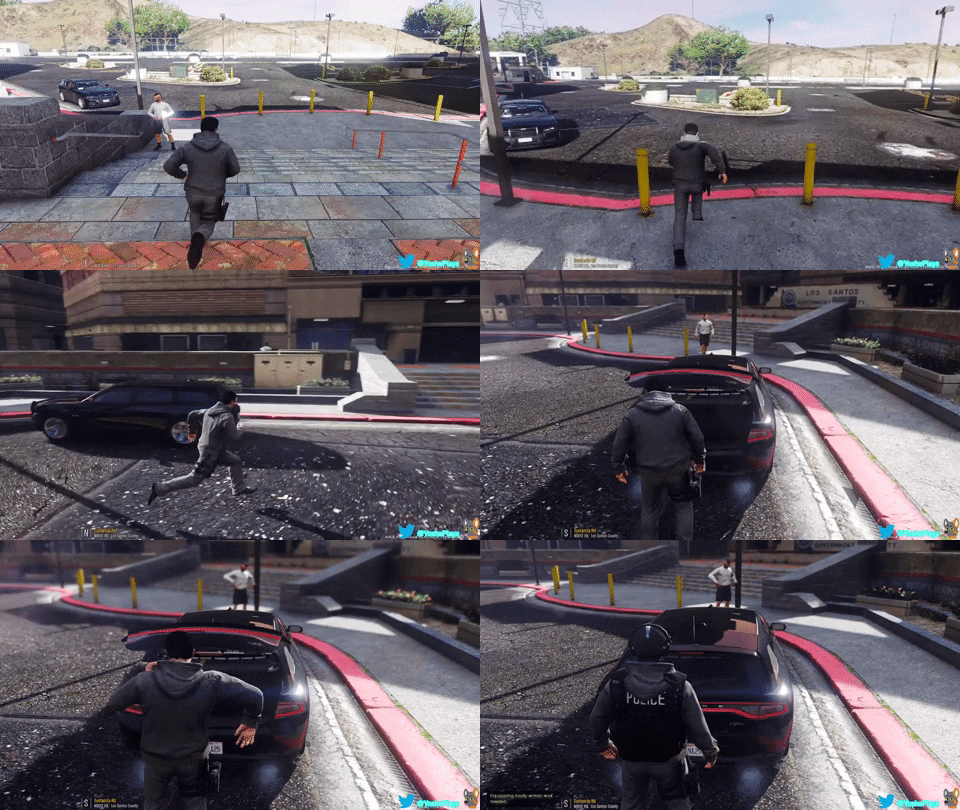
  • Retrieve the same from either inside the vehicle, or from the outside. Stand near the driver door and press the key to retrieve your weapons, stand near the trunk and press the key to retrieve your armor + medkit and/or your fire extinguisher
  • Includes some fancy animations
  • Customizable attachments for the weapons
  • Customizable keybinds


Installation:


Put the .dll and the .ini into your "Grand Theft Auto V\Plugins\" folder.


Make sure to take a look at the .ini file to set your name and preferred keybind.


You have to sit in a Police car  to store and retrieve your rifle/shotgun.

It does not matter whether it's a default police car, a replacement, or an addon, as long as you added the Police car correctly.
It works with the Carbine Rifle(MK2) and PumpShotgun, which come with an equipped flashlight upon retrieving. 


Disclaimer:


Do NOT upload or redistribute without my written permission.

This includes private sharing or uploading to any other website. 


And here's a link to my Discord server, where you'll find information about the current state of development for my plugins, and you'll get early access to beta builds:

https://discord.gg/RbSGF2d


The first compatible vehicle. Made by @panoszaf. Thank you 🙂


giphy.gif


Thanks to FirstThirtyMinutes for showing the plugin in action!


What's New in Version 1.4.1.0

Released

Patchnotes for 1.4.1.0:


  • Fixed scope not attaching on standard Carbine Rifle.


Patchnotes for 1.4.0.0:


  • Added SMG
  • Added SMG Mk2
  • Added Attachments for SMG/Mk2
  • Added Shotgun Mk2
  • Added Attachments for Shotgun/Mk2
  • Added all 3 Scope variations for the Carbine Rifle Mk2, SMG Mk2, and Shotgun Mk2


Patchnotes for 1.3.3.0:


  • Updated for RPH .63
  • Changed a function for making compatible vehicles. (misc_z and extra_ten for the Carbine Rifle, misc_y and extra_12 for the Shotgun)

trunk.JPG

User Feedback

Recommended Comments

Sebo

Members Author

1 hour ago, TheMonotoneScone said:

I think it's due to one of the scripts I'm using, I'll see if removing it fixes it


It has to be. There is no way my plugin could do that. 

The Sheriff

Members

@Sebo I don’t think I got this clear, so will vehicles non-compatible with the plugin disable it or something (I’m not talking about the feature where the shotgun disappears when retrieving and comes back when unequiping the gun) I mean will I still be able to equip and unequip the gun

Sebo

Members Author

57 minutes ago, DXVX said:

@Sebo I don’t think I got this clear, so will vehicles non-compatible with the plugin disable it or something (I’m not talking about the feature where the shotgun disappears when retrieving and comes back when unequiping the gun) I mean will I still be able to equip and unequip the gun


The plugin will work normally without a compatible vehicle, yes. 

cerki

Members

Could there be a way to disable the function where it adds a flashlight to the shotgun? I can't find it in the INI config.

Sebo

Members Author

12 hours ago, cerki said:

Could there be a way to disable the function where it adds a flashlight to the shotgun? I can't find it in the INI config.


What's wrong with it? 😄

cerki

Members

12 hours ago, Sebo said:


What's wrong with it? 😄

Well, I use a different shotgun and it just doesn't really fit with the flashlight attachment. It floats right next to the weapon lol


If it's fine I'll just use the vanilla one

Sebo

Members Author

11 hours ago, cerki said:

Well, I use a different shotgun and it just doesn't really fit with the flashlight attachment. It floats right next to the weapon lol


If it's fine I'll just use the vanilla one


I blame the shotgun model haha. I'm sure there are some out there that have proper attachments. 

But to answer your initial question: I don't plan to include customizable attachments for the shotgun.

However, you can get rid of the flashlight with a trainer.

Jakedman21

Members

Just installed this today, but no matter what I seem to do I can't get anything to work. I installed everything correctly, and when I load the plugin with RAGEhook it says it loaded up successfully, and that I have the newest version. I've changed the keybinds twice with no avail. Am I the only one experiencing these issues?

michaelg2482

Members

On 7/23/2018 at 3:14 PM, Jakedman21 said:

Just installed this today, but no matter what I seem to do I can't get anything to work. I installed everything correctly, and when I load the plugin with RAGEhook it says it loaded up successfully, and that I have the newest version. I've changed the keybinds twice with no avail. Am I the only one experiencing these issues?

I'm having the same problem i believe the plugin won't work with the newer RPH versions.

Sebo

Members Author

4 hours ago, michaelg2482 said:

I'm having the same problem i believe the plugin won't work with the newer RPH versions.


Interesting. It should work though, but I'm giving it a quick test and submit an updated version if needed.

Thanks for telling me 🙂

YoshePlays

Members

(edited)

Just a suggestion, maybe an option to use the SMG instead of a carbine in the ini file?

Edited by YoshePlays

Oatmeal

Members

@Sebo Would it be possible for the mod to prevent the auto pick up of a shot gun or rifle when you are in a police car. So only you would be able to control it and not have one given to you by the game. 

Sebo

Members Author

1 hour ago, Oatmeal said:

@Sebo Would it be possible for the mod to prevent the auto pick up of a shot gun or rifle when you are in a police car. So only you would be able to control it and not have one given to you by the game. 


I don't think so. That's a basic GTA mechanic, but you can disable it for each police car in the vehicles.meta. There's a special section for the "rewards" you get when entering a vehicle.

CanadianCabinet

Members

This is a stupid question, but is there a way to get your gun from outside the vehicle without the animation? I love the functionality but not a big fan of animations, in general. Thanks in advance!

Myer Flyer

Members

What button is D0? nothing happens and I downloaded a hold my gun compatible vehicle. There are no guns even in the vehicle when I load up the game despite it showing there is in the .yft file.

Sebo

Members Author

On 9/17/2018 at 12:48 AM, Myer Flyer said:

What button is D0? nothing happens and I downloaded a hold my gun compatible vehicle. There are no guns even in the vehicle when I load up the game despite it showing there is in the .yft file.


D0 is just 0. 

And the since the weapons are extras, it's randomized by the game whether or not the extra is turned on or off when spawning the vehicle. Just hit they keybinds once and they will show up 🙂

Myer Flyer

Members

On 9/17/2018 at 6:56 PM, Sebo said:


D0 is just 0. 

And the since the weapons are extras, it's randomized by the game whether or not the extra is turned on or off when spawning the vehicle. Just hit they keybinds once and they will show up 🙂

I hit 0 and nothing happens. No animation or anything

Sebo

Members Author

3 hours ago, Myer Flyer said:

I hit 0 and nothing happens. No animation or anything


I suggest you check the ini again and look at the modifier key. Both need to be pressed.

Myer Flyer

Members

7 hours ago, Sebo said:


I suggest you check the ini again and look at the modifier key. Both need to be pressed.

Both keys? I need to hit two things at once?

";Key to equip rifle
Rifle Key=D0"

That's all it says, I hit 0 and nothing happens.

Sebo

Members Author

Yes, both. That's the whole point of a modifier key.

image.png.3362d9eeacc24f02a1f8ebc97dd6f0c2.png

Sebo

Members Author

On 8/12/2018 at 9:28 AM, YoshePlays said:

Just a suggestion, maybe an option to use the SMG instead of a carbine in the ini file?


SMG will be added in the next update 🙂

YoshePlays

Members

2 hours ago, Sebo said:


SMG will be added in the next update 🙂


😮 Thanks a bunch!

Btw, could there be an option where the modifier keys are different for every equipment? So that I only have to allocate one key for the guns and another for the other items. 

Sebo

Members Author

9 hours ago, YoshePlays said:


😮 Thanks a bunch!

Btw, could there be an option where the modifier keys are different for every equipment? So that I only have to allocate one key for the guns and another for the other items. 


I'll think about it.

Sebo

Members Author

22 hours ago, YoshePlays said:


😮 Thanks a bunch!

Btw, could there be an option where the modifier keys are different for every equipment? So that I only have to allocate one key for the guns and another for the other items. 


Added 😄

YoshePlays

Members

35 minutes ago, Sebo said:


Added 😄

Thanks 😄

Create an account or sign in to comment

Latest Mods

Account

Navigation

Search

Search

Configure browser push notifications

Chrome (Android)
  1. Tap the lock icon next to the address bar.
  2. Tap Permissions → Notifications.
  3. Adjust your preference.
Chrome (Desktop)
  1. Click the padlock icon in the address bar.
  2. Select Site settings.
  3. Find Notifications and adjust your preference.













