Skip to content
View in the app

A better way to browse. Learn more.

LCPDFR.com

A full-screen app on your home screen with push notifications, badges and more.

To install this app on iOS and iPadOS
  1. Tap the Share icon in Safari
  2. Scroll the menu and tap Add to Home Screen.
  3. Tap Add in the top-right corner.
To install this app on Android
  1. Tap the 3-dot menu (⋮) in the top-right corner of the browser.
  2. Tap Add to Home screen or Install app.
  3. Confirm by tapping Install.

Simple Speed Radar 1.9.2

(2 reviews)

7 Screenshots

Simple Speed Radar

Hello LSPDFR players!

After searching for a simple speed radar system that fit my needs, I decided to create my own. One of my favorite radar systems was the one included with Albo1125's Traffic Policer, but with that mod no longer being maintained, I wanted something that captured the same simple experience while adding modern features and customization.

Simple Speed Radar is designed to be lightweight, easy to use, and highly configurable. It focuses on the core features most officers need without adding unnecessary complexity.


Requirements

  • RagePluginHook

  • Rage NativeUI (1.6 or newer)


Features

Fully Customizable Configuration

Customize nearly every aspect of the radar through the included INI file:

  • Radar window positions

  • Marker size

  • Marker color

  • Fast speed threshold

  • Lock timer duration

  • Enable/Disable speeding vehicle blip

  • Custom key bindings

  • Radar marker behavior

  • Vehicle target lock controls


Speed Detection

When a vehicle exceeds your configured speed limit, the radar can:

  • Display a blip on the speeding vehicle (optional)

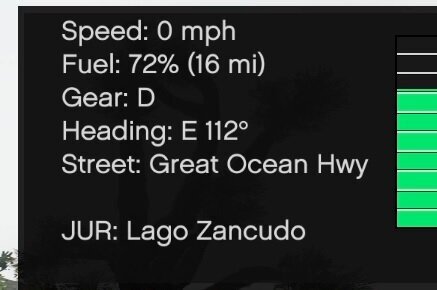
  • Show the vehicle's:

    • Speed

    • License plate

    • Vehicle model

  • Automatically maintain a lock for the configured amount of time or until a faster vehicle is detected


Target Lock

Need to keep tracking a specific violator?

Use the Target Lock key to manually lock onto a vehicle. While locked, the radar ignores other passing vehicles until you unlock the target.

Perfect for maintaining visual contact while initiating a traffic stop.


Moveable Radar Marker

Place the radar exactly where you want it.

Features include:

  • Freely move the radar marker

  • Improved movement controls (hold keys for faster movement)

  • Lock the marker in place so it stays where you positioned it

  • Unlock it at any time to reposition it

  • Reset the radar position back to your current location


In-Game Menu

No need to edit configuration files while playing.

Adjust settings directly from the in-game menu, including:

  • Window positions

  • Marker size

  • Fast speed threshold

  • Lock timer

  • Marker options

  • Radar controls


Additional Improvements

  • Radar only operates while you are inside a vehicle

  • Cleaner, modernized user interface

  • Improved marker movement

  • General code cleanup and optimization

  • Various bug fixes and stability improvements


Notes

I know there are many advanced speed radar systems available on LCPDFR. This mod isn't trying to replace them.

Simple Speed Radar is intended for players who want a clean, reliable, and easy-to-use radar with the essential features needed for traffic enforcement, while still offering enough customization to fit different play styles.


Credits

Some concepts and functionality were inspired by the speed radar included with Albo1125's open-source Traffic Policer project. Credit goes to Albo1125 for making portions of that project available to the community.


Version 1.9.2 Showcase Video

Edited by Abel Gaming

What's New in Version 1.9.2

Released

Changes [1.9.2]

  • Added key binding and menu option to allow for locking/unlocking of the radar marker - this will allow to place it and lock it so it does not move with the player vehicle (Either drop the new .INI or add the lock radar marker to your existing INI file)

Changes [1.9.1]

  • Fixed menu version

  • Added .INI setting for marker color

  • Improved the marker move speed (now allows holding the key down to move the marker faster)

Changes [1.9]

  • Added target lock feature with a key bind to lock the target vehicle (Either drop the new .INI or add the lock line to your existing INI file)

  • General code clean up

Changes [1.8]

  • Added menu option to reset radar position to current player position

  • Radar only available in vehicle

  • Hopefully fixed the crashing issue reported by users

Changes [1.7]

  • Changed things inside of the menu

    • Added system tools

    • Reorganized and cleaned up

  • Newly updated and clean UI

  • Fixed bug where radar moved weird with controls (now moves properly)

  • Fixed where radar would remain stationery wherever it was placed, now moves with player - this allows for moving radar

Notes

I am aware that there are far more advanced speed radar systems available on the site; however, this aims to be a simple to use speed radar system with basic features


Short Description

A light-weight speed radar system

User Feedback

Recommended Comments

Abel Gaming

Members Author

15 minutes ago, unitedOrange66 said:

This reminds me of the good old days of LCPDFR and LSPDFR. Things were much simpler but enjoyable. 

Exactly how I feel lol! I love the realistic immersion when playing but sometimes I also just want simple things! 
 

15 minutes ago, fedbravo said:

Will there be a lock-on feature? 

This is certainly something that I can work on and try to get implemented in the future!

249Xeno

Members

1 hour ago, Abel Gaming said:

Exactly how I feel lol! I love the realistic immersion when playing but sometimes I also just want simple things! 
 

This is certainly something that I can work on and try to get implemented in the future!


I think the lock on the last vehicle would be nice as well as keeping the speed when pulled over. I will download and use it once that is implemented.

Abel Gaming

Members Author

Just now, 249PD said:


I think the lock on the last vehicle would be nice as well as keeping the speed when pulled over. I will download and use it once that is implemented.

Yeah I had plans to keep their plate, speed, and model on a separate window maybe, as well as blip the vehicle!

249Xeno

Members

35 minutes ago, Abel Gaming said:

Yeah I had plans to keep their plate, speed, and model on a separate window maybe, as well as blip the vehicle!

I cant wait to test it out!!

Abel Gaming

Members Author

(edited)

28 minutes ago, Haze Studio said:

What's different between Traffic Policer version, and this version?

Traffic Policer is no longer supported and hasn’t been for quite some time (last updated in 2019). As noted in the description, this actually uses some source code from Traffic Policer as Albo has actually published the source code for this reason

Edited by Abel Gaming

DCarausu

Members

1 hour ago, GTA 5 Jedi Master said:

Great job on this!  Any chance of getting an .ini file for keybinds?   

My numpad is already completely used too, so the .ini for keybinds suggestion is great 👍

Abel Gaming

Members Author

(edited)

1 hour ago, GTA 5 Jedi Master said:

Great job on this!  Any chance of getting an .ini file for keybinds?   


22 minutes ago, DCarausu said:

My numpad is already completely used too, so the .ini for keybinds suggestion is great 👍

Sure thing! Was just getting ready to do some final testing on 1.2, but I will get a configuration file thrown together before release!

Edited by Abel Gaming

1 hour ago, Abel Gaming said:


Sure thing! Was just getting ready to do some final testing on 1.2, but I will get a configuration file thrown together before release!

DUDE, that was fast as hell!  THANK YOU for the configuration option.  ABSOLUTELY LOVE IT!!!!!!!

Abel Gaming

Members Author

Just now, GTA 5 Jedi Master said:

DUDE, that was fast as hell!  THANK YOU for the configuration option.  ABSOLUTELY LOVE IT!!!!!!!

Of course! It's my goal to please the people 😄

NSM Tragedy

Members

Will this eventually have all the features of traffic policer? like blip a vehicle if it has expired regristration or warrants. im excited to use this. 

Abel Gaming

Members Author

5 minutes ago, NSM Tragedy said:

Will this eventually have all the features of traffic policer? like blip a vehicle if it has expired regristration or warrants. im excited to use this. 

While it was not originally in the plans, if it's something you and others would like to see, I can certainly work on getting it added in!

NSM Tragedy

Members

5 minutes ago, Abel Gaming said:

While it was not originally in the plans, if it's something you and others would like to see, I can certainly work on getting it added in!

I was only curious if it was planned really. I personally dont mind using ALPR's for that, others might like it though. 

Abel Gaming

Members Author

1 minute ago, NSM Tragedy said:

I was only curious if it was planned really. I personally dont mind using ALPR's for that, others might like it though. 

I might work on getting it added in here soon! I wanted to get some LSPDFR integration built in anyway and would be a good time to do it!

NSM Tragedy

Members

1 minute ago, Abel Gaming said:

I might work on getting it added in here soon! I wanted to get some LSPDFR integration built in anyway and would be a good time to do it!

Looking forward to seeing it, mods like this bring me back to the early days of lspdfr lol. definitely appreciated  

DCarausu

Members

Just tested this and it's awesome!!!

Simple, intuitive, easy to use and old school for the grass roots. Love it!


One more recommendation for your next update; in your .ini, make it available to the user to move the info box on the screen to a desired location. Something like:

InfoPanelPositionX=1365

InfoPanelPositionY=660


Thank you for making this and keeping on it, this is exciting!!c 😊

Deactivated Member

Deactivated

(edited)

12 hours ago, Abel Gaming said:

Traffic Policer is no longer supported and hasn’t been for quite some time (last updated in 2019). As noted in the description, this actually uses some source code from Traffic Policer as Albo has actually published the source code for this reason

Oh no I am aware that it hasn't been updated, I am just curious as to if there is any change in the code from TP and this mod is all. Or is it just a c/p of TP put into a RPH plugin. 

Edited by Haze Studio

Abel Gaming

Members Author

4 hours ago, Haze Studio said:

Oh no I am aware that it hasn't been updated, I am just curious as to if there is any change in the code from TP and this mod is all. Or is it just a c/p of TP put into a RPH plugin. 

Code is different! The one thing that I pulled from TP was the on screen text drawn and the idea of the marker (code is different for the marker).

10 hours ago, DCarausu said:

Just tested this and it's awesome!!!

Simple, intuitive, easy to use and old school for the grass roots. Love it!


One more recommendation for your next update; in your .ini, make it available to the user to move the info box on the screen to a desired location. Something like:

InfoPanelPositionX=1365

InfoPanelPositionY=660


Thank you for making this and keeping on it, this is exciting!!c 😊

Certainly! I just kind of overlooked this and never really thought of it! Will be added in the next update!

BlueLine Vibes

Insiders

(edited)

As others have already mentioned and I think you have responded, I am just echoing the same message.   Would like to see some type of  Speed Locking function,  it would mainly just lock the make, model and speed of the vehicle.  We can look for the vehicle on the highway, so probably no need for a blip on the map currently, unless you want to make it a  enable/disable feature in the ini

Edited by BlueLine Vibes

Abel Gaming

Members Author

4 hours ago, BlueLine Vibes said:

As others have already mentioned and I think you have responded, I am just echoing the same message.   Would like to see some type of  Speed Locking function,  it would mainly just lock the make, model and speed of the vehicle.  We can look for the vehicle on the highway, so probably no need for a blip on the map currently, unless you want to make it a  enable/disable feature in the ini

Current version does feature a temporary lock for 60 seconds with a blip, locked plate, locked model, and locked speed. After 60 seconds it is dismissed back to the game to prevent from having multiple vehicles marked as persistent and causing a memory issue. 
 

However, that being said, I’m not happy with this feature how it currently sits and am working on a different method/system. 
 

I’ll be sure to get the description and hopefully video updated tonight that does reflect the current state of the plugin. 

249Xeno

Members

8 hours ago, Abel Gaming said:

Current version does feature a temporary lock for 60 seconds with a blip, locked plate, locked model, and locked speed. After 60 seconds it is dismissed back to the game to prevent from having multiple vehicles marked as persistent and causing a memory issue. 
 

However, that being said, I’m not happy with this feature how it currently sits and am working on a different method/system. 
 

I’ll be sure to get the description and hopefully video updated tonight that does reflect the current state of the plugin. 

As far as you're not happy with this feature, I am sure you will come up with a way to bypass the current system setup. It just takes some outside-of-the-box thinking to bring that idea out of the head ya know.


I do like it kinda, but at the same time, I feel like there is stuff that is missing from this plugin that can make it even better too. But as it stands now, this will do. At least its a bit better than Prowler. Maybe a new facial look? or speed config? larger box to cover two or more lanes at a time? I'm not sure, but I'm sure there will be an upgrade to it.

249Xeno

Members

I think you should make an ini file where the user can adjust the side of the bubble so it reads both lanes. I have been using it and I notice that the blue bubble is only big enough to be on one lane at a time and if try to put it in the middle, some of the ped drives far enough that the bubble does not touch it.

Adjusting the bubble side can help read both lanes and also able to place the speed box wherever the user wants to put it instead just close to the left corner.

Create an account or sign in to comment

Account

Navigation

Search

Search

Configure browser push notifications

Chrome (Android)
  1. Tap the lock icon next to the address bar.
  2. Tap Permissions → Notifications.
  3. Adjust your preference.
Chrome (Desktop)
  1. Click the padlock icon in the address bar.
  2. Select Site settings.
  3. Find Notifications and adjust your preference.