Skip to content
View in the app

A better way to browse. Learn more.

LCPDFR.com

A full-screen app on your home screen with push notifications, badges and more.

To install this app on iOS and iPadOS
  1. Tap the Share icon in Safari
  2. Scroll the menu and tap Add to Home Screen.
  3. Tap Add in the top-right corner.
To install this app on Android
  1. Tap the 3-dot menu (⋮) in the top-right corner of the browser.
  2. Tap Add to Home screen or Install app.
  3. Confirm by tapping Install.

[Immersion] Officer Status Menu 1.2.1

(13 reviews)

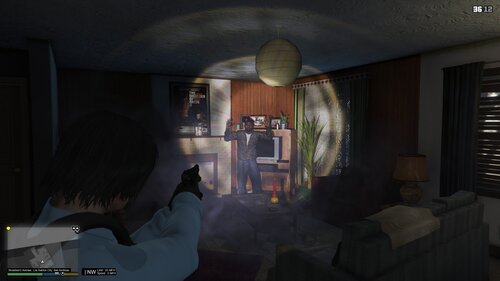
5 Screenshots

**UPDATE**

Between college, work, and the fact I have stopped playing LSPDFR for the time being, this plugin will probably not be updated for a while and will have limited support


Do you feel like you are not talking to dispatch as much as a real cop would? Do you wish that you could report to dispatch your current status, as well as inform them of various things?

Then this plugin is for you. It does not add much in terms of features, as most of the functions are purely aesthetic and are just there for immersion.

All options when selected generate a verbal response from dispatch and play the radio animation.


Video of it in action (older version): 


Current Features: (features with actual functions are detailed in parenthesis)

  • Traffic Stop 
    • Tell dispatch you are on a traffic stop. Inform them of occupancy, whether its a felony stop, your location, and if you require assistance (regular stop backup is one unit, felony is two units)
    • Supports Bejoljo's traffic stop backup mod along with OJDoesIt's felony stop backup mod
      • ONLY supports these mod if you leave their keys untouched (default)
  • "Show Me..." 
    • Current Options:
      • En Route (Accepts callout if one's available)
      • On Scene
      • In Foot Pursuit (Generates 2 backup pursuit units)
      • In Vehicle Pursuit (Generates 2 backup pursuit units)
      • Code 4 (Ends current callout if active, aesthetic dispatch response if not)
  • Suspect Description
    • Give dispatch description of suspect such as gender, race, and build.
  • Vehicle Description
    • Give dispatch description of suspect's vehicle type and color. 
      • NEW! Traffic stops and vehicle pursuits now automatically give dispatch vehicle's description (color, model, and license plate)
  • "Suspect is/has..."
    • In Sight
    • In Custody
    • Crashed
    • In Transport
    • Dead
  • Update Location
    • Tell dispatch your current location
  • Shots Fired
    • Tells dispatch that shots have been fired at your location, along with information on deceased peds/officers. Depending on the situation, the amount of backup will change dynamically
  • Each option plays a transmission radio tone and generates a random response from dispatch each time, changing depending on the situation.


RequiresRequires:

IMPORTANT!

You MUST use ScriptHookVDotNet2, not old ScriptHookVDotNet. Failure to do so will result in a crash.


Default Controls:

  • "i" = Open menu
  • "," = Tell dispatch you are in foot pursuit
  • "." = Tell dispatch you are in vehicle pursuit
  • "/" = Tell dispatch suspect has crashed
  • "-" = Tell dispatch shots have been fired

All controls editable in the .ini file. Keep in mind the Oem2 key is NOT the "2" key but the "/" key.


Any reviews that result from not following installation instructions will be ignored, if you have a problem with the plugin, please tell me about it before you make a review and I will work with you to fix the problem! Thank you.


You can find me on the LSPDFR Discord here:

https://discordapp.com/invite/hxmvtHE

I can assist you over Discord or private message here for any problems you may have!


Thank you to:

AlexGuirre - RageNativeUI
turbofandude - Helping me with accepting callouts
scorponok - Being a great help and making a video showcasing the mod
All of my beta testers - Being awesome people and giving me ideas!

OJDoesIt - Helped me a lot in coding some of the more difficult parts and makes awesome mods!

Y

s

Y

What's New in Version 1.2.1

Released

v1.2.1:

  • Removed OJDoesIt FelonyStopPlugin API to attempt to fix crash when going on duty


v1.2.0:

  • Removed "busy" functionality as it had no effect on callouts
  • Added OJDoesIt's FelonyStopPlugin API
    • Requires that you use v1.1 of his plugin if you decide to enable this feature in the .ini
  • Added detection of dead peds when "Shots Fired" is pressed, detects if civs, officers, or both have been shot and dispatches additional units depending on the situation
  • Added automatic car descriptions. Whenever you are in a pursuit or traffic stop, you will automatically give dispatch a description of the vehicle including color, model, and license plate
  • Added more dispatch response to traffic stop, pursuit, and shots fired. Now dispatch will say more than generic responses in these situations
  • Fixed a bug in the traffic stop backup compatibility

Short Description

[Immersion] Officer Status Menu

User Feedback

Recommended Comments

SirNavarro

Members

Another amazing plugin to bring in the realism to our daily patrols.


Thank you so much @Phaxol!

taxi44

Members

Can you give an INI option to make the traffic stop backup work with Bejoljo's mod?

CaliNative92

Members

Can someone help me get this to work.? My game crashes everytime I have Ragehook and Scripthookvdot net installed together. 

Phaxol

Friends of LSPDFR Author

(edited)

1 hour ago, Asahammer said:

Can you give an INI option to make the traffic stop backup work with Bejoljo's mod?


I can look into it in the next version, I will have to message him and see if we can maybe get the plugins to work together. As of now I have just been calling in backup from that mod separately after I tell dispatch I am on a traffic stop.


2 hours ago, vladimir850 said:

Could u add Custom Backup plugin support pls?


Yes sir, I am looking into it for the next release! I have to configure it for myself to make sure I get everything in order as I currently do not use Custom Backup. I believe it should work with it in its current state if you have "overrideLSPDFRbackup" set to true however.


30 minutes ago, Compton said:

Can someone help me get this to work.? My game crashes everytime I have Ragehook and Scripthookvdot net installed together. 


When does your game crash? PM me with some more info and I can see if I can't get it figured out.

Edited by Phaxol

DaWoodz

Members

 I have I have the old update for GTA the last update not the newest one and I was wondering if you could make it compatible for that at all cuz I would like to try this mod

J.J Designs

Members

wow really nice but local dispatch does the same as this script but i guest this is good for those that don't have mic

HyperSin

Members

You should add a few more cops hate to say

1. Shots fired, officer down (make em say it 2 or 3 times depending on the situation

2. Officer down without the shots fired part

3. Officer has passed away

4. Officer has been sent to the hospital

Etc just stuff like that for the shots fired officer down id set it to send the entire damn department ment, light the sky with blue lights ( i disabled all red lights but for fire and ems

Phaxol

Friends of LSPDFR Author

(edited)

2 hours ago, J.J Designs said:

wow really nice but local dispatch does the same as this script but i guest this is good for those that don't have mic


That is where a lot of the inspiration came from for this script, but I would have to repeat myself several times to get it to work. I made this for personal use but a lot of people had interest in it so I decided to release it. Its good for people who can't get their voice recognized, don't want to speak out loud while playing, or as you said simply don't have a mic.


15 hours ago, DaWoodz said:

 I have I have the old update for GTA the last update not the newest one and I was wondering if you could make it compatible for that at all cuz I would like to try this mod


Unfortunately, I probably cannot do this. Why haven't you updated yet?


1 hour ago, HyperSin said:

You should add a few more cops hate to say

1. Shots fired, officer down (make em say it 2 or 3 times depending on the situation

2. Officer down without the shots fired part

3. Officer has passed away

4. Officer has been sent to the hospital

Etc just stuff like that for the shots fired officer down id set it to send the entire damn department ment, light the sky with blue lights ( i disabled all red lights but for fire and ems


I am currently working on adding auto-detect logic for situations, such as automatically giving vehicle descriptions when you go into pursuit (adding this for ped description would be nearly impossible as I would have to index every ped in the game), I can look into adding some logic for this also such as detecting if an officer or civilian has been shot. Thank you for the idea!

Edited by Phaxol

DaWoodz

Members

Because I don't want to lose all my info in the update folder for my mods

HyperSin

Members

Make a backup and your welcome, i am trying to make this as realistic as i possibly can

Alex Subb

Members

(edited)

Crashes then i send In vehicle pursuit

LSPD First Response: GetAudioFileForAction: No file found for: UNITS_RESPOND_CODE_3

Edited by Alex Subb

Phaxol

Friends of LSPDFR Author

(edited)

23 minutes ago, Alex Subb said:

Crashes then i send In vehicle pursuit

LSPD First Response: GetAudioFileForAction: No file found for: UNITS_RESPOND_CODE_3


Go into LSPDFR\Police Scanner\StatusMenu and make a copy of "ALL_AVAILABLE_UNITS_RESPOND_CODE3.wav" and rename it to "UNITS_RESPOND_CODE_3.wav". Will fix this next release

Edited by Phaxol

taxi44

Members

The traffic stop doesn't seem to set my callouts to off.  I still get calls on traffic stops.

HyperSin

Members

Technically in rl thats how it is but in rl only for super emergencys do they do that, i might like that bug

Phaxol

Friends of LSPDFR Author

(edited)

7 hours ago, Asahammer said:

The traffic stop doesn't seem to set my callouts to off.  I still get calls on traffic stops.


Currently I am not sure if there is a way to disable callouts entirely. The only method for this I could find was in the LSPDFR API there is a function to set the player as busy, but it seems to be hit or miss on whether it works or not. Sometimes I think it works while other times I get callouts as you said. This seems to be a limitation with the API and I'm not sure if it can be fixed as of right now. I will have to ask the devs about this function and what it actually does

Edited by Phaxol

culley39

Members

does scripthookvdotnet go in the gta v root folder? the instructions are not all that clear, thanks

Phaxol

Friends of LSPDFR Author

12 minutes ago, culley39 said:

does scripthookvdotnet go in the gta v root folder? the instructions are not all that clear, thanks


Yup just put all the files in the ScriptHookVDotNet archive into your root directory and you should be good to go

culley39

Members

i downloaded the scripthookdotnet and put it in the root folder, i haven't tried it yet, i wasn't sure if it was included or if i needed to download it.

Stepanic

Members

Every time when I go on duty, lspdfr crash. I delete this plugin and lspdfr is working. Can you tell me how to fix this ? I rly wonna play with this :D 

Phaxol

Friends of LSPDFR Author

(edited)

41 minutes ago, Stepanic said:

Every time when I go on duty, lspdfr crash. I delete this plugin and lspdfr is working. Can you tell me how to fix this ? I rly wonna play with this :D 


You have probably installed it wrong, please send me the contents of your RagePluginHook.log over private message and I should be able to help you. Are you sure you're using ScriptHookVDotNet2 and not ScriptHookVDotNet?

Edited by Phaxol

HyperSin

Members

He had to of cause mine works fine (havent updated yet) been working on a new unmarked/marked all blue/ blue red srt dodge hellcat police car

Stepanic

Members

3 hours ago, Phaxol said:


You have probably installed it wrong, please send me the contents of your RagePluginHook.log over private message and I should be able to help you. Are you sure you're using ScriptHookVDotNet2 and not ScriptHookVDotNet?

I look in folder GTA 5 and i find SHDontNet2, how to fix this?

Phaxol

Friends of LSPDFR Author

3 minutes ago, Stepanic said:

I look in folder GTA 5 and i find SHDontNet2, how to fix this?


Send me your RagePluginHook.log file containing the crash in a private message and I can tell you the problem.

Phaxol

Friends of LSPDFR Author

Big update coming tonight, lots of changes and things improved! File might be down for a bit while it is updated

Create an account or sign in to comment

Account

Navigation

Search

Search

Configure browser push notifications

Chrome (Android)
  1. Tap the lock icon next to the address bar.
  2. Tap Permissions → Notifications.
  3. Adjust your preference.
Chrome (Desktop)
  1. Click the padlock icon in the address bar.
  2. Select Site settings.
  3. Find Notifications and adjust your preference.