

Skip to content
View in the app

A better way to browse. Learn more.

LCPDFR.com

A full-screen app on your home screen with push notifications, badges and more.

To install this app on iOS and iPadOS
  1. Tap the Share icon in Safari
  2. Scroll the menu and tap Add to Home Screen.
  3. Tap Add in the top-right corner.
To install this app on Android
  1. Tap the 3-dot menu (⋮) in the top-right corner of the browser.
  2. Tap Add to Home screen or Install app.
  3. Confirm by tapping Install.

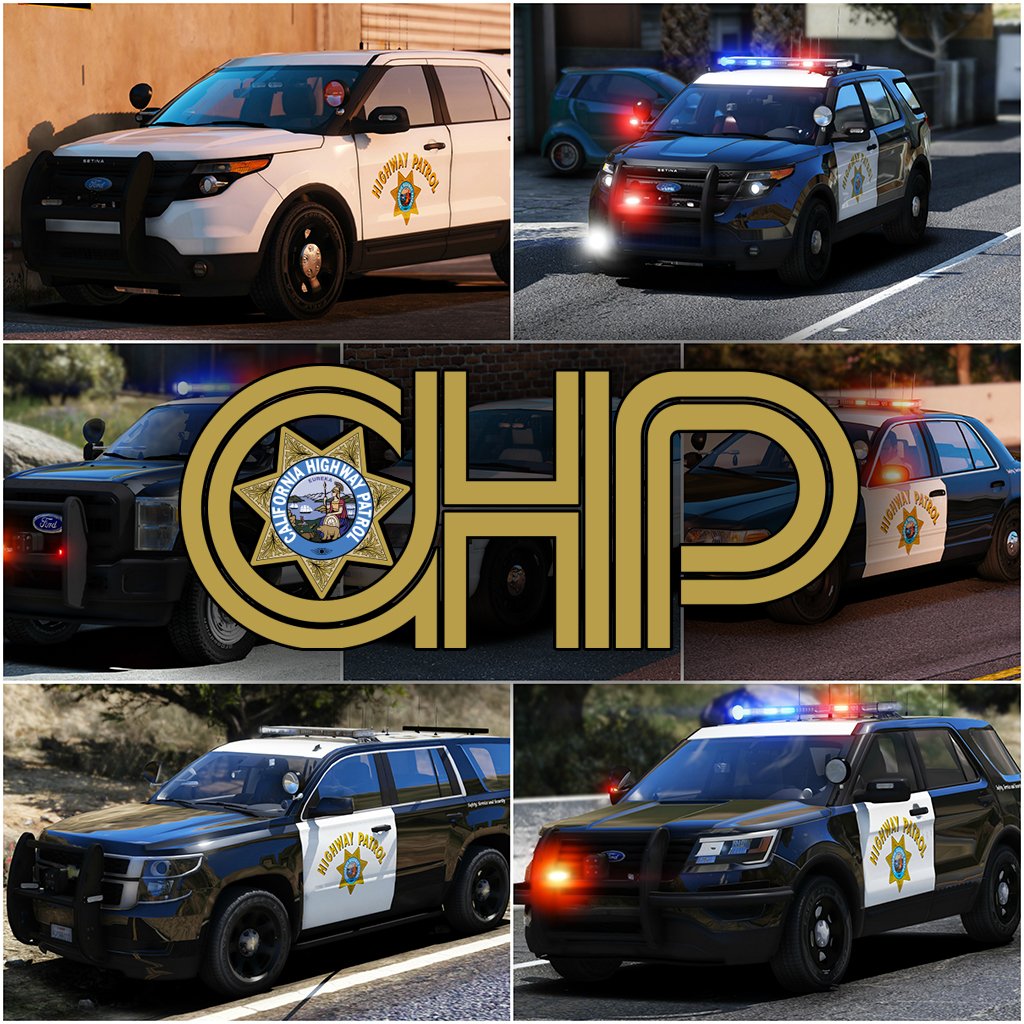
2017 California Highway Patrol Mega Pack - ELS 1.1.0

(158 reviews)

14 Screenshots

    10021674_300x300.png.9b7a0360d24b9207fd8aa44c1b616d80.png


    Welcome to something that has been in the making since I've gotten my hands on ELS, something that has taken more hours then you guys could understand. I've pulled out all the stops for this pack. I've taken all your guys' feedback on my screenshots, and I've done my best to destroy it in the realistic/quality/immersion department. I've done my best to simplify the installation of this file. For those of you who are looking for an add-on version of this pack, you're going to have to wait a little longer, as I've got barely any time to even upload this. So without further adieu, I present to you my pride and joy, the 2017 California Highway Patrol ELS mega pack, or whatever you want to call it. 


I've updated the pack to include updates to the majority of cars, an add-on version of the pack(.oiv format), and the templates that everyone has requested!
 

PACK OVERVIEW
=================================
- NAME: 2017 CHP mega pack ELS
- VERSION: V1.0
- EXTRA PARTS: CHP
- OPTIMIZED FOR: Anything


ELS USE IN GAME

=================================
When in game, the lights will work as i've designed for them to. When you exit the vehicle, the entire front of the vehicle will steady burn as it will mimic the 
CHP Traffic Stop pattern. I can't stop this from happening. 


When you are using any of the vehicles in this pack, and you preform a traffic stop, I HIGHLY recommend hitting alt-j to go to light stage two and hitting L to turn on the 
front of the vehicle. This; A, enhances realism and B, makes the car look really pretty. 


There are multiple other features that I will leave for you guys to find out with the CHP settings.


IMPORTANT NOTES
=================================

I am always accepting donations! Any amount is appreciated more then you guys will ever know!


Unfortunately I've had to split this pack into two separate parts (will be 3 when .oiv is included), PLEASE BE SURE TO DOWNLOAD ALL PARTS!


PLEASE PLEASE PLEASE READ THE READ ME BEFORE YOU ACTUALLY INSTALL THIS PACK!!!!!!!!!!!!!!!!!!!!


There are some things I have been unable to do with this pack and there are some things i've been able to do.


There is no way for me to turn off the park mode steadyburn for when you get out of the vehicle.


If you want to "reset" the pattern for the vehicle if some reason it becomes out of sync, simply press alt-J and then j again.


A incredible thank you to @Problematic , @TaylorSwift and a few more for their help and  assistance throughout this entire production of this pack. 


INSTALLATION INSTRUCTIONS

=================================


-To install any of these vehicles, Navigate to the latest patch day that you install vehicles to, I've found success with patchday10, and drag all vehicle files into the patch day
Location: Grand Theft Auto V\mods\update\x64\dlcpacks\patchday10ng\dlc.rpf\x64\levels\gta5\vehicles.rpf


-To install any VCFs with the pack
Location: Grand Theft Auto V\ELS\pack_default


-To install any included vehicle metas files
Location: Grand Theft Auto V\mods\update\update.rpf\common\data\levels\gta5


COMMON QUESTIONS
=================================

Q: Why aren't my lights bright?
A: You do not have light-enhancing mods installed. Download RadianceV and/or, other mods that increase emergency lighting brightness.


Q: Where is _____(insert any vehicle here)?

A: I've made the main vehicles of the CHP fleet as I've seen. At this point I am Content with the 16 Vehicles.


Q: Will you please help me ins--
A: Did you read the readme? No? The installation is simple.


Q: I don't have Patchday10/anything else?
A: Then put the car in your latest patch day, or copy patchday10/anything else over from your base game into your mods folder.
 
Q: Why does my game crash after I install the car/meta/carcol?
A: Make sure you have no spaces when you copied the line, make sure you're installing it in the right location and back all your shit up. 


Q: Will you send me ______?
A: No.


Q: Can I make skins for this Pack?
A: By all means, go ahead, just dont re-upload the vehicle model itself.


Q: Can I have the templates for this pack?

A: In the next update, hopefully I remember to add them.


PACK NOTES
=================================
Before i get started, please, please PLEASE don't ask me where this vehicle is, or why i didn't make this vehicle. There are 14 in this pack, please be happy with what i've 
made so far.


- All vehicles do have working takedowns with working spotlights


- All vehicles feature the same CHP setup as in real life


- All vehicles have accurate interior equipment


- All vehicles feature accurate antenna setups 


- K9 vehicles have a spawnable dog in the rear of the vehicle, for those of you who do or don't use a k9 mod


- If I haven't included a version for add-on vehicles that is in an .oiv format, then i will include one at a later date.


- There is approx 14 vehicles in this current phase of the pack, phase 2 will have a few more vehicles, that are the more abstract vehicles in the CHP fleet.


- A huge thanks to officer27 for the CHP and SAHP skins.


- With the large amount of vehicles in this pack, there are bound to be some issues with vehicles. Please let me know of any bugs you find and i'll do my best to fix them


  I'm going to be doing my best to update this pack with as many cars as I can make, and fixing any bugs i come across in the midst of it. Please consider following the file to make sure you receive all updates for the file!


Flawless video by @mroxplay, also you need to start making music mixes, the transition between songs was fantastic!


Disclaimer
=================================
-You are not to attempt to modify or rip this pack in any way shape or form.
-I (Thehurk) am not responsible for any damages done to your game. Please make a backup of any edited files!
-Do not attempt to make a profit off this pack in any way shape or form.
-Do not re-upload this pack, please make a link!!!!!
-Do not upload this file to any other site, claiming it as your own. 
-If you want to use this file in a clan, PLEASE ask me before doing so!!! I greatly appreciate this and almost always say yes!


Thank you everyone if you've gotten to this point in reading, you are truly a saint and I appreciate you not just skipping it saying what is this bullshit.


What's New in Version 1.1.0

Released

-Fixed all vehicles that have a liberty (missing one module on the passenger side)

-Fixed the 2006 CVPI Vision somehow having being affected by tint.

-Fixed the expedition's rear blues on the liberty not working

-Fixed 2013 Explorer's mirror lights not being synced
-Fixed some of the spotlights, not all, didn't have time to do others as i've been working crazy overtime.

-Fixed some VCF issues (once again they are all customizable);

  • 2006 CVPI traffic advisor should be customizable to your liking, i've left it on the default TRAF pattern
  • All motorcycles (Policeb) should now automatically go to stage 3, as there is nothing with the other two stages

-Added 2013 Harley Davidson Electraglide motorcycle

-Added the Add-On Version .oiv

-Uploaded all templates
 

User Feedback

Recommended Comments

NewbCrazy

Members

(edited)

10 hours ago, SchvanyCrack said:

UPDATE- I forgot of the option to hit "j" and "alt-j". Lights do work. But seems to conflict with the mod Siren Mastery controls. Is there a way I can configure the controls?

Also I have another question. Do these vehicles support multiple skins?


If you have ELS installed (Which you do, since you mentioned J and Alt J) then Siren Mastery is no longer needed. ELS has everything Siren Mastery offers (Except the ability to have 10 sirens per vehicle) and much, much more.

Edited by GGN Crazy

Kilyin

Members

2 minutes ago, GGN Crazy said:


If you have ELS installed (Which you do, since you mentioned J and Alt J) then Siren Mastery is no longer needed. ELS has everything Siren Mastery offers and much, much more.


no, it doesn't, not even close to it, and they can be used together.

AJ Deere T680

Members

21 minutes ago, Jibril said:

I think it's suppose to be like that, cuz it's that way IRL.


@AJ Deere T680   Maybe, I think you'd have to change the ELS config files.

I Got my good friend Psource to see if its possible and hes having some trouble so maybe Hurk can see if he can do something with the patterns.

NewbCrazy

Members

4 minutes ago, Kilyin said:


no, it doesn't, not even close to it, and they can be used together.


If Siren Mastery only turns on/off the siren, and changes which siren you sound (Which ELS does) then whats the point of having the two together?

Jibril

Members

8 minutes ago, AJ Deere T680 said:

I Got my good friend Psource to see if its possible and hes having some trouble so maybe Hurk can see if he can do something with the patterns.


Yea, the ELS files look complicated.

Kilyin

Members

Just now, GGN Crazy said:


If Siren Mastery only turns on/off the siren, and changes which siren you sound (Which ELS does) then whats the point of having the two together?


Siren Mastery allows you to use as many different types of siren audio as you want and assign them to specific car models. ELS currently limits you to basically one siren for every police car/firetruck/ambulance in the game. SM is aimed at audio, where ELS is more of a visual mod.

badass22

Members

(edited)

Hello guys! Just a question: can I use SirenMastery with ELS putting a specific siren to vehicle that I select for it? Because I have RDE, modded with LAPD, LASD and CHP, I want to put the CHP siren on ELS CHP vehicle selecting it to put the siren via SirenMastery (AI included). Lemme know.

Edited by badass22

Thehurk

Members Author

6 hours ago, momo536 said:

After the update the light patern dont work right one of the red light stay on..... Ill remove all the vehicule for my old ones


10 hours ago, SchvanyCrack said:

UPDATE- I forgot of the option to hit "j" and "alt-j". Lights do work. But seems to conflict with the mod Siren Mastery controls. Is there a way I can configure the controls?

Also I have another question. Do these vehicles support multiple skins?


2 hours ago, attf said:


I am having this issue also. After replacing the older version cars with the ones from update (and their new VCFs), I am only able to turn on the single forward red steady burn. ELS cycles normally through all stages while pressing J but no other lights turn on during any stage.


I reverted back to using the previous MegaPack version's cars and VCFs but for some reason the problem still persists! Any help would be appreciated.


Are all of you guys using Siren Mastery? I'd like to see what the issue you guys are having is.

3 hours ago, AJ Deere T680 said:

My favourite pack on the website!!! But, Is it possible to get another flash pattern in? Like whenever CHP Change to yelp, it changes patterns to on and off. like this:


This pattern is currently not possible.


2 hours ago, gpjr92 said:

I noticed that when you install the 2013 FPIU, it stands as a giant in comparison to the other vehicles. Can you update it to so that the size doesn't seem that huge.


Sizing of the vehicle will not be touched. It is scaled to in game vehicles and that's the way its going to stay.


3 hours ago, winglesschip209 said:

Does n e one encounter this problem on the latest update on all cars when i press L,K the blinkers turns on too one for each side


Seems like you have a script that turns that on. L and K don't do that for me when i press them.
 

SchvanyCrack

Members

19 minutes ago, Thehurk said:


Are all of you guys using Siren Mastery? I'd like to see what the issue you guys are having is.


This pattern is currently not possible.


Sizing of the vehicle will not be touched. It is scaled to in game vehicles and that's the way its going to stay.


Seems like you have a script that turns that on. L and K don't do that for me when i press them.
 

There is no issues. I just completely disabled all Siren Mastery controls since ELS does everything and more. The L and K letters are settings under the trainer.ini (Simple Trainer at least) for indicators, just set them to "None". 

winglesschip209

Members

23 minutes ago, Thehurk said:


Are all of you guys using Siren Mastery? I'd like to see what the issue you guys are having is.


This pattern is currently not possible.


Sizing of the vehicle will not be touched. It is scaled to in game vehicles and that's the way its going to stay.


Seems like you have a script that turns that on. L and K don't do that for me when i press them.
 

Thank you for respond thank god is on my end I'll figure it out thank you again

steinberg4145

Members

1 hour ago, AJ Deere T680 said:

I Got my good friend Psource to see if its possible and hes having some trouble so maybe Hurk can see if he can do something with the patterns.

If you go back a few pages you'll notice I answered the yelp pattern question already.  It works but unfortunately you're left with the choice of accurate lstg 1-3 or fucked up lstg 1-2 And ok lstg3+yelp pattern.

attf

Members

1 hour ago, Thehurk said:


Are all of you guys using Siren Mastery? I'd like to see what the issue you guys are having is.


I am not and have not ever used Siren Mastery, only ELS.

Kilyin

Members

1 minute ago, attf said:


I am not and have not ever used Siren Mastery, only ELS.


I just tested every single car from the update and the lights work fine so it's something on your end.

attf

Members

Yeah, it's something weird. I was using the MegaPack cars with no issues. Installed this latest version's cars and VCFs, and only the front single red comes on during all stages (spotlights/takedowns and cruise lights still light up normally). So I reinstalled the older MegaPack cars and VCFs over the new version and still have the same issue.


I am very confused what may have messed up.

Kilyin

Members

2 minutes ago, attf said:

Yeah, it's something weird. I was using the MegaPack cars with no issues. Installed this latest version's cars and VCFs, and only the front single red comes on during all stages (spotlights/takedowns and cruise lights still light up normally). So I reinstalled the older MegaPack cars and VCFs over the new version and still have the same issue.


I am very confused what may have messed up.


you using the replace or addon version? Maybe try the addon... I know that works. I mean, both should work but I only tested the addon.

Dewar90

Members

11 minutes ago, attf said:

Yeah, it's something weird. I was using the MegaPack cars with no issues. Installed this latest version's cars and VCFs, and only the front single red comes on during all stages (spotlights/takedowns and cruise lights still light up normally). So I reinstalled the older MegaPack cars and VCFs over the new version and still have the same issue.


I am very confused what may have messed up.

I've just installed this pack also and having the same read light issue. I'm using the addon pack. Wonder what it is? Loving the pack all the same. If anyone has any ideas to fix would appreciate it

attf

Members

28 minutes ago, Kilyin said:


you using the replace or addon version? Maybe try the addon... I know that works. I mean, both should work but I only tested the addon.


I'm sorry I'm not on my gaming PC right now so I don't remember which is called which (replace or addon), but I installed each car by manually dragging the 3 files into OpenIV. So I believe I used the replacement version, not the addon version that involves the .oiv file.

Sheriff Rosco

Members

I have the addon version and have the gameconfig installed, but I still get 'Game Memory Error'.

Kilyin

Members

50 minutes ago, Stingy said:

I have the addon version and have the gameconfig installed, but I still get 'Game Memory Error'.


Try one of these:


Sheriff Rosco

Members

26 minutes ago, Kilyin said:


Try one of these:


Is there a certain one I have to use? I have this, but still get the same results.

Kilyin

Members

(edited)

3 minutes ago, Stingy said:

Is there a certain one I have to use? I have this, but still get the same results.


if you're on the latest game version use the one from the folder \Version 6.0 Latest version for v1.944\1x traffic 1xpeds (Means Gta base)

Edited by Kilyin

Sheriff Rosco

Members

59 minutes ago, Kilyin said:


if you're on the latest game version use the one from the folder \Version 6.0 Latest version for v1.944\1x traffic 1xpeds (Means Gta base)


Still nothing. Dang

Kethen

Members

(edited)

On 3/3/2017 at 4:48 PM, kevo15 said:


I believe you were born a meth head.  there is more than one pattern.  you have got to be kidding me right now.  you think they don't have more control over there lighting system???  lets get real!!!

Just a pro tip: The steady burn is a California law, so yes, they actually do all have it. 

And the patterns used in the pack are the authentic patterns used by our Highway Patrol.

If you're going to get into an argument with strangers and raise your blood pressure over it, it should really be something important--or barring that--something you can argue for. Disputing CHP patterns and the mandated steady burn is like disputing global warming: you're entitled to being wrong and sharing it with the world, but facts will go on with or without you and it makes a poor impression among your better informed peers. 

There are plenty of FPIUs, Taurus/Vic/Charger/Tahoe/Bike and all of these other models with various lighting patterns of all sorts of variety, usually around 140 options, that allow all sorts of flashy patterns. While you're certainly entitled to request more options, those who realize the intent of the pack (A CHP pack, with CHP cars, that use CHP lighting, for people who like the CHP and are familiar with the CHP all of which the name should make absolutely explicit) are equally entitled to suggest one of the many aforementioned models that provide that. You may have missed the point of the pack, but in law enforcement they teach you to own up to your mistakes and not to pretend to have the answers when you don't rather than get belligerent as a result. That is some LE roleplay you can bring into your every day life.
 

Edited by Kethen

Kilyin

Members

(edited)

18 minutes ago, Stingy said:

Still nothing. Dang


Hm, try this one, it was posted in the RDE thread:

gameconfig.xml


13 minutes ago, Kethen said:

Now, unrelated, does someone have the original Policeb carvar/meta file to share so I can swap it on back over to the 2013 Harley motor unit? lol


don't think you need a carvar, but here's the vehicles.meta:


Spoiler

    <Item>
      <modelName>policeb</modelName>
      <txdName>policeb</txdName>
      <handlingId>POLICEB</handlingId>
      <gameName>POLICEB</gameName>
      <vehicleMakeName />
      <expressionDictName>null</expressionDictName>
      <expressionName>null</expressionName>
      <animConvRoofDictName>null</animConvRoofDictName>
      <animConvRoofName>null</animConvRoofName>
      <animConvRoofWindowsAffected />
      <ptfxAssetName>null</ptfxAssetName>
      <audioNameHash>POLICEB</audioNameHash>
      <layout>LAYOUT_BIKE_POLICE</layout>
      <coverBoundOffsets>POLICEB_COVER_OFFSET_INFO</coverBoundOffsets>
      <POVTuningInfo>POLICEB_POV_TUNING</POVTuningInfo>
      <explosionInfo>EXPLOSION_INFO_DEFAULT</explosionInfo>
      <scenarioLayout />
      <cameraName>FOLLOW_UPRIGHT_BIKE_CAMERA</cameraName>
      <aimCameraName>BIKE_AIM_CAMERA</aimCameraName>
      <bonnetCameraName>BIKE_POLICEB_POV_CAMERA</bonnetCameraName>
      <povCameraName>BIKE_POLICEB_POV_CAMERA</povCameraName>
      <FirstPersonDriveByIKOffset x="0.000000" y="-0.060000" z="0.000000" />
      <FirstPersonDriveByUnarmedIKOffset x="-0.050000" y="-0.125000" z="0.000000" />
      <FirstPersonProjectileDriveByIKOffset x="0.000000" y="0.000000" z="0.000000" />
      <FirstPersonProjectileDriveByPassengerIKOffset x="0.000000" y="0.000000" z="0.000000" />
      <FirstPersonProjectileDriveByRearLeftIKOffset x="0.000000" y="0.000000" z="0.000000" />
      <FirstPersonProjectileDriveByRearRightIKOffset x="0.000000" y="0.000000" z="0.000000" />
      <FirstPersonDriveByLeftPassengerIKOffset x="0.000000" y="0.000000" z="0.000000" />
      <FirstPersonDriveByRightPassengerIKOffset x="0.000000" y="0.000000" z="0.000000" />
      <FirstPersonDriveByRightRearPassengerIKOffset x="0.000000" y="0.000000" z="0.000000" />
      <FirstPersonDriveByLeftPassengerUnarmedIKOffset x="0.000000" y="0.000000" z="0.000000" />
      <FirstPersonDriveByRightPassengerUnarmedIKOffset x="0.000000" y="0.000000" z="0.000000" />
      <FirstPersonMobilePhoneOffset x="0.155000" y="0.315000" z="0.520000" />
      <FirstPersonPassengerMobilePhoneOffset x="0.136000" y="0.223000" z="0.425000" />
      <PovCameraOffset x="0.000000" y="0.000000" z="0.000000" />
      <PovCameraVerticalAdjustmentForRollCage value="0.000000" />
      <PovPassengerCameraOffset x="0.000000" y="0.000000" z="0.000000" />
      <PovRearPassengerCameraOffset x="0.000000" y="0.000000" z="0.000000" />
      <vfxInfoName>VFXVEHICLEINFO_MOTORBIKE_GENERIC</vfxInfoName>
      <shouldUseCinematicViewMode value="true" />
      <shouldCameraTransitionOnClimbUpDown value="false" />
      <shouldCameraIgnoreExiting value="false" />
      <AllowPretendOccupants value="false" />
      <AllowJoyriding value="true" />
      <AllowSundayDriving value="true" />
      <AllowBodyColorMapping value="true" />
      <wheelScale value="0.229500" />
      <wheelScaleRear value="0.200000" />
      <dirtLevelMin value="0.000000" />
      <dirtLevelMax value="0.300000" />
      <envEffScaleMin value="0.000000" />
      <envEffScaleMax value="1.000000" />
      <envEffScaleMin2 value="0.000000" />
      <envEffScaleMax2 value="1.000000" />
      <damageMapScale value="0.600000" />
      <damageOffsetScale value="1.000000" />
      <diffuseTint value="0x88000000" />
      <steerWheelMult value="0.600000" />
      <HDTextureDist value="5.000000" />
      <lodDistances content="float_array">
        15.000000
        30.000000
        70.000000
        140.000000
        500.000000
        500.000000
      </lodDistances>
      <minSeatHeight value="10" />
      <identicalModelSpawnDistance value="100" />
      <maxNumOfSameColor value="10" />
      <defaultBodyHealth value="1000.000000" />
      <pretendOccupantsScale value="1.000000" />
      <visibleSpawnDistScale value="1.000000" />
      <trackerPathWidth value="2.000000" />
      <weaponForceMult value="1.000000" />
      <frequency value="30" />
      <swankness>SWANKNESS_5</swankness>
      <maxNum value="2" />
      <flags>FLAG_NO_BOOT FLAG_LAW_ENFORCEMENT FLAG_NO_RESPRAY FLAG_HAS_EXTRA FLAG_HAS_LIVERY FLAG_IGNORE_ON_SIDE_CHECK FLAG_DONT_SPAWN_IN_CARGEN FLAG_HEADLIGHTS_USE_ACTUAL_BONE_POS FLAG_BIKE_CLAMP_PICKUP_LEAN_RATE FLAG_REPORT_CRIME_IF_STANDING_ON</flags>
      <type>VEHICLE_TYPE_BIKE</type>
      <plateType>VPT_BACK_PLATES</plateType>
      <dashboardType>VDT_ZTYPE</dashboardType>
      <vehicleClass>VC_EMERGENCY</vehicleClass>
      <wheelType>VWT_BIKE</wheelType>
      <trailers />
      <additionalTrailers />
      <drivers>
        <Item>
          <driverName>S_M_Y_HWayCop_01</driverName>
          <npcName />
        </Item>
      </drivers>
      <extraIncludes />
      <doorsWithCollisionWhenClosed />
      <driveableDoors />
      <bumpersNeedToCollideWithMap value="false" />
      <needsRopeTexture value="false" />
      <requiredExtras />
      <rewards>
        <Item>REWARD_WEAPON_PISTOL</Item>
        <Item>REWARD_AMMO_PISTOL</Item>
        <Item>REWARD_STAT_WEAPON</Item>
      </rewards>
      <cinematicPartCamera>
        <Item>WHEEL_REAR_LEFT_CAMERA</Item>
        <Item>WHEEL_REAR_RIGHT_CAMERA</Item>
      </cinematicPartCamera>
      <NmBraceOverrideSet>Bike</NmBraceOverrideSet>
      <buoyancySphereOffset x="0.000000" y="0.000000" z="0.000000" />
      <buoyancySphereSizeScale value="1.000000" />
      <pOverrideRagdollThreshold type="NULL" />
      <firstPersonDrivebyData>
        <Item>BIKE_POLICEB_FRONT</Item>
      </firstPersonDrivebyData>
    </Item>


Edited by Kilyin

Create an account or sign in to comment

Latest Mods

Account

Navigation

Search

Search

Configure browser push notifications

Chrome (Android)
  1. Tap the lock icon next to the address bar.
  2. Tap Permissions → Notifications.
  3. Adjust your preference.
Chrome (Desktop)
  1. Click the padlock icon in the address bar.
  2. Select Site settings.
  3. Find Notifications and adjust your preference.

















