Skip to content
View in the app

A better way to browse. Learn more.

LCPDFR.com

A full-screen app on your home screen with push notifications, badges and more.

To install this app on iOS and iPadOS
  1. Tap the Share icon in Safari
  2. Scroll the menu and tap Add to Home Screen.
  3. Tap Add in the top-right corner.
To install this app on Android
  1. Tap the 3-dot menu (⋮) in the top-right corner of the browser.
  2. Tap Add to Home screen or Install app.
  3. Confirm by tapping Install.

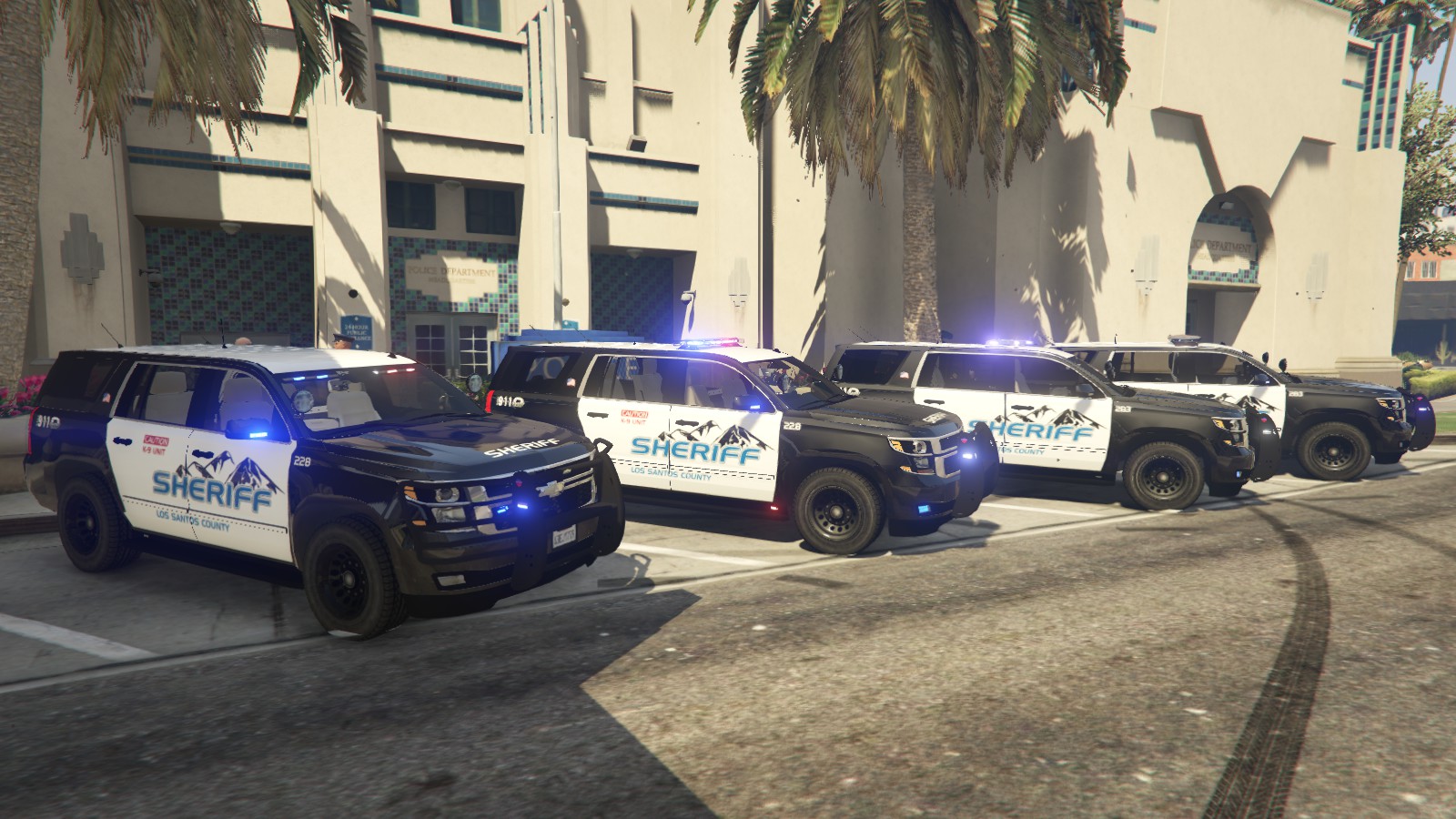
2015 Chevy Tahoe LSSD 2.0

(34 reviews)

7 Screenshots

ATTENTION: If you have previously downloaded this file, please redownload this new version!


I am proud to finally present version 2.0 of my 2015 Tahoe, outfitted for the Los Santos County Sheriff's Department, featuring high-quality skins by @Krame86 and now templated for multiple liveries by @Thero This vehicle has been in the making for nearly two months and has been EXTENSIVELY updated and now also includes the Federal Signal Arjent as an optional lightbar. Please try out this new version if you had the previous one!

Features:

  • Multiple lightbar/extra options: Federal Signal Valor, Whelen Liberty, Federal Signal Arjent (new) and Whelen-inspired interior lightbar all in one model!
    • Extra 1: Federal Signal Valor
    • Extra 2: Whelen Liberty
    • Extra 3: Federal Signal Arjent (NEW)
    • Extra 7: Interior Lightbar
    • Extra 11: Passenger-side spotlight
    • Extra 12: Pushbar wraparound (NEW)
  • Rear partition
  • Integrated console with laptop (NEW)
  • Panasonic Arbitrator dashcam
  • Medkit, duty bag, and weapon/storage compartment in the trunk
  • Trunk and hood issues from original model have been fixed
  • Breaking glass
  • Much more!

Install:

  • To install, simply place all sheriff2 files in \GTA V\mods\update\x64\dlcpacks\patchday9ng\dlc.rpf\x64\levels\gta5\vehicles.rpf.

Credits:

  • Shadydk311: Original Suburban Model
  • Peng00820: Converting model to GTA IV
  • BritishGamer88: Convering to GTA V
  • AuthorSaulAlan: Modifying Suburban into Tahoe
  • RidgeRunner Designs: Panasonic Toughbook CF-31
  • johnclark1102 and diablozer0d617: Panasonic Arbitrator
  • BFRS-EMT: Progard partition
  • PSource and Sergitj: Duffle bag, medkit
  • RoegonTV/BogdanM: Federal Signal Valor
  • F5544: Converting and providing Valor
  • EVI: Whelen Liberty
  • OfficerFive0: Liberty Emmissive Texture
  • Krame86: HQ Sheriff Textures
  • Thero: Mapping and Templating the vehicle for multiple liveries
  • Virzza: Help/guidance along the way!
  • Lundy: Federal Signal Arjent and teaching me how to fix window tint bug!
  • BxBugs123 (?): Go Rhino Pushbar


Known bugs:

  • Pushbumper does not deform during collisions, this will be fixed soon
  • Gauges are now functional, but are not properly calibrated


Please report any bugs, issues, or other problems in my WIP thread: 


Enjoy!

Screenshot 2016-05-09 17.47.44.png

Capture.PNG

upclose.PNG

20160624042107_1.jpg

20160624042112_1.jpg

What's New in Version 2.0

Released

The tahoe has been almost completely rebuilt from the ground up for this update. So many things have changed that I will probably miss several, but here are the big things:

  • Vehicle has been completely remapped for multiple liveries by @Thero (template included)
  • Brand-new liveries by @Krame86
  • Added Arjent lightbar by @Lundy
  • New pushbumper (Go Rhino by I believe BxBugs123, taken from the Police Car Parts resource. Wraparound is an extra component)
  • Redone lighting setup including rear traffic advisor, all red/blue setup for lightbars, new grille and pushbumper lights, fog lights. All coronas are hidden to allow for all-blue light setup (textures included in download)
  • Center console has been redone and is now integrated and doesn't look like crap
  • Various bug fixes

Hopefully more to come!

User Feedback

Recommended Comments

Captain14

Members Author

32 minutes ago, Techengage said:

I don't want to question/insult your skill, but do you know how to remove coronas completely? Most people using these bigger car files are using Rad V anyway. Or is it possible to replicate the blue light (siren 12 or 14, whichever), delete the red siren, and move the replicated blue light over? I'm just throwing crap out, honestly. I'm very new to creating skins/textures. I've always stuck to text coding and editing. I really appreciate it your help/input on this, because I love this truck so much, haha!

Yeah I absolutely can remove the coronas. I'll just have to get an update together for the file.

Techengage

Members

(edited)

21 minutes ago, Captain14 said:

Yeah I absolutely can remove the coronas. I'll just have to get an update together for the file.

I don't want to be pushy or demanding, because I am not the one spending time to perfect these beauties (sadly); but I will tell you; if you come out with a corona-free update, I will download it without a doubt lol. Also, if you don't mind, could you point me in the direction of a viable link to get better at model coding or at least how to remove coronas on a model-to-model basis? I would love to help out instead of asking for it!

Regards,

Jon

Edited by Techengage

Captain14

Members Author

18 minutes ago, Techengage said:

I don't want to be pushy or demanding, because I am not the one spending time to perfect these beauties (sadly); but I will tell you; if you come out with a corona-free update, I will download it without a doubt lol. Also, if you don't mind, could you point me in the direction of a viable link to get better at model coding or at least how to remove coronas on a model-to-model basis? I would love to help out instead of asking for it!

Regards,

Jon

You have to be able to edit the model to take care of coronas unless you install a mod which just removes them altogether. There is a mod I saw recently which completely removes all coronas from the game.

Techengage

Members

1 hour ago, Captain14 said:

You have to be able to edit the model to take care of coronas unless you install a mod which just removes them altogether. There is a mod I saw recently which completely removes all coronas from the game.

I have found two, but they just edit the visualsettings.meta, so it basically overwrites Rad V and removes red coronas without making anything else bright. I have tried coding the .meta to meld the two, but I can't get the red siren coronas to disappear without making those lights blank or changing them to a amber/yellow/white color. I am very curious as to how Gump made this truck all blue without any corona issues. His templates for the lights are still red, too:


Captain14

Members Author

2 minutes ago, Techengage said:

I have found two, but they just edit the visualsettings.meta, so it basically overwrites Rad V and removes red coronas without making anything else bright. I have tried coding the .meta to meld the two, but I can't get the red siren coronas to disappear without making those lights blank or changing them to a amber/yellow/white color. I am very curious as to how Gump made this truck all blue without any corona issues. His templates for the lights are still red, too:


Same way that I hid the coronas for all the other lights on my Tahoe. It's just a matter of setting up the sirens. He remapped his lights to all use the blue texture only.

Techengage

Members

1 minute ago, Captain14 said:

Same way that I hid the coronas for all the other lights on my Tahoe. It's just a matter of setting up the sirens. He remapped his lights to all use the blue texture only.

Being the amateur here, it seems the easiest way would be to just change the left taillight back to red so it is more symmetrical, right? I assume it can be done any variety of ways, but some are simply more annoying to do than others. Living in Tennessee, every LE vehicle is blue only, so I really appreciate the work ya'll have put in to make that a reality in-game for us! Either way I love the model and I look forward to what you have in store for us. I will also keep learning how to remodel myself so I don't have to bother ya'll anymore, haha. I'll keep following your work and see where things go. Cheers, bro!

Jon

Drewster327

Members

I really like the livery and would like to apply them to my sheriff charger but I can't seem to be able to export the sign files, are the textures locked?

Captain14

Members Author

24 minutes ago, Drewster327 said:

I really like the livery and would like to apply them to my sheriff charger but I can't seem to be able to export the sign files, are the textures locked?

They're not locked, you should be able to export them

Drewster327

Members

I looked into it, apparently photoshop doesnt recognize dds files, uhggg

Captain14

Members Author

11 minutes ago, Drewster327 said:

I looked into it, apparently photoshop doesnt recognize dds files, uhggg

Export them as PNG files

Drewster327

Members

oh, didn't know you could do that, don't I feel stupid now.... LOL, I guess you learn something new everyday, appreciate the help

JZersche

Members

1 hour ago, Captain14 said:

Export them as PNG files

Use the photoshop dds plugin, you can get it off google, you can alternatively export as png, but there are some textures you will run in to occasional that will need to be dds from what I can remember, like sometimes you might export a dds texture that's mipmapped to DXT5, DXT1, A8R8G8B8, in photoshop and when saving as dds you'll need to generate new mipmaps.  DXT1 for RGB maps, DXT5 for RGB + Alpha, you can also use existing mipmaps but I've had issues with that option from what I remember.

joeym

Members

Amazing model! It's the only one I ever use.

My one suggestion is to have the lightbar takedown (white) lights come on steady burn with the high-beams/spotlights.

againstallodds

Members

(edited)

Hey can someone help me out I put this vehicle on police3 and now the front lightbar lights fly off the vehicle when the siren/lights are on. 


Do I need some custom carvariations or something?


If so can someone link me theirs. Thanks.


d31a177713.png

Edited by Dominic Kuchera

Captain14

Members Author

9 hours ago, Dominic Kuchera said:

Hey can someone help me out I put this vehicle on police3 and now the front lightbar lights fly off the vehicle when the siren/lights are on. 


Do I need some custom carvariations or something?


If so can someone link me theirs. Thanks.


d31a177713.png

You'll have to edit your carvariations file, police3 uses sirensetting 2 and this car requires sirensetting 1.

againstallodds

Members

16 hours ago, Captain14 said:

You'll have to edit your carvariations file, police3 uses sirensetting 2 and this car requires sirensetting 1.

That fixed it, thank you!

FighterForever3

Members

Is there any way to just make one of the light bars appear? For instance all models that spawn will have the liberty. I think I have an idea where to start, but I dont want to mess the model up. Thank you

cschnipke279

Members

where can i find the carvariations file? i want to replace fbi2, but when i search for carvariations in openiv i get like 29 different ones

TrustedChimp

Members

9 hours ago, cschnipke279 said:

where can i find the carvariations file? i want to replace fbi2, but when i search for carvariations in openiv i get like 29 different ones

if it does not come with one you do not need it

cschnipke279

Members

58 minutes ago, TrustedChimp said:

if it does not come with one you do not need it

thanks i got it, it turns out i wasnt looking for the carvariations but the vehicles.meta, which i found, i just wanted to enable liveries on the fbi2

Sniperfox

Members

Love the vehicle, I only have one issue and cannot figure it out.


My carvariations are set correctly like such: <lightSettings value="1" />
  <sirenSettings value="1" />
</Item>

But i still have lights backwards.

Any suggestions?

20160924_134826.jpg

20160924_134834.jpg

Techengage

Members

Hey, @Captain14

Is there any chance you know why I am getting yellow textures? It happened before I changed the skins or lighting.

I've circled the issues in my screenshots. Thanks!

GTA5 2016-09-29 19-59-21.png

GTA5 2016-09-29 19-59-34.png

Captain14

Members Author

8 minutes ago, Techengage said:

Hey, @Captain14

Is there any chance you know why I am getting yellow textures? It happened before I changed the skins or lighting.

I've circled the issues in my screenshots. Thanks!

GTA5 2016-09-29 19-59-21.png

GTA5 2016-09-29 19-59-34.png

I'm not sure, no one else has reported it. Try deleting the vehicle and reinstalling (including the .ytd) and see if ti resolves.

Techengage

Members

Problem fixed!

Thanks!

Untitled.png

vazlpower7

Members

What light mod are you using to make the lights so great in the pictures? In my game the lights on it are really dull and bad

Create an account or sign in to comment

Latest Mods

Account

Navigation

Search

Search

Configure browser push notifications

Chrome (Android)
  1. Tap the lock icon next to the address bar.
  2. Tap Permissions → Notifications.
  3. Adjust your preference.
Chrome (Desktop)
  1. Click the padlock icon in the address bar.
  2. Select Site settings.
  3. Find Notifications and adjust your preference.










