Jump to content

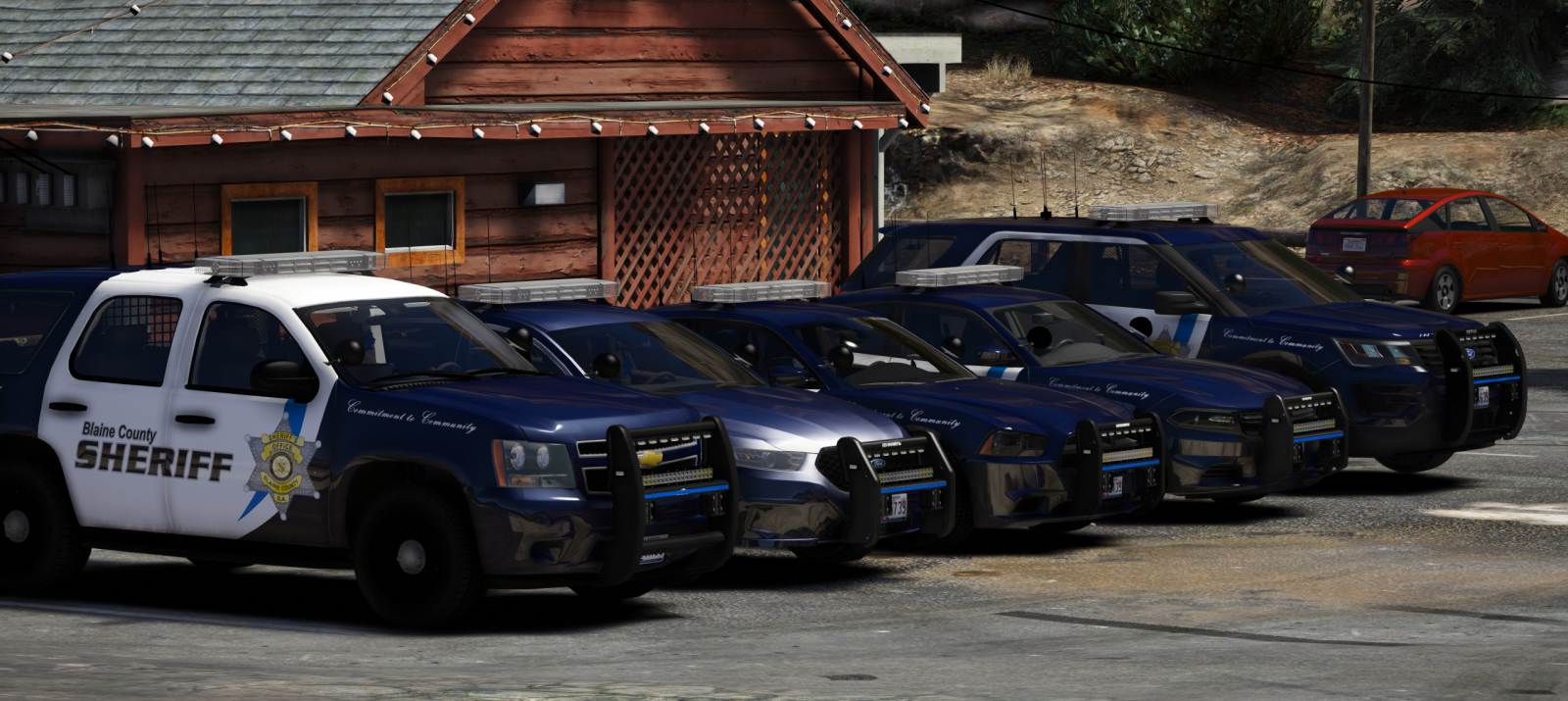
Blaine County Sheriff Pack 1.0.0

   (44 reviews)

7 Screenshots

Some models are quite large in file size which i apologize about but im  really happy to release this.


SHOWCASE!! Massive thanks to @mroxplay.Pls go and check his other videos.


INSTALLATION:

Models:Mods - Update - x64 - DlcPacks - Patchday15/14(Most recent in your game) - dlc.rpf - x64 - levels - gta5 - vehicles.rpf (Replace/Drag and drop)


VCFs:Grand Theft Auto V Directory - ELS - pack_default (Replace/Drag and drop)


Meta for 2016 Explorer.(Also included in the file)

Spoiler

-To install the vehicles meta file, navigate to:
C:\Program Files (x86)\Steam\steamapps\common\Grand Theft Auto V\mods\update\update.rpf\common\data\levels\gta5
Or the spot you put your metas in. Simply copy over this line over the existing police3 line.

 <Item>
      <modelName>POLICE3</modelName>
      <txdName>POLICE3</txdName>
      <handlingId>POLICE3</handlingId>
      <gameName>POLICE</gameName>
      <vehicleMakeName />
      <expressionDictName>null</expressionDictName>
      <expressionName>null</expressionName>
      <animConvRoofDictName>null</animConvRoofDictName>
      <animConvRoofName>null</animConvRoofName>
      <animConvRoofWindowsAffected />
      <ptfxAssetName>null</ptfxAssetName>
      <audioNameHash />
      <layout>LAYOUT_STD_EXITFIXUP</layout>
      <coverBoundOffsets>POLICE3_COVER_OFFSET_INFO</coverBoundOffsets>
      <explosionInfo>EXPLOSION_INFO_DEFAULT</explosionInfo>
      <scenarioLayout />
      <cameraName>DEFAULT_FOLLOW_VEHICLE_CAMERA</cameraName>
      <aimCameraName>MID_BOX_VEHICLE_AIM_CAMERA</aimCameraName>
      <bonnetCameraName>VEHICLE_BONNET_CAMERA_MID_NEAR</bonnetCameraName>
      <povCameraName>DEFAULT_POV_CAMERA</povCameraName>
      <FirstPersonDriveByIKOffset x="0.000000" y="-0.060000" z="-0.030000" />
      <FirstPersonDriveByUnarmedIKOffset x="0.000000" y="0.000000" z="-0.020000" />
      <FirstPersonProjectileDriveByIKOffset x="0.055000" y="-0.075000" z="-0.045000" />
      <FirstPersonProjectileDriveByPassengerIKOffset x="-0.055000" y="-0.075000" z="-0.045000" />
      <FirstPersonProjectileDriveByRearLeftIKOffset x="0.000000" y="0.000000" z="0.000000" />
      <FirstPersonProjectileDriveByRearRightIKOffset x="0.000000" y="0.000000" z="0.000000" />
      <FirstPersonDriveByLeftPassengerIKOffset x="0.000000" y="0.000000" z="0.000000" />
      <FirstPersonDriveByRightPassengerIKOffset x="0.000000" y="-0.060000" z="-0.030000" />
      <FirstPersonDriveByRightRearPassengerIKOffset x="0.000000" y="0.000000" z="0.000000" />
      <FirstPersonDriveByLeftPassengerUnarmedIKOffset x="0.000000" y="0.000000" z="0.000000" />
      <FirstPersonDriveByRightPassengerUnarmedIKOffset x="0.000000" y="0.000000" z="0.000000" />
      <FirstPersonMobilePhoneOffset x="0.130000" y="0.275000" z="0.530000" />
      <FirstPersonPassengerMobilePhoneOffset x="0.136000" y="0.223000" z="0.425000" />
      <FirstPersonMobilePhoneSeatIKOffset>
        <Item>
            <Offset x="0.136000" y="0.156000" z="0.445000" />
            <SeatIndex value="2" />
        </Item>
        <Item>
            <Offset x="0.136000" y="0.156000" z="0.445000" />
            <SeatIndex value="3" />
        </Item>
      </FirstPersonMobilePhoneSeatIKOffset> 
      <PovCameraOffset x="0.000000" y="-0.175000" z="0.675000" />
      <PovCameraVerticalAdjustmentForRollCage value="0.000000" />
      <PovPassengerCameraOffset x="0.000000" y="0.000000" z="0.000000" />
      <PovRearPassengerCameraOffset x="0.000000" y="0.000000" z="0.000000" />
      <vfxInfoName>VFXVEHICLEINFO_CAR_GENERIC</vfxInfoName>
      <shouldUseCinematicViewMode value="true" />
      <shouldCameraTransitionOnClimbUpDown value="false" />
      <shouldCameraIgnoreExiting value="false" />
      <AllowPretendOccupants value="true" />
      <AllowJoyriding value="false" />
      <AllowSundayDriving value="false" />
      <AllowBodyColorMapping value="false" />
      <wheelScale value="0.244000" />
      <wheelScaleRear value="0.244000" />
      <dirtLevelMin value="0.000000" />
      <dirtLevelMax value="0.300000" />
      <envEffScaleMin value="0.000000" />
      <envEffScaleMax value="1.000000" />
      <envEffScaleMin2 value="0.000000" />
      <envEffScaleMax2 value="1.000000" />
      <damageMapScale value="0.600000" />
      <damageOffsetScale value="1.000000" />
      <diffuseTint value="0x00FFFFFF" />
      <steerWheelMult value="1.000000" />
      <HDTextureDist value="5.000000" />
      <lodDistances content="float_array">
        15.000000
        30.000000
        70.000000
        140.000000
        500.000000
        500.000000
      </lodDistances>
      <minSeatHeight value="0.83" />
      <identicalModelSpawnDistance value="100" />
      <maxNumOfSameColor value="10" />
      <defaultBodyHealth value="1000.000000" />
      <pretendOccupantsScale value="1.000000" />
      <visibleSpawnDistScale value="1.000000" />
      <trackerPathWidth value="2.000000" />
      <weaponForceMult value="2.000000" />
      <frequency value="100" />
      <swankness>SWANKNESS_0</swankness>
      <maxNum value="2" />
      <flags>FLAG_HAS_LIVERY FLAG_EXTRAS_ALL FLAG_EXTRAS_REQUIRE FLAG_LAW_ENFORCEMENT FLAG_EMERGENCY_SERVICE FLAG_NO_RESPRAY FLAG_DONT_SPAWN_IN_CARGEN FLAG_HAS_INTERIOR_EXTRAS FLAG_REPORT_CRIME_IF_STANDING_ON FLAG_EXTRAS_STRONG</flags>
      <type>VEHICLE_TYPE_CAR</type>
      <plateType>VPT_BACK_PLATES</plateType>
      <dashboardType>VDT_GENTAXI</dashboardType>
      <vehicleClass>VC_EMERGENCY</vehicleClass>
      <wheelType>VWT_SPORT</wheelType>
      <trailers />
      <additionalTrailers />
      <drivers>
        <Item>
          <driverName>S_M_Y_Cop_01</driverName>
          <npcName />
        </Item>
      </drivers>
      <extraIncludes />
      <doorsWithCollisionWhenClosed />
      <driveableDoors />
      <bumpersNeedToCollideWithMap value="false" />
      <needsRopeTexture value="false" />
      <requiredExtras>EXTRA_3</requiredExtras>
      <requiredExtras>EXTRA_7</requiredExtras>
      <rewards>
        <Item>REWARD_WEAPON_PUMPSHOTGUN</Item>
        <Item>REWARD_AMMO_PUMPSHOTGUN_ENTER_VEHICLE</Item>
        <Item>REWARD_STAT_WEAPON</Item>
      </rewards>
      <cinematicPartCamera>
        <Item>WHEEL_FRONT_RIGHT_CAMERA</Item>
        <Item>WHEEL_FRONT_LEFT_CAMERA</Item>
        <Item>WHEEL_REAR_RIGHT_CAMERA</Item>
        <Item>WHEEL_REAR_LEFT_CAMERA</Item>
      </cinematicPartCamera>
      <NmBraceOverrideSet />
      <buoyancySphereOffset x="0.000000" y="0.000000" z="0.000000" />
      <buoyancySphereSizeScale value="1.000000" />
      <pOverrideRagdollThreshold type="NULL" />
      <firstPersonDrivebyData>
        <Item>STD_POLICE3_FRONT_LEFT</Item>
        <Item>STD_POLICE3_FRONT_RIGHT</Item>
        <Item>STD_POLICE2_REAR_LEFT</Item>
        <Item>STD_POLICE2_REAR_RIGHT</Item>
      </firstPersonDrivebyData>
    </Item>


Massive thanks to @Sinnisa for that awesome skin.Check his amazing work out http://www.lcpdfr.com/profile/319377-sinnisa/?do=content&type=downloads_file&change_section=1

.Credits are included.Pls message me if there are bugs or if i forgot someone in the credits.


FREQUENTLY ASKED QUESTIONS:

Q: Why r ur lights so shiny pls help :(

A: I use RadianceV to make my lights bright, you will need something like this or another mod like it to make your lights as bright as mine.


Q: Can you please make an ELS pack for my own personal town?

A: Not even a little sorry bb 


Q: X isn't working why?

A: You may be doing something wrong, or I may have fucked something up. If you do find a bug or have a question please comment with a screenshot or video to give me a better idea of what is wrong and I will get back to you.


Q: My lightbar and windows are tinted :(

I try to fix those but sometimes it still happens. Go into vehicles.metafind the line that says diffusetint for the model and find the diffusetint value and replace the value with this<diffuseTint value="0x00FFFFFF" />


Please do not redistribute this pack, or any part of it including the liveries, or models, or screenshots, or use them in clans or public/private servers. Please do not upload this file or a part of it to any other site unless given explicit credit. Thanks for downloading ;) Please report the bugs in the comments before posting a review about them, it may be a misunderstanding or just an easy fix. Enjoy!

 
Included

You may also like

  • LSPD First Response

    The LSPD First Response modification
    Sam

    By Sam

    Updated

    • 9.8m
  • Emergency Lighting System

    Emergency Lighting System V brings one of the most popular modifications ever created for a GTA title (ELS-IV) to Grand Theft Auto V. ELS-V will add a whole new dimension to  your patrols. With a fresh look and many more features than its predecessor, it's also sure to brighten up your game and satisfy the emergency lighting enthusiast in anyone.   DESCRIPTION − ELS provides an alternate and incredibly in-depth way of controlling emergency vehicle lights and sounds. − ELS requires
    Lt.Caine

    By Lt.Caine

    Updated

    • 2m
  • Emergency uniforms pack - Law & Order

    https://www.patreon.com/alex_ashfold
    Alex_Ashfold

    By Alex_Ashfold

    Updated

    • 1.7m
  • EUP Menu

    EUP Menu is a carefully-built menu for the popular Emergency Uniforms Pack modification. EUP Menu allows you to easily apply EUP clothing to your MP peds. It also includes a character creator exactly like GTA Online's character creation system. You can edit, save and even share your favourite characters. Making your own awesome police officer has never been easier.   Don't like the predefined clothing options? The wardrobe feature has got your back. You can create and save your o
    PieRGud

    By PieRGud

    Updated

    • 1.1m
  • 2017 California Highway Patrol Mega Pack - ELS

    Welcome to something that has been in the making since I've gotten my hands on ELS, something that has taken more hours then you guys could understand. I've pulled out all the stops for this pack. I've taken all your guys' feedback on my screenshots, and I've done my best to destroy it in the realistic/quality/immersion department. I've done my best to simplify the installation of this file. For those of you who are looking for an add-on version of this pack, you're going to have to wait a littl
    Thehurk

    By Thehurk

    Updated

    • 538.6k
  • Los Santos Police Department Mega Pack [ELS]

    Hi ladies. So now that ScriptHook has updated it's release time. This is a pack I have been working on for the better part of the last month in a half, and I am actually very proud of it. The pack is based on Fort Worth, but the actual cars are not accurate to those, just the liveries, window templates, and lightbar are equal to Fort Worth and some of the pushbar setups. The pack comes with 13 different vehicles ranging from SUVs like FPIUs and Tahoes, Pickup trucks like Silverados and Sedans li
    t0y

    By t0y

    Submitted

    • 386.4k
  • User Feedback

    Recommended Comments


    16 minutes ago, SpikeTerm said:

    Maurice97 this is random but what do you suggest to improve FPS in game? I have lots of mods and I have visual V as well as a re-sader.

    What mod/plugin is the most common cause of FPS drop?


    I noticed frame drops recently as well. It's not too bad for me (will dip to 55 in the city and sometimes 50 with 4+ cars on scene). The EMS mod in particular causes some noticeable drops for me, but it could be a combination of mods since I have quite a few plugins installed.


     Great pack as always! Do you plan on adding a CVPI? It kept merging my comments

    Edited by jacklop21
    Link to comment
    Share on other sites

    Great pack, but i have a few suggestions: 

    1) Radar model and dash cam. these things come standard in pretty much every patrol vehicle these days and I would like to see them implemented. 

    2) I would also suggest three stage lighting as well. Because it is very nice feature in my opinion

    3) Light pattern options. The thing i have noticed with you packs the lack of different flashing patterns. i feel there are lots more options to add especially with a double light bar style that you have in this pack.

    4) The ram bar white lights. Please remove the white cloud that appears once activating your ram bar take down light. it really takes away from the effect in my opinion. 

    I would say these are my main suggestions for this pack. I would love to hear back from you to see what you think, Thanks:)  

    Link to comment
    Share on other sites
    6 hours ago, jacklop21 said:


    I noticed frame drops recently as well. It's not too bad for me (will dip to 55 in the city and sometimes 50 with 4+ cars on scene). The EMS mod in particular causes some noticeable drops for me, but it could be a combination of mods since I have quite a few plugins installed.


     Great pack as always! Do you plan on adding a CVPI? It kept merging my comments

    I get around 30 FPS. It never seemed to be this bad, ever. I don't know what to do...

    Link to comment
    Share on other sites

    there is a reason i use alot of your cars in my streams and videos! you have a fantastic looking fleet here Maurice. while i would have LOVED to have a crown vic, i do understand times are changing :sad: i'll be using these sometime this weekend i hope! will be back to review once i've tried them.

    Link to comment
    Share on other sites

    i would like to make the bottom 6 leds on the back of the light bar to amber... for traffic advisory. how would i go about doing that? 
    i was looking at the emis, but i didnt have a whole lot of luck .. i found the right texture. however when i tried to change it, it didnt work. instead it changed all the lights colors.

    also in ELS i changed it from euro to manual .. but when i hit J, in game my 1st stage lights dont show anything , ive been playing a lot with the ELS  xml, 

    did things that i thought would work but had no luck .. is it possible to change that? 

    absolutely beautiful cars btw ! 
    and the light bar just looks flat out B A 

    Edited by Dodgeboy1213
    Link to comment
    Share on other sites

    Has anyone had any luck with installing these cars over the stock Sheriff and Sheriff2 vehicles, I tried the Taurus and Exp,


    Taurus using police4's meta renamed for sheriff (as no meta was included so I used rockstars for the slot it was named) and the exp with the included meta for it In Sheriff2.

    The Taurus was extremely spongy, tried all three police car handlings, 

    The Explorer would roll at about 25 mph, on any corner. changed handling to the balla2 like another explorer i have, but no avail. 


    I had other cars installed in these slots before that, that I overwrote to install these, but i cant get them to drive normal :( The videos in the review section don't have the issues I do)

    So I figured it out, the Vehicles.meta in albo's modding kit doesnt override the stock sheriff line, causing the handling bugs, if you edit the update.rpf one it will fix it. 


    Edited by Fullmetal1212
    Link to comment
    Share on other sites
    On 3/27/2018 at 7:07 PM, OfficerBenzo said:

    Great looking pack.   However, I always find it awkward how modders have the sheriff vehicles in police slots.  So basically you have All BCSO all in the city.  Yep you can rename I get it,  but it shouldn't have to be that way.

    This is an exact representation of what I would comment. Awesome pack, but sheriff vehicles in police slots... I find that very awkward.

    Link to comment
    Share on other sites

    The lights on the car are stuck like just always on and it seems like els isn't working like i press j or g nothing happens only the default e. if its me tell me how to fix thanks.

    Link to comment
    Share on other sites

    @Maurice97 These are as close to the Police Dept. in my home city as it gets. However, I wish you installed a secondary bar in the back or traffic advisories. Seeing changing patterns on the lights would make these cars PRIME (not saying they aren't already pretty cool.) I've been following your work for awhile now and I think you have mastered the art of making good looking vehicles and suggesting you move on to making good lights to match.


    Oh one more thing why does my lightbar only activate lights at stage 3?


    Happy modding man. Don't stop what you are doing!

    Link to comment
    Share on other sites
    On 2018/3/28 at 1:07 AM, OfficerBenzo said:

    Great looking pack.   However, I always find it awkward how modders have the sheriff vehicles in police slots.  So basically you have All BCSO all in the city.  Yep you can rename I get it,  but it shouldn't have to be that way.

    I think so,too. Emmm.... I want change the vehicles in sheriff slots, just simply  change the file name, xml name? Do I  need to change anything in vehicles meta file? Your video is great BTY :)

    Link to comment
    Share on other sites

    help here pls! i installed these to my game and when i spawn the sheriff car the skin of the car is all pinkish and stuff not the real black and white textures thats

    suppose to show!

    Link to comment
    Share on other sites

    Create an account or sign in to comment

    You need to be a member in order to leave a comment

    Create an account

    Sign up for a new account in our community. It's easy!

    Register a new account

    Sign in

    Already have an account? Sign in here.

    Sign In Now
    ×
    ×
    • Create New...





