

Skip to content
View in the app

A better way to browse. Learn more.

LCPDFR.com

A full-screen app on your home screen with push notifications, badges and more.

To install this app on iOS and iPadOS
  1. Tap the Share icon in Safari
  2. Scroll the menu and tap Add to Home Screen.
  3. Tap Add in the top-right corner.
To install this app on Android
  1. Tap the 3-dot menu (⋮) in the top-right corner of the browser.
  2. Tap Add to Home screen or Install app.
  3. Confirm by tapping Install.

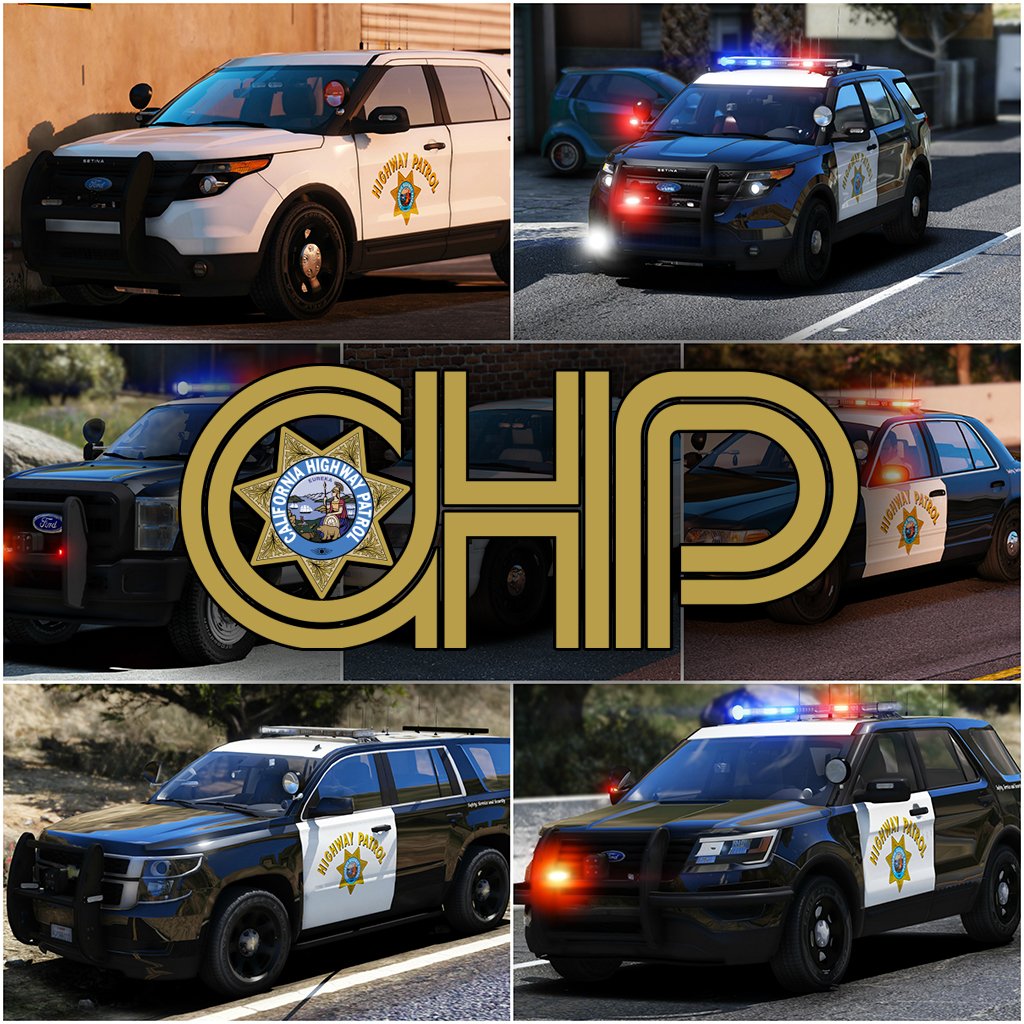
2017 California Highway Patrol Mega Pack - ELS 1.1.0

(158 reviews)

14 Screenshots

    10021674_300x300.png.9b7a0360d24b9207fd8aa44c1b616d80.png


    Welcome to something that has been in the making since I've gotten my hands on ELS, something that has taken more hours then you guys could understand. I've pulled out all the stops for this pack. I've taken all your guys' feedback on my screenshots, and I've done my best to destroy it in the realistic/quality/immersion department. I've done my best to simplify the installation of this file. For those of you who are looking for an add-on version of this pack, you're going to have to wait a little longer, as I've got barely any time to even upload this. So without further adieu, I present to you my pride and joy, the 2017 California Highway Patrol ELS mega pack, or whatever you want to call it. 


I've updated the pack to include updates to the majority of cars, an add-on version of the pack(.oiv format), and the templates that everyone has requested!
 

PACK OVERVIEW
=================================
- NAME: 2017 CHP mega pack ELS
- VERSION: V1.0
- EXTRA PARTS: CHP
- OPTIMIZED FOR: Anything


ELS USE IN GAME

=================================
When in game, the lights will work as i've designed for them to. When you exit the vehicle, the entire front of the vehicle will steady burn as it will mimic the 
CHP Traffic Stop pattern. I can't stop this from happening. 


When you are using any of the vehicles in this pack, and you preform a traffic stop, I HIGHLY recommend hitting alt-j to go to light stage two and hitting L to turn on the 
front of the vehicle. This; A, enhances realism and B, makes the car look really pretty. 


There are multiple other features that I will leave for you guys to find out with the CHP settings.


IMPORTANT NOTES
=================================

I am always accepting donations! Any amount is appreciated more then you guys will ever know!


Unfortunately I've had to split this pack into two separate parts (will be 3 when .oiv is included), PLEASE BE SURE TO DOWNLOAD ALL PARTS!


PLEASE PLEASE PLEASE READ THE READ ME BEFORE YOU ACTUALLY INSTALL THIS PACK!!!!!!!!!!!!!!!!!!!!


There are some things I have been unable to do with this pack and there are some things i've been able to do.


There is no way for me to turn off the park mode steadyburn for when you get out of the vehicle.


If you want to "reset" the pattern for the vehicle if some reason it becomes out of sync, simply press alt-J and then j again.


A incredible thank you to @Problematic , @TaylorSwift and a few more for their help and  assistance throughout this entire production of this pack. 


INSTALLATION INSTRUCTIONS

=================================


-To install any of these vehicles, Navigate to the latest patch day that you install vehicles to, I've found success with patchday10, and drag all vehicle files into the patch day
Location: Grand Theft Auto V\mods\update\x64\dlcpacks\patchday10ng\dlc.rpf\x64\levels\gta5\vehicles.rpf


-To install any VCFs with the pack
Location: Grand Theft Auto V\ELS\pack_default


-To install any included vehicle metas files
Location: Grand Theft Auto V\mods\update\update.rpf\common\data\levels\gta5


COMMON QUESTIONS
=================================

Q: Why aren't my lights bright?
A: You do not have light-enhancing mods installed. Download RadianceV and/or, other mods that increase emergency lighting brightness.


Q: Where is _____(insert any vehicle here)?

A: I've made the main vehicles of the CHP fleet as I've seen. At this point I am Content with the 16 Vehicles.


Q: Will you please help me ins--
A: Did you read the readme? No? The installation is simple.


Q: I don't have Patchday10/anything else?
A: Then put the car in your latest patch day, or copy patchday10/anything else over from your base game into your mods folder.
 
Q: Why does my game crash after I install the car/meta/carcol?
A: Make sure you have no spaces when you copied the line, make sure you're installing it in the right location and back all your shit up. 


Q: Will you send me ______?
A: No.


Q: Can I make skins for this Pack?
A: By all means, go ahead, just dont re-upload the vehicle model itself.


Q: Can I have the templates for this pack?

A: In the next update, hopefully I remember to add them.


PACK NOTES
=================================
Before i get started, please, please PLEASE don't ask me where this vehicle is, or why i didn't make this vehicle. There are 14 in this pack, please be happy with what i've 
made so far.


- All vehicles do have working takedowns with working spotlights


- All vehicles feature the same CHP setup as in real life


- All vehicles have accurate interior equipment


- All vehicles feature accurate antenna setups 


- K9 vehicles have a spawnable dog in the rear of the vehicle, for those of you who do or don't use a k9 mod


- If I haven't included a version for add-on vehicles that is in an .oiv format, then i will include one at a later date.


- There is approx 14 vehicles in this current phase of the pack, phase 2 will have a few more vehicles, that are the more abstract vehicles in the CHP fleet.


- A huge thanks to officer27 for the CHP and SAHP skins.


- With the large amount of vehicles in this pack, there are bound to be some issues with vehicles. Please let me know of any bugs you find and i'll do my best to fix them


  I'm going to be doing my best to update this pack with as many cars as I can make, and fixing any bugs i come across in the midst of it. Please consider following the file to make sure you receive all updates for the file!


Flawless video by @mroxplay, also you need to start making music mixes, the transition between songs was fantastic!


Disclaimer
=================================
-You are not to attempt to modify or rip this pack in any way shape or form.
-I (Thehurk) am not responsible for any damages done to your game. Please make a backup of any edited files!
-Do not attempt to make a profit off this pack in any way shape or form.
-Do not re-upload this pack, please make a link!!!!!
-Do not upload this file to any other site, claiming it as your own. 
-If you want to use this file in a clan, PLEASE ask me before doing so!!! I greatly appreciate this and almost always say yes!


Thank you everyone if you've gotten to this point in reading, you are truly a saint and I appreciate you not just skipping it saying what is this bullshit.


What's New in Version 1.1.0

Released

-Fixed all vehicles that have a liberty (missing one module on the passenger side)

-Fixed the 2006 CVPI Vision somehow having being affected by tint.

-Fixed the expedition's rear blues on the liberty not working

-Fixed 2013 Explorer's mirror lights not being synced
-Fixed some of the spotlights, not all, didn't have time to do others as i've been working crazy overtime.

-Fixed some VCF issues (once again they are all customizable);

  • 2006 CVPI traffic advisor should be customizable to your liking, i've left it on the default TRAF pattern
  • All motorcycles (Policeb) should now automatically go to stage 3, as there is nothing with the other two stages

-Added 2013 Harley Davidson Electraglide motorcycle

-Added the Add-On Version .oiv

-Uploaded all templates
 

User Feedback

Recommended Comments

Chappie

Members Contributor

7 hours ago, BluntMachete said:

Really loving this pack great job and thanks :thumbsup: i just have 1 question i placed the 2009 crown vic in "policeold1" slot but i can't change any skins with simple trainer it just shows a value of -1 in change livery option how can i fix this?

There is a flag you can add to vehicles.meta. Find your desired slot, scroll until you find <flags> and put this somewhere in the line. FLAG_HAS_LIVERY


Here is an example line. ONLY AN EXAMPLE. 

<flags>FLAG_BIG FLAG_AVOID_TURNS FLAG_HAS_LIVERY FLAG_EXTRAS_STRONG FLAG_PEDS_CAN_STAND_ON_TOP FLAG_DONT_SPAWN_IN_CARGEN FLAG_USE_FAT_INTERIOR_LIGHT FLAG_BLOCK_FROM_ATTRACTOR_SCENARIO FLAG_IS_BUS FLAG_USE_FULL_ANIMS_FOR_MP_WARP_ENTRY_POINTS</flags>

dunkboi

Members

20 hours ago, Thehurk said:


Off the top of my head no sorry. 


CHP normally never does transports to detachments. They usually let the city units take care of that. I could have used a partition in some of the utilities but I don't have the accurate one. 


Here in Golden Gate, not going to say which area office, but we do sometimes transfer prisoners in the vehicles without partitions, what we do is put them in the front seat, handcuffed and everything just the same as if they were in the back of a partition car

Thehurk

Members Author

3 hours ago, EMT62899 said:

Didn't change anything in the metas cause it didn't specify to in the installation files. I'll do that and see how it goes.


I'm assuming when you're installing this pack, you're installing it to the base game with no edits. Hence why I hadn't specified anything. 

BluntMachete

Members

4 hours ago, Problematic said:

There is a flag you can add to vehicles.meta. Find your desired slot, scroll until you find <flags> and put this somewhere in the line. FLAG_HAS_LIVERY


Here is an example line. ONLY AN EXAMPLE. 

<flags>FLAG_BIG FLAG_AVOID_TURNS FLAG_HAS_LIVERY FLAG_EXTRAS_STRONG FLAG_PEDS_CAN_STAND_ON_TOP FLAG_DONT_SPAWN_IN_CARGEN FLAG_USE_FAT_INTERIOR_LIGHT FLAG_BLOCK_FROM_ATTRACTOR_SCENARIO FLAG_IS_BUS FLAG_USE_FULL_ANIMS_FOR_MP_WARP_ENTRY_POINTS</flags>

Thank you so much it worked! just 1 more question why the headlights are yellow i mean is it intentional or a bug? the black crown vic is from this pack and explorer is also from TheHurk271590_20170224123918_1.thumb.png.5e55870cd926b4ad9464566a323de294.png.

pallemen

Members

Love the pack! but isn't there any SAHP skins for the first pack? cuz I get the same link from that skins folder, as I get from the second pack.  

Jakeus

Members

@steinberg4145 I meant to say there's no environmental lighting from the main lightbar on the '06 CVPI.  Everything looks just fine otherwise.  The environmental lighting seems stuck, if that makes sense?  So rather than rotating around the car and flashing off buildings etc, it's just stuck even though the lightbar itself seems to function as intended...

Marquess

Members

(edited)

22 hours ago, Thehurk said:

@MarquessThe way the lights are set up, is the way Lt.Caine, the creator of ELS intended for them to be.


Not really, since most other vehicle mods use very similar settings. It has been always that way since GTA SA. Lt.Caine for sure didn't want to have only ONE pattern, unable being changed...


22 hours ago, Thehurk said:

@Marquess
Also I don't know if you ever have seen a California car, but they have this little law, that requires a steadyburn red light on every vehicle.


I don't know what you mean by "California car", but there are verry little emergency vehicles in California that use the steady burn. Anyway, that wasn't my point. The point is that there's no way to turn that off. You HAVE this option in RL and you HAVE this option in ELS - so why did you took it away?

I also doubt that in RL they can't turn off the traffic advisor. I'm pretty sure, they can...

But the main issue is the fact that you can't toggle the pattern of the main lights.


All that isn't realistic at all - if that is what you intended.


Don't get me wrong. I've been waiting for this. These are first class models. But when I can't change the ELS patterns/settings the way I want them (like in every other ELS car mod)... :-(


You could have set it as the main setup, but taking away the option to change it in general, is a no go

Edited by Marquess

HDgamerzPC

Members

(edited)

42 minutes ago, Marquess said:


Not really, since most other vehicle mods use very similar settings. It has been always that way since GTA SA. Lt.Caine for sure didn't want to have only ONE pattern, unable being changed...


I don't know what you mean by "California car", but there are verry little emergency vehicles in California that use the steady burn. Anyway, that wasn't my point. The point is that there's no way to turn that off. You HAVE this option in RL and you HAVE this option in ELS - so why did you took it away?

I also doubt that in RL they can't turn off the traffic advisor. I'm pretty sure, they can...

But the main issue is the fact that you can't toggle the pattern of the main lights.


All that isn't realistic at all - if that is what you intended.


Don't get me wrong. I've been waiting for this. These are first class models. But when I can't change the ELS patterns/settings the way I want them (like in every other ELS car mod)... :-(


You could have set it as the main setup, but taking away the option to change it in general, is a no go


These cars are as realistic as they get. Either enjoy them for being realistic or use other cars.  By the way, you may want to read up on this California Code of Regulations 13 CCR § 818

Edited by HDgamerzPC

steinberg4145

Members

35 minutes ago, Marquess said:


Not really, since most other vehicle mods use very similar settings. It has been always that way since GTA SA. Lt.Caine for sure didn't want to have only ONE pattern, unable being changed...


I don't know what you mean by "California car", but there are verry little emergency vehicles in California that use the steady burn. Anyway, that wasn't my point. The point is that there's no way to turn that off. You HAVE this option in RL and you HAVE this option in ELS - so why did you took it away?

I also doubt that in RL they can't turn off the traffic advisor. I'm pretty sure, they can...

But the main issue is the fact that you can't toggle the pattern of the main lights.


All that isn't realistic at all - if that is what you intended.


Don't get me wrong. I've been waiting for this. These are first class models. But when I can't change the ELS patterns/settings the way I want them (like in every other ELS car mod)... :-(


You could have set it as the main setup, but taking away the option to change it in general, is a no go

Try reading the ELS documentation. The CHP patterns option overrides the users ability to change patterns on the fly.  If you want to be able to change patterns on the fly and use non-chp patterns change the els config from chp to led.

Have you ever heard of something called the California vehicle code? It requires a rear facing amber light and a forward facing red steadyburn.

http://leginfo.legislature.ca.gov/faces/codes_displaySection.xhtml?sectionNum=25252.&lawCode=VEH

http://www.911signalusa.com/states/california.php

Scuderio

Members

42 minutes ago, Marquess said:


Not really, since most other vehicle mods use very similar settings. It has been always that way since GTA SA. Lt.Caine for sure didn't want to have only ONE pattern, unable being changed...


I don't know what you mean by "California car", but there are verry little emergency vehicles in California that use the steady burn. Anyway, that wasn't my point. The point is that there's no way to turn that off. You HAVE this option in RL and you HAVE this option in ELS - so why did you took it away?

I also doubt that in RL they can't turn off the traffic advisor. I'm pretty sure, they can...

But the main issue is the fact that you can't toggle the pattern of the main lights.


All that isn't realistic at all - if that is what you intended.


Don't get me wrong. I've been waiting for this. These are first class models. But when I can't change the ELS patterns/settings the way I want them (like in every other ELS car mod)... :-(


You could have set it as the main setup, but taking away the option to change it in general, is a no go

You can't be serious.

Chappie

Members Contributor

8 hours ago, BluntMachete said:

Thank you so much it worked! just 1 more question why the headlights are yellow i mean is it intentional or a bug? the black crown vic is from this pack and explorer is also from TheHurk

Spoiler

271590_20170224123918_1.thumb.png.5e55870cd926b4ad9464566a323de294.png


Curious... I'll ask around.

steinberg4145

Members

9 hours ago, BluntMachete said:

Thank you so much it worked! just 1 more question why the headlights are yellow i mean is it intentional or a bug? the black crown vic is from this pack and explorer is also from TheHurk


1 minute ago, Problematic said:


Curious... I'll ask around.

Ah, you need to change the carvariations for those slots to lightsetting 1. Not sirensetting, lightsetting.

Officer Julien

Members

4 minutes ago, Problematic said:


Curious... I'll ask around.

install the carvariation of police and police3 for your policeold slots

9 hours ago, BluntMachete said:

Thank you so much it worked! just 1 more question why the headlights are yellow i mean is it intentional or a bug? the black crown vic is from this pack and explorer is also from TheHurk271590_20170224123918_1.thumb.png.5e55870cd926b4ad9464566a323de294.png.

install the carvariation of police and police3 for your policeold slots

Thehurk

Members Author

1 hour ago, Marquess said:

-what.....-


I really don't know what kind of drug you are on, get me some, because that is some of the most oblivious shit i've ever heard. 

For starters, EVERY California vehicle has a steady burn that the officer is unable to turn off because of STATE LAW. This is a California Highway Patrol PACK. 


In "real life" CHP have set patterns for their stages, as you can see here: https://www.smugmug.com/gallery/n-m6ZNd/ . I've mimicked all these stages that they have to the best of my abilites and which in my opinion, I did a pretty good job at.

Another thing is you clearly don't understand how modeling with ELS works. It was not actually possible for me to set the cars up the way you want them to be, because I wouldn't have enough extras, nor would i have all the patterns I want for this pack.

All this shit you're bitching about is all able to be customized, AS LT.CAINE INTENDED IT TO BE.


I believe you need to check your research before you start telling a person they are wrong, or did something wrong. 

BluntMachete

Members

1 hour ago, Julien98 said:

install the carvariation of police and police3 for your policeold slots

Can you tell me where i can find those? i have extracted one carvariation.meta file to my desktop (don't remember it's path) but it doesn't have any police or police3 when i cntrl+f in notepad.

Thehurk

Members Author

10 hours ago, BluntMachete said:

Thank you so much it worked! just 1 more question why the headlights are yellow i mean is it intentional or a bug? the black crown vic is from this pack and explorer is also from TheHurk


I guess the lights looking yellow-ish on the vic is a little better looking, as it uses halogen lights, but the utility I have no clue. I've never had issues with headlight colors, they have always been the same to me. 

BluntMachete

Members

6 minutes ago, Thehurk said:


I guess the lights looking yellow-ish on the vic is a little better looking, as it uses halogen lights, but the utility I have no clue. I've never had issues with headlight colors, they have always been the same to me. 

I think the problem is with those slots maybe.

Thehurk

Members Author

1 minute ago, BluntMachete said:

I think the problem is with those slots maybe.


That would be a safe assumption  

Officer Julien

Members

15 minutes ago, BluntMachete said:

Can you tell me where i can find those? i have extracted one carvariation.meta file to my desktop (don't remember it's path) but it doesn't have any police or police3 when i cntrl+f in notepad.

use the carvariation from mpluxe2 and add these: 


<Item>
      <modelName>policeold2</modelName>
      <colors>
        <Item>
          <indices content="char_array">
            134 
            134 
            156  
            156 
          </indices>
          <liveries>
            <Item value="true" />
            <Item value="false" />
            <Item value="false" />
            <Item value="false" />
            <Item value="false" />
            <Item value="false" />
            <Item value="false" />
            <Item value="false" />
          </liveries>
        </Item>
        <Item>
          <indices content="char_array">
            134 
            134 
            156  
            156 
          </indices>
          <liveries>
            <Item value="false" />
            <Item value="true" />
            <Item value="false" />
            <Item value="false" />
            <Item value="false" />
            <Item value="false" />
            <Item value="false" />
            <Item value="false" />
          </liveries>
        </Item>
        <Item>
          <indices content="char_array">
            134 
            134 
            156  
            156 
          </indices>
          <liveries>
            <Item value="false" />
            <Item value="false" />
            <Item value="false" />
            <Item value="false" />
            <Item value="true" />
            <Item value="false" />
            <Item value="false" />
            <Item value="false" />
          </liveries>
        </Item>
        <Item>
          <indices content="char_array">
            134 
            134 
            156  
            156 
          </indices>
          <liveries>
            <Item value="false" />
            <Item value="false" />
            <Item value="true" />
            <Item value="false" />
            <Item value="false" />
            <Item value="false" />
            <Item value="false" />
            <Item value="false" />
          </liveries>
        </Item>
        <Item>
          <indices content="char_array">
            134
            134
            156  
            156 
          </indices>
          <liveries>
            <Item value="false" />
            <Item value="false" />
            <Item value="false" />
            <Item value="true" />
            <Item value="false" />
            <Item value="false" />
            <Item value="false" />
            <Item value="false" />
          </liveries>
        </Item>
      </colors>
      <kits> 
        <Item>157_massacaro2_modkit</Item>
      </kits>
      <windowsWithExposedEdges />
      <plateProbabilities>
        <Probabilities />
      </plateProbabilities>
      <lightSettings value="1" />
      <sirenSettings value="13" />
    </Item>

BluntMachete

Members

1 hour ago, Julien98 said:

use the carvariation from mpluxe2 and add these: 


<Item>
      <modelName>policeold2</modelName>
      <colors>
        <Item>
          <indices content="char_array">
            134 
            134 
            156  
            156 
          </indices>
          <liveries>
            <Item value="true" />
            <Item value="false" />
            <Item value="false" />
            <Item value="false" />
            <Item value="false" />
            <Item value="false" />
            <Item value="false" />
            <Item value="false" />
          </liveries>
        </Item>
        <Item>
          <indices content="char_array">
            134 
            134 
            156  
            156 
          </indices>
          <liveries>
            <Item value="false" />
            <Item value="true" />
            <Item value="false" />
            <Item value="false" />
            <Item value="false" />
            <Item value="false" />
            <Item value="false" />
            <Item value="false" />
          </liveries>
        </Item>
        <Item>
          <indices content="char_array">
            134 
            134 
            156  
            156 
          </indices>
          <liveries>
            <Item value="false" />
            <Item value="false" />
            <Item value="false" />
            <Item value="false" />
            <Item value="true" />
            <Item value="false" />
            <Item value="false" />
            <Item value="false" />
          </liveries>
        </Item>
        <Item>
          <indices content="char_array">
            134 
            134 
            156  
            156 
          </indices>
          <liveries>
            <Item value="false" />
            <Item value="false" />
            <Item value="true" />
            <Item value="false" />
            <Item value="false" />
            <Item value="false" />
            <Item value="false" />
            <Item value="false" />
          </liveries>
        </Item>
        <Item>
          <indices content="char_array">
            134
            134
            156  
            156 
          </indices>
          <liveries>
            <Item value="false" />
            <Item value="false" />
            <Item value="false" />
            <Item value="true" />
            <Item value="false" />
            <Item value="false" />
            <Item value="false" />
            <Item value="false" />
          </liveries>
        </Item>
      </colors>
      <kits> 
        <Item>157_massacaro2_modkit</Item>
      </kits>
      <windowsWithExposedEdges />
      <plateProbabilities>
        <Probabilities />
      </plateProbabilities>
      <lightSettings value="1" />
      <sirenSettings value="13" />
    </Item>

wow that actually solved the problem thank you so much for your help. :smile:

Officer Julien

Members

1 minute ago, BluntMachete said:

wow that actually solved the problem thank you so much for your help. :smile:

 @B-7 you're both welcome

Schecter004

Members

vor 5 Stunden schrieb Marquess:


Not really, since most other vehicle mods use very similar settings. It has been always that way since GTA SA. Lt.Caine for sure didn't want to have only ONE pattern, unable being changed...


I don't know what you mean by "California car", but there are verry little emergency vehicles in California that use the steady burn. Anyway, that wasn't my point. The point is that there's no way to turn that off. You HAVE this option in RL and you HAVE this option in ELS - so why did you took it away?

I also doubt that in RL they can't turn off the traffic advisor. I'm pretty sure, they can...

But the main issue is the fact that you can't toggle the pattern of the main lights.


All that isn't realistic at all - if that is what you intended.


Don't get me wrong. I've been waiting for this. These are first class models. But when I can't change the ELS patterns/settings the way I want them (like in every other ELS car mod)... :-(


You could have set it as the main setup, but taking away the option to change it in general, is a no go

Hey buddy.

It's in the California Vehicle Code.

Title VIII.

There's no ,,very little emergency cars".

EVERY emergency vehicle MUST use at least one single steady burning red lights to the front.

It's the law.

Without exception.

If Hurk changed anything on the lights, it wouldn't be a CHP car anymore.


vor 4 Stunden schrieb Scuderio:

You can't be serious.

I guess, he is!


vor 4 Stunden schrieb steinberg4145:

Try reading the ELS documentation. The CHP patterns option overrides the users ability to change patterns on the fly.  If you want to be able to change patterns on the fly and use non-chp patterns change the els config from chp to led.

Have you ever heard of something called the California vehicle code? It requires a rear facing amber light and a forward facing red steadyburn.

http://leginfo.legislature.ca.gov/faces/codes_displaySection.xhtml?sectionNum=25252.&lawCode=VEH

http://www.911signalusa.com/states/california.php

Well, the rear amber is not a requirement.

It's a recommendation.

You really need only 1 steady red light to the front and a siren to be a fully emergency vehicle.

B-7

Members

(Anyone ever thought that might be ridiculous?)

Create an account or sign in to comment

Latest Mods

Account

Navigation

Search

Search

Configure browser push notifications

Chrome (Android)
  1. Tap the lock icon next to the address bar.
  2. Tap Permissions → Notifications.
  3. Adjust your preference.
Chrome (Desktop)
  1. Click the padlock icon in the address bar.
  2. Select Site settings.
  3. Find Notifications and adjust your preference.














