


AirOne - Police Helicopter Air Unit
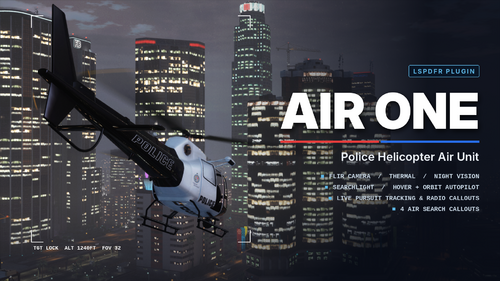
Take to the skies as your department's air unit. Follow pursuits from above, track suspects with a FLIR camera and searchlight, and run air search callouts built for helicopter patrol.
FEATURES
Helicopter Camera (FLIR)
- Uses GTA's own helicopter camera overlay
- Mouse to look, scroll to zoom, thermal and night vision modes
- Lock onto any vehicle or person, or mark a position on the ground
- Live target panel: vehicle, plate, speed, direction, street and range
- The helicopter holds a hover automatically while you're on the camera
Searchlight & Autopilot
- Searchlight follows your camera aim, or your locked target when the camera is closed
- Hover autopilot holds your position
- Orbit autopilot circles your locked target or marked position
Pursuit Support
- Joins LSPDFR pursuits automatically when you're in a helicopter
- While you keep a visual on the suspect, LSPDFR treats you as an officer with eyes on them, so they can't escape
- Radio updates with direction, street, area and speed
- Bail-outs are called out instantly
- Lose sight and you get a "last known area" circle to search
- Request a ground unit or EMS Code 3 to your target from the menu
Air Unit Menu (F7)
- Deploy a police Maverick at one of six bases: Mission Row PD roof, Pillbox Medical roof, LSIA, Vespucci Heliport, Sandy Shores Airfield or Paleto Bay Sheriff
- Toggle the searchlight, set autopilot, give a radio update, request units, set a route back to base, or stand down
CALLOUTS
These are only offered while you're in a helicopter (this can be changed in the INI).
- Air Support Requested (Pursuit): Ground units are chasing a vehicle. Get overhead and keep sight of it.
- Air Search (Suspect on Foot): A suspect is hiding in a search area. Find and identify them with the camera or searchlight, then ground units are sent in for the foot chase. Suspects may be armed.
- Missing Hiker: Search the backcountry, find the injured hiker, land nearby or hover low to winch them aboard, then fly them to the nearest hospital.
- Stolen Vehicle Tracker: GPS pings narrow the search area over time. Find the car, read its plate through the camera to confirm it, and the driver runs once units close in.
DEFAULT CONTROLS (change any of them in AirOne.ini)
F7 - Air unit menu
X - Helicopter camera on/off
L - Searchlight
O - Autopilot (off / hover / orbit)
In the camera:
Mouse - Look
Space or Left Click - Lock target / mark position
Mouse Wheel or Page Up/Down - Zoom
T - Thermal
N - Night vision
REQUIREMENTS
- LSPDFR 0.4.9
- RAGE Plugin Hook
- RAGENativeUI
INSTALLATION
1. Copy AirOne.dll into Grand Theft Auto V\Plugins\LSPDFR\
2. Optionally copy AirOne.ini to the same folder. It is created automatically on first launch if it's missing.
3. Go on duty, press F7 and deploy your air unit.
CONSOLE COMMANDS
AirOneDeploy - Spawn the air unit at the nearest base
AirOneReloadSettings - Reload AirOne.ini
Feedback and bug reports are welcome in the comments.
Preview
Edited by Abel Gaming
Video added
What's New in Version 1.1
Released
CHANGELOG
1.1
- Added traffic patrol / speed enforcement and the Air Traffic Enforcement callout
- AirOne.ini now updates itself with new settings when you install an update
UPDATING
Just replace AirOne.dll. You don't need a new INI: new settings are added to your existing AirOne.ini automatically on launch, your current settings are kept, and a backup is saved as AirOne.ini.bak.
Short Description
AI disclosure
The author has disclosed that AI tools were used in creating the following aspects of this file:
- Description
- Mod and Mod Content (Minor)
AI was used to help with some things that I was having difficulty doing on my own such as the following: • Drawing the spot light • Controlled auto-pilot (Mine before AI help was pure chaos) • Clean UI




![SAST Livery [FIVEM]](http://s3-screenshots.int-cdn.lcpdfrusercontent.com/resize/500/-/monthly_2026_10/Screenshot2026-10-19162023.thumb.png.9aa1104bd82b43df65f54a108bcb764f.png)


![[ELS-HYBRID] [ADD-ON] 2026 Clayton County Sheriff's Office Mustang](http://s3-screenshots.int-cdn.lcpdfrusercontent.com/resize/500/-/monthly_2026_10/Screenshot_3737.thumb.png.091f4e1157973200842907e47c4d6dae.png)







Recommended Comments
Create an account or sign in to comment