Skip to content
View in the app

A better way to browse. Learn more.

LCPDFR.com

A full-screen app on your home screen with push notifications, badges and more.

To install this app on iOS and iPadOS
  1. Tap the Share icon in Safari
  2. Scroll the menu and tap Add to Home Screen.
  3. Tap Add in the top-right corner.
To install this app on Android
  1. Tap the 3-dot menu (⋮) in the top-right corner of the browser.
  2. Tap Add to Home screen or Install app.
  3. Confirm by tapping Install.

Traffic Coordination 2.5.0

(1 review)

5 Screenshots

Have you ever heard of the "Scene Manager" plugin and wished it were up to date and running smoothly?

WELL, NOW YOU CAN!

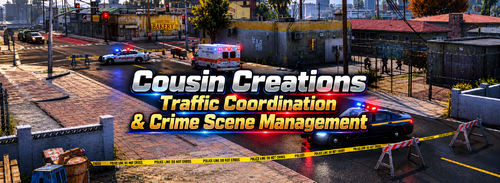
Cousin Creations would like to announce a new plugin called "Traffic Coordination"

What does the plugin do?

TrafficCoordination lets you create custom pathways to help manage your incidents, MVA scenes, Vehicle Checks, and more. 

Allows you to create and manage Civilian Vehicle Pathways

Lets Users use Environmental Props to help design the look and flow in which vehicle traffic follows

It includes


Custom waypoint behavior

Custom stop waypoints

Custom Speed zone circles

Custom Collection circles

Allows the ability to Save/imported pathways

CREDITS


We would like to give a HUGE shoutout to Rich for allowing us (Cousin Creations) to take his original Scene Manager plugin and not only expand on it, but also enhance it in the future.

Rich's Page: www.lcpdfr.com/profile/9654-rich9654

At this time, we are unsure if Rich hosts his own official Discord server but, give him a follow anyways!.

Edited by Cousin Creations
Updated Photos

What's New in Version 2.5.0

Released

VERSION 2.5.0 - UPDATED FEATURES

Version 2.5.0 introduces several major new features focused on traffic control, road closures, crime scene management, and overall plugin improvements.

- Temporary Road Closures

Create custom road closures and completely block civilian traffic from entering selected areas.

- Adjustable Road Closure Waypoint Size

Change the size of road closure waypoints to better fit different roads, intersections, and scene sizes.

- Road Closure Countdown Timer

Set a custom timer for a road closure and have it automatically removed once the countdown reaches zero. Timers can be set for up to 1 hour.

- Movable & Scalable Countdown HUD

A compact on-screen countdown display shows how much time remains before the road reopens. The HUD can be moved and resized to fit your preferred screen layout.

- Crime Scene Props Section

A dedicated menu section for crime scene-related props, making it easier to build and manage detailed scenes.

- Expanded Crime Scene Props

Added support for items such as evidence markers, custom barriers, custom crime scene tents, police tape feature, body bags & more.

- Menu, UI & Stability Improvements

The plugin menus, sections, and submenus have been reviewed and cleaned up to improve navigation, organization, reliability, and overall usability.

----------------------------------------------------------------------------------------------------------

CREDITS

---

We would like to give a HUGE shoutout to Rich for allowing us (Cousin Creations) to take his original Scene Manager plugin and not only expand on it, but also enhance it in the future.

Rich's Profile - CLICK HERE

At this time, we are unsure if Rich hosts his own official Discord server but, give him a follow anyways!

---

©Cousin Creations. All rights reserved.

This plugin, including its code, content, and included files, may not be reused, redistributed, repackaged, modified for redistribution, or included in other plugins or mod packs without the explicit permission from Cousin Creations.


Short Description

Traffic Coordination is an LSPDFR plugin that lets you create and manage civilian traffic pathways.

AI disclosure

The author has disclosed that AI tools were used in creating the following aspects of this file:

  • Mod and Mod Content (Substantial)

AI (GPT PRO) was used to make additional features to the already created Scene Manager Plugin by Rich

User Feedback

Recommended Comments

HyperBlueSmart

Members

(edited)

Greetings, @Cousin Creations

I have a question. Was there anything that was actually changed from Scene Manager by Rich and implemented in this Traffic Coordination plugin? Like if the code was improved or something like that? I know there are some things that were changed for the front-end design from Scene Manager. However, is there anything else besides that? I am just wondering because there is not much information stating whether anything was changed or not from Rich's Scene Manager plugin under this plugin's description. Overall, the plugin works exactly like Rich's Scene Manager plugin with some other additional new or changed things. I also noticed that vehicles do follow the waypoints created for a path accordingly without going crazy or following AI pathfinding.

Good job on creating this plugin, and thank you for making this plugin as well! Keep up the great work!

Please let me know. I would truly appreciate if you told me.

Thanks.

Edited by HyperBlueSmart

Cousin Creations

Members Author

(edited)

Hey! @HyperBlueSmart

First off, thanks for the support and kind words! We really appreciate it!

So yes, Traffic Coordination is based on Rich’s original Scene Manager plugin. Rich actually gave us permission to use his plugin, use his existing code, update it, and release it under Traffic Coordination. All the original features are from Scene Manager, and full credit goes to him for that!

Here’s some of the stuff we’ve changed and added:

  • Compatibility Updates – Updated it to work with newer versions of RAGE Plugin Hook.

  • UI Improvements – Changed the menu layout, design, and organization.

  • Menu Color Settings – Added options to customize menu colors, text, waypoints, and more.

  • Custom Keybinds – Added the ability to change keybinds and modifier keys.

  • Menu Changes – Renamed and reorganized several sections to make things easier to use.

  • Environmental Props – Added more props and barriers.

  • About Section – Added plugin information, credits, and links.

  • Bug Fixes – Fixed some issues and made improvements throughout the plugin.

🚧 Stuff we’re currently working on (NOT RELEASED YET):

  • Crime Scene Props – A new section for crime scene equipment and props.

  • Road Closure Improvements – Multiple waypoints, larger closure areas, and more customization.

  • Road Closure Timer – Set a timer that automatically removes closures when it runs out.

  • Live Countdown UI – A small UI you can move and resize that shows how much time is left.

Just to be clear, Crime Scene Props and all the new Road Closure features are NOT in the public version yet. They’ll be coming in a future update.

As for the vehicle pathfinding, that’s from the original Scene Manager. We haven’t taken credit for that system.

Rich gave us permission to continue developing it, and that’s exactly what we’re doing. We just want to keep improving the plugin and adding stuff the community will enjoy.

Thanks again for checking it out and supporting us!

  • Cousin Creations


8 hours ago, HyperBlueSmart said:

Greetings, @Cousin Creations

I have a question. Was there anything that was actually changed from Scene Manager by Rich and implemented in this Traffic Coordination plugin? Like if the code was improved or something like that? I know there are some things that were changed for the front-end design from Scene Manager. However, is there anything else besides that? I am just wondering because there is not much information stating whether anything was changed or not from Rich's Scene Manager plugin under this plugin's description. Overall, the plugin works exactly like Rich's Scene Manager plugin with some other additional new or changed things. I also noticed that vehicles do follow the waypoints created for a path accordingly without going crazy or following AI pathfinding.

Good job on creating this plugin, and thank you for making this plugin as well! Keep up the great work!

Please let me know. I would truly appreciate if you told me.

Thanks.

Edited by Cousin Creations

HyperBlueSmart

Members

2 hours ago, Cousin Creations said:

Hey! @HyperBlueSmart

First off, thanks for the support and kind words! We really appreciate it!

So yes, Traffic Coordination is based on Rich’s original Scene Manager plugin. Rich actually gave us permission to use his plugin, use his existing code, update it, and release it under Traffic Coordination. All the original features are from Scene Manager, and full credit goes to him for that!

Here’s some of the stuff we’ve changed and added:

  • Compatibility Updates – Updated it to work with newer versions of RAGE Plugin Hook.

  • UI Improvements – Changed the menu layout, design, and organization.

  • Menu Color Settings – Added options to customize menu colors, text, waypoints, and more.

  • Custom Keybinds – Added the ability to change keybinds and modifier keys.

  • Menu Changes – Renamed and reorganized several sections to make things easier to use.

  • Environmental Props – Added more props and barriers.

  • About Section – Added plugin information, credits, and links.

  • Bug Fixes – Fixed some issues and made improvements throughout the plugin.

🚧 Stuff we’re currently working on (NOT RELEASED YET):

  • Crime Scene Props – A new section for crime scene equipment and props.

  • Road Closure Improvements – Multiple waypoints, larger closure areas, and more customization.

  • Road Closure Timer – Set a timer that automatically removes closures when it runs out.

  • Live Countdown UI – A small UI you can move and resize that shows how much time is left.

Just to be clear, Crime Scene Props and all the new Road Closure features are NOT in the public version yet. They’ll be coming in a future update.

As for the vehicle pathfinding, that’s from the original Scene Manager. We haven’t taken credit for that system.

Rich gave us permission to continue developing it, and that’s exactly what we’re doing. We just want to keep improving the plugin and adding stuff the community will enjoy.

Thanks again for checking it out and supporting us!

  • Cousin Creations


No problem! I see. Thank you for the detailed information on the plugin. I really appreciate it. :)

Cousin Creations

Members Author

6 hours ago, HyperBlueSmart said:

No problem! I see. Thank you for the detailed information on the plugin. I really appreciate it. :)

You’re very welcome! I am glad you’re enjoying it & appreciate the feedback.

Upcoming Update

Are new update will be published tonight with new props, custom tents, fixed menu layout & more.

Bear82

Members

It’s great to see that truly useful and well-made extensions aren't dying out. I’ve enjoyed using Rich’s Scene Manager so far, thanks again for that! One thing I did notice with the Scene Manager, though, was that if a driver was prevented from following their assigned path, they would suddenly vanish, leaving their vehicle behind empty. This created a knock-on effect for the traffic behind. Perhaps you’ve fixed that bug, too. Many thanks for your work!

I went to load the plugin and it said that InputManager.dll wasnt installed.. any reason why that is or where i can get that from?

Cousin Creations

Members Author

3 hours ago, HabitualLineCroxxxer27 said:

I went to load the plugin and it said that InputManager.dll wasnt installed.. any reason why that is or where i can get that from?

Hello,

Looking at the file I did by accident forget to include the input manager.dll in the files. I’ll post a fix tn. If you’d like to join our DC server we can send you a working one now!.

Create an account or sign in to comment

Account

Navigation

Search

Search

Configure browser push notifications

Chrome (Android)
  1. Tap the lock icon next to the address bar.
  2. Tap Permissions → Notifications.
  3. Adjust your preference.
Chrome (Desktop)
  1. Click the padlock icon in the address bar.
  2. Select Site settings.
  3. Find Notifications and adjust your preference.