





SentinelMDT
Autor / Author: KermitDEV — KermitDevelopment
🇵🇱 POLSKI
SentinelMDT to nowoczesny komputer patrolowy dla GTA V Legacy i LSPDFR. Łączy kartoteki osób i pojazdów, dokumenty, dyspozytornię oraz narzędzia do prowadzenia służby RP.
Jednym kliknięciem przełączysz profile Warszawa / USA, zmieniając język, wzory dokumentów, walutę, zegar regionu i jednostki radaru.
Najważniejsze funkcje:
Kartoteki osób po obsługiwanym zdarzeniu sprawdzenia dokumentu.
Sprawdzanie pojazdów i dostępnych danych właściciela, rejestracji, ubezpieczenia oraz VIN.
Dokumenty PL/USA z czytelnymi statusami uprawnień.
CAD, zgłoszenia, statusy jednostek i lokalne przydziały RP.
ALPR, BOLO, historia kontroli i powiązania spraw.
Raporty oraz lokalne mandaty RP z wyborem wykroczeń.
Odczyt pobliskich patroli AI.
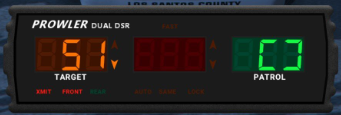
Osobny radar samochodowy z pomiarem przód/tył i blokadą odczytu.
35 dostępnych aplikacji, Centrum aplikacji, ustawienia i zapis danych.
Bez kluczy aktywacyjnych i serwera licencji.
Wymagania: Windows x64, GTA V Legacy, zgodne RAGE Plugin Hook i LSPDFR, .NET Framework 4.8 oraz Microsoft Edge WebView2 Runtime x64. STP oraz PR/CDF są opcjonalnymi integracjami.
Sterowanie: F7 — MDT, Ctrl+K — wyszukiwanie, NumPad 4 — radar, NumPad 5 — blokada odczytu, NumPad 6 — przód/tył.
🇺🇸 ENGLISH
SentinelMDT is a modern patrol computer for GTA V Legacy and LSPDFR, bringing together person and vehicle records, documents, dispatch and tools for managing your RP shift.
Switch between Warsaw / USA profiles with one click to change the interface language, document styles, currency, regional clock and radar units.
Main features:
Person records collected through supported document-check events.
Vehicle lookup with available owner, registration, insurance and VIN information.
Polish/US documents with clear license statuses.
CAD, calls, unit statuses and local RP assignments.
ALPR, BOLO, stop history and linked cases.
Reports and local RP citations with selectable offenses.
Nearby AI patrol information.
Separate vehicle radar with front/rear measurement and reading lock.
35 available apps, an App Center, settings and persistent records.
No activation keys or license server.
Requirements: Windows x64, GTA V Legacy, compatible RAGE Plugin Hook and LSPDFR, .NET Framework 4.8 and Microsoft Edge WebView2 Runtime x64. STP and PR/CDF integrations are optional.
Controls: F7 — MDT, Ctrl+K — search, NumPad 4 — radar, NumPad 5 — reading lock, NumPad 6 — front/rear.


Edited by Kermit213
What's New in Version 3.3.2.0
Released
3.3.0.0 — Fieldwork
- Redesigned terminal with a graphite palette, warm typography, copper accents, and SentinelMDT’s own visual mark.
- Added vertical navigation and organized 39 applications into four groups.
- Added application search by name and description, including accent-insensitive matching. Press / to focus application search.
- The dashboard now shows current documents, active calls, report drafts, the patrol profile, and recent activity. Calls in the queue open their CAD records.
- Refined the appearance of records, forms, tables, and settings. Added four themes, list layout, larger text, and options to show application descriptions and the shift summary.
3.3.1.0 — Field Tablet
- On foot, the MDT automatically switches to a narrower, rounded tablet layout with a two-column application directory.
- Entering a vehicle restores the vehicle terminal layout.
- Switching layouts keeps the active application, open form, and data intact. Device labels follow the selected PL or USA mode.
3.3.2.0 — Radar
- Radar state reaches the MDT through a separate, faster update channel. The control panel shows confirmed game state and prevents repeated clicks while a command is pending.
- NumPad 4/5/6 also control the radar while its MDT application is open.
- Locking resamples the current target before storing a reading. The panel shows the locked plate, model, speed, and time.
- The primary target switches less often between nearby vehicles. A target is cleared when it leaves the beam, becomes obstructed, or moves out of range.
- Controls respond to stale data, disconnection, measurement faults, and the conditions required to lock a target.
PL/Warsaw and USA modes, the separate in-game radar overlay, user profiles, and existing applications remain available. Citations and specialist registers are local RP features.
Verification: interface, radar logic, and first-party host tests passed with test data. Gameplay with GTA and real STP/PR was not verified in this round. The promotional graphic is a visualization, not an in-game screenshot.
3.3.0.0 — Fieldwork
- Nowy wygląd terminala: grafitowe tło, jasna typografia, miedziane akcenty i własny znak SentinelMDT.
- Pionowa nawigacja oraz katalog 39 aplikacji podzielonych na cztery grupy.
- Wyszukiwanie aplikacji po nazwach i opisach, także bez polskich znaków. Skrót / otwiera wyszukiwarkę aplikacji.
- Pulpit pokazuje bieżące dokumenty, aktywne zgłoszenia, szkice raportów, patrol i ostatnią aktywność. Zgłoszenie z kolejki prowadzi do karty CAD.
- Spójniejszy wygląd kartotek, formularzy, tabel i ustawień. Cztery motywy, widok listy, większy tekst i opcje pokazywania opisów oraz panelu służby.
3.3.1.0 — Field Tablet
- MDT na pieszo automatycznie przybiera wygląd węższego, zaokrąglonego tabletu z dwiema kolumnami aplikacji.
- Po wejściu do pojazdu wraca wygląd terminala samochodowego.
- Zmiana obudowy zachowuje otwartą aplikację, formularz i dane. Podpis urządzenia działa w wersji polskiej i amerykańskiej.
3.3.2.0 — Radar
- Stan radaru dociera do MDT osobnym, szybszym kanałem. Panel pokazuje potwierdzone ustawienia i blokuje powtarzane kliknięcia podczas oczekiwania.
- NumPad 4/5/6 steruje radarem także z otwartej aplikacji w MDT.
- Blokada ponownie sprawdza cel przed zapisaniem odczytu. Panel wyświetla tablicę, model, prędkość i czas zablokowanego pomiaru.
- Radar rzadziej przeskakuje między bliskimi pojazdami. Cel znika po utracie widoczności lub wyjściu z zasięgu.
- Panel reaguje na brak świeżych danych, rozłączenie, błąd pomiaru i warunki wymagane do blokady.
Zachowano tryby PL/Warszawa i USA, osobną nakładkę radaru w grze, profil użytkownika i wcześniejsze aplikacje. Funkcje mandatów i rejestrów są elementami lokalnej rozgrywki RP.
Weryfikacja: przeszły testy interfejsu, logiki radaru i własnego hosta z danymi testowymi. Działania w GTA z rzeczywistymi STP/PR nie potwierdzono w tej weryfikacji. Grafika promocyjna jest wizualizacją, a nie zrzutem ekranu z gry.
Short Description
AI disclosure
The author has disclosed that AI tools were used in creating the following aspects of this file:
- Images
- Mod and Mod Content (Substantial)
KermitDEV jest głównym twórcą i prowadzi projekt. AI wykorzystano do poprawiania części kodu, interfejsu, testów oraz dokumentacji. Entire UI design and code work appears to be heavily generated using an LLM.
KermitDEV / KermitDevelopment — główny autor i twórca projektu SentinelMDT. Koncepcja, kierunek rozwoju, dobór funkcji i decyzje dotyczące wydania.
OpenAI / Codex — pomoc przy tworzeniu kodu, interfejsu, testów, dokumentacji i materiałów promocyjnych.
Microsoft — komponenty WebView2 wykorzystane do wyświetlania interfejsu.
Podziękowania dla twórców RAGE Plugin Hook, LSPDFR, Stop The Ped, Policing Redefined i Common Data Framework za narzędzia i API wykorzystywane przez projekt.
🇺🇸 ENGLISH
KermitDEV / KermitDevelopment — lead creator and project author of SentinelMDT. Responsible for the concept, development direction, feature selection and release decisions.
OpenAI / Codex — assistance with code, interface, testing, documentation and promotional materials.
Microsoft — WebView2 components used to display the interface.
Thanks to the creators of RAGE Plugin Hook, LSPDFR, Stop The Ped, Policing Redefined and Common Data Framework for the tools and APIs used by the project.
- BJ USA and SergeantCode3
-
 2




Recommended Comments
Create an account or sign in to comment