Skip to content
View in the app

A better way to browse. Learn more.

LCPDFR.com

A full-screen app on your home screen with push notifications, badges and more.

To install this app on iOS and iPadOS
  1. Tap the Share icon in Safari
  2. Scroll the menu and tap Add to Home Screen.
  3. Tap Add in the top-right corner.
To install this app on Android
  1. Tap the 3-dot menu (⋮) in the top-right corner of the browser.
  2. Tap Add to Home screen or Install app.
  3. Confirm by tapping Install.

Heli Assistance - Observer Mode, Customizable Searchlight, More Features 2.4.2

(33 reviews)

7 Screenshots

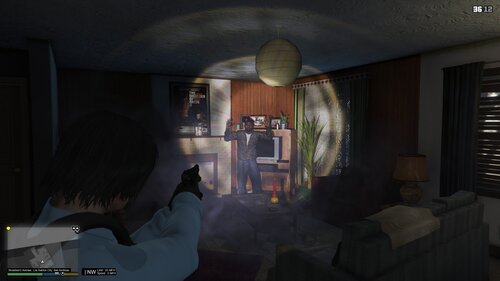
This mod simulates the flight patterns of Southern California (more specifically, Los Angeles area) law enforcement air support helicopters. That is, they will orbit around a target entity or position instead of just hovering above. A spotlight will track the subject when night-time. You may also call for a backup heli anytime while on-duty.


A Must-Have For Realistic Gameplay!


Make sure to put HeliAssistance.dll and HeliAssistance.ini and HeliAssistance.pdb into \Plugins\LSPDFR folder.

Make sure you have the latest RageNativeUI installed. And make sure you have Spotlight installed.


API for Developers (for usage with v2.4.2)

Spoiler
namespace HeliAssistanceAPI
{
	using LSPD_First_Response.Mod.API;
	using Rage;
    using Functions = HeliAssistance.API.Functions;

    internal static class HeliAssistanceWrapper
	{
		private const string DllPath = @"Plugins\LSPDFR\HeliAssistance.dll";
		private static readonly bool DllExists = System.IO.File.Exists(DllPath);

		/// <summary>
		/// One more wrapper to prevent <see cref="CanBeUsed"/> from trying to load the HeliAssistance assembly.
		/// </summary>
		private static class IsLoadedWrapper
		{
			public static bool IsLoaded => Functions.IsLoaded;
		}

		/// <summary>
		/// Checks if the plugin is loaded within LSPDFR (i.e. LSPDFR is loaded and the player is on duty).
		/// </summary>
		public static bool CanBeUsed => DllExists ? IsLoadedWrapper.IsLoaded : false;

		/// <summary>
		/// Determines whether the menu can be toggled by the player. If set to false, the menu will be closed if it is visible.
		/// </summary>
		public static bool CanPlayerUseMenu
        {
			get => Functions.CanPlayerUseMenu;
			set => Functions.CanPlayerUseMenu = value;
        }

		/// <summary>
		/// Requests the air unit to be created and respond to the <see cref="Entity"/> target. If the air unit is already active and/or alive, then it will merely have the air unit respond to the target.
		/// </summary>
		public static void RequestAirUnit(Entity target) => Functions.RequestAirUnit(target);

		/// <summary>
		/// Requests the air unit to be created and respond to the <see cref="Vector3"/> target. If the air unit is already active and/or alive, then it will merely have the air unit respond to the target.
		/// </summary>
		public static void RequestAirUnit(Vector3 target) => Functions.RequestAirUnit(target);

		/// <summary>
		/// Dismisses the air unit from any active player-requested task.
		/// </summary>
		public static void DismissAirUnit() => Functions.DismissAirUnit();

		/// <summary>
		/// Attaches the active air unit to the <see cref="LHandle"/> pursuit.
		/// </summary>
		public static void AssignAirUnitToPursuit(LHandle pursuit) => Functions.AssignAirUnitToPursuit(pursuit);
		
		/// <summary>
		/// Removes the air unit from the <see cref="LHandle"/> pursuit.
		/// </summary>
		public static void RemoveAirUnitFromPursuit() => Functions.RemoveAirUnitFromPursuit();

		/// <summary>
		/// Checks if the air unit exists, regardless of its current assigned task.
		/// </summary>
		public static bool IsAirUnitAlive() => Functions.IsAirUnitAlive();

		[System.Obsolete("Use IsAirUnitInService()")]
		public static bool IsAirUnitActive() => Functions.IsAirUnitActive();

		/// <summary>
		/// Checks if the air unit exists and is currently assigned to a player-assigned task.
		/// </summary>
		public static bool IsAirUnitInService() => Functions.IsAirUnitInService();

		/// <summary>
		/// Assigns a new <see cref="Entity"/> target to the air unit, if it is active in service.
		/// </summary>
		public static void UpdateTarget(Entity target) => Functions.UpdateTarget(target);

		/// <summary>
		/// Assigns a new <see cref="Vector3"/> target to the air unit, if it is active in service.
		/// </summary>
		public static void UpdateTarget(Vector3 target) => Functions.UpdateTarget(target);

		/// <summary>
		/// Updates the air unit's flight characteristics. Pass a value <= 0 to a parameter to restore the default value of the respective flight behavior.
		/// </summary>
		/// <param name="flightAltitude">The altitude the air unit will fly when responding or following a target.</param>
		/// <param name="flightSpeed">The speed the air unit fly when responding or following a target. Value should be in GTA's default measurement, m/s.</param>
		/// <param name="orbitRadius">The radius the air unit will orbit.</param>
		/// <param name="orbitSpeed">The speed the air unit will orbit. Value should be in GTA's default measurement, m/s.</param>
		public static void UpdateFlightCharacteristics(float flightAltitude = -1f, float flightSpeed = -1f, float orbitRadius = -1f, float orbitSpeed = -1f) => Functions.UpdateFlightCharacteristics(flightAltitude, flightSpeed, orbitRadius, orbitSpeed);

		/// <summary>
		/// Sets the on-scene duration to the given <paramref name="duration"/>. If the air unit is already in the on-scene task, then it will extend the duration to the given <paramref name="duration"/>.
		/// </summary>
		/// <param name="duration">In milliseconds</param>
		public static void UpdateOnsceneDuration(int duration) => Functions.UpdateOnsceneDuration(duration);

		/// <summary>
		/// Checks if the target of the air unit is the given <see cref="Entity"/>. <br/>Note: Make sure to call <see cref="IsAirUnitInService"/> to verify the air unit is active before calling this.
		/// </summary>
		public static bool IsCurrentTarget(Entity pedToCheck) => Functions.IsCurrentTarget(pedToCheck);

		/// <summary>
		/// Checks if the target of the air unit is the given <see cref="Vector3"/>. <br/>Note: Make sure to call <see cref="IsAirUnitInService"/> to verify the air unit is active before calling this.
		/// </summary>
		public static bool IsCurrentTarget(Vector3 posToCheck) => Functions.IsCurrentTarget(posToCheck);

		/// <summary>
		/// Retrieves the <see cref="Entity"/> the air unit is targeting. <br/>Note: Make sure to call <see cref="IsAirUnitInService"/> to verify the air unit is active before calling this.
		/// </summary>
		public static Entity GetCurrentTarget() => Functions.GetCurrentTarget();

		/// <summary>
		/// Retrieves the <see cref="Vector3"/> the air unit is targeting. <br/>Note: Make sure to call <see cref="IsAirUnitInService"/> to verify the air unit is active before calling this.
		/// </summary>
		public static Vector3 GetCurrentTargetPosition() => Functions.GetCurrentTargetPosition();

		/// <summary>
		/// Checks if the air unit is active, but not assigned to the player's request. In other words, is the air unit currently roaming around.
		/// </summary>
		/// <returns></returns>
		public static bool IsCurrentlyRoaming() => Functions.IsCurrentlyRoaming();
	}
}


Take a look at the INI at least once to make sure you are satisfied with the settings. 


Special Thanks:

@alexguirre

@DiamondTKG

@NorthKing

@Echooo

LSPDFR Developer Discord

Edited by OJdoesIt
Update

What's New in Version 2.4.2

Released

- Added feature to modify the jerk rate and distance (shakiness) of the searchlight
- Improved the accuracy of ETA
- Updated API to allow an Entity object to be targeted instead of just a Ped object
- Made minor updates to the API methods



Short Description

helicopter helicopter helicopter helicopter

User Feedback

Recommended Comments

RCrw notik

Members

thanks for very good job !! 

Fan of Frank Murphy ( astro division ) and of her patrols on Los Angeles in the 80s, I am happy to find him for me secured in GTAV, almost 32 years later....

zslfrank

Members

(edited)

Hello.

The mod was working fine before(old version, when I should place the files in GTA5\Plugins).

It doesn't work now, since the latest version files should be placed in GTA5\Plugins\LSPDFR.

When I started the game, I can see the notices: Heli Orbit loaded successfully( also Felon Stop).

However,  the keys didn't work. I pressed H and no heli spawned. In addition, when I called heli for backup in a pursuit, I pressed numpad9 and nothing happened( it worked in old version).

I feel like the mod has some kind of conflicts with the ELS.

Edited by zslfrank

RCrw notik

Members

In kept silent rested (Ctrl + H)? .... And directly in PoliceSmartRadio you cannot the used?

OJdoesIt

Members Author

11 hours ago, zslfrank said:

Hello.

The mod was working fine before(old version, when I should place the files in GTA5\Plugins).

It doesn't work now, since the latest version files should be placed in GTA5\Plugins\LSPDFR.

When I started the game, I can see the notices: Heli Orbit loaded successfully( also Felon Stop).

However,  the keys didn't work. I pressed H and no heli spawned. In addition, when I called heli for backup in a pursuit, I pressed numpad9 and nothing happened( it worked in old version).

I feel like the mod has some kind of conflicts with the ELS.

The mod never worked to be placed inside GTA5\Plugins.

It always goes in GTA5\Plugins\LSPDFR

After loading LSPDFR, go on duty. Try the command ForceDuty

5 hours ago, RCrw notik said:

In kept silent rested (Ctrl + H)? .... And directly in PoliceSmartRadio you cannot the used?

I don't understand.

RCrw notik

Members

:smile:Sorry im french, no easy for me....

- you push Keys ( CTRL+H) ?

OJdoesIt

Members Author

10 minutes ago, RCrw notik said:

:smile:Sorry im french, no easy for me....

- you push Keys ( CTRL+H) ?

Yes, but you can change them in the INI file.

RCrw notik

Members

Yes exact but now i use policesmartRadio for it....what's your problem exactly ?

RCrw notik

Members

Sorry I did not understand what there is in the new version ?

OJdoesIt

Members Author

1 hour ago, RCrw notik said:

Sorry I did not understand what there is in the new version ?

- Fixed key press issue for some users

RCrw notik

Members

.... yes I read well that but more exactly

OJdoesIt

Members Author

4 hours ago, RCrw notik said:

.... yes I read well that but more exactly

Some keys weren't working for some users.

RCrw notik

Members

Thank you sir for your answer, your plugin is really magnificent, you are my hero ;)

Tasm

Members

is this correct for RDE 3.1.1 ?

[Models]
// Enter the model names of the heli you want to spawn according to the location (county)
// This section is mainly for Realism Dispatch Enhanced users
LosSantos=polmav
LosSantosCounty=lssheriffmav
BlaineCounty=sheriffmav
SanAndreas=lssheriffmav


Pressing this while in pursuit does not work -

// Spawns a police heli to the nearest threat or your location
HeliBackup=ControlKey
HeliBackupModifier=H


Even calling air support via policesmartradio does not spawn heli as heliorbit while in pursuit, its just normal heli not the one which has cam control.


I'm using v1.3.6

HeliOrbitPlugin.ini

OJdoesIt

Members Author

8 hours ago, Tasm said:

is this correct for RDE 3.1.1 ?

[Models]
// Enter the model names of the heli you want to spawn according to the location (county)
// This section is mainly for Realism Dispatch Enhanced users
LosSantos=polmav
LosSantosCounty=lssheriffmav
BlaineCounty=sheriffmav
SanAndreas=lssheriffmav


Pressing this while in pursuit does not work -

// Spawns a police heli to the nearest threat or your location
HeliBackup=ControlKey
HeliBackupModifier=H


Even calling air support via policesmartradio does not spawn heli as heliorbit while in pursuit, its just normal heli not the one which has cam control.


I'm using v1.3.6

HeliOrbitPlugin.ini

Use the default LSPDFR backup menu to get a heli in pursuit.

FoxTrot999

Members

Is the button meant to disappear when in pursuit or is that a fault? Thought that would be this plugins main feature?

OJdoesIt

Members Author

37 minutes ago, FoxTrot999 said:

Is the button meant to disappear when in pursuit or is that a fault? Thought that would be this plugins main feature?

The button disappears in pursuit because there are other plugins that add air support. 

FoxTrot999

Members

(edited)

Disappointed as I’ll like to use your plugin as it’s handy and only other one is gtav back up but it ignores the spawn distance I set and any keyboard combination is to messy to do while chasing a stolen car where as the radio button works perfect if it didn’t disappear, can you not edit the plugin to only disappear if another heli back up plugin is found and then for people like me it would show up and when other people have X Plugin it wouldn’t 

Edited by FoxTrot999

OJdoesIt

Members Author

3 hours ago, FoxTrot999 said:

Disappointed as I’ll like to use your plugin as it’s handy and only other one is gtav back up but it ignores the spawn distance I set and any keyboard combination is to messy to do while chasing a stolen car where as the radio button works perfect if it didn’t disappear, can you not edit the plugin to only disappear if another heli back up plugin is found and then for people like me it would show up and when other people have X Plugin it wouldn’t 

I'll provide an update.

FoxTrot999

Members

Thank you OJ now it’s amazing 😊😊😊

zslfrank

Members

(edited)

Hello

The mod works great now when it comes to a regular traffic stop. If the suspect vehicle started fleeing the heli would chase him.

However, the backup helli would not join any on going pursuits. Such as Grand theft auto, armed suspect, stolen police vehicle, street racing etc

I called the backup heli, and it only focused on my car but not the suspect that being chased. The heli would leave later, like nothing is happening.

Edited by zslfrank

OJdoesIt

Members Author

18 minutes ago, zslfrank said:

Hello

The mod works great now when it comes to a regular traffic stop. If the suspect vehicle started fleeing the heli would chase him.

However, the backup helli would not join any on going pursuits. Such as Grand theft auto, armed suspect, stolen police vehicle, street racing etc

I called the backup heli, and it only focused on my car but not the suspect that being chased. The heli would leave later, like nothing is happening.

The backup heli is for callouts/traffic stops. For pursuits, use the LSPDFR pursuit menu and HeliOrbit will take control of that heli.

zslfrank

Members

(edited)

10 minutes ago, OJdoesIt said:

The backup heli is for callouts/traffic stops. For pursuits, use the LSPDFR pursuit menu and HeliOrbit will take control of that heli.

Yes, that's the problem. I did use the LSPDFR menu to call that heli in pursuit. Somehow HeliOrbit didn't take control of that heli.  

There was no notice of HeliOrbit came out when chasing suspect. I pressed numpad9 and nothing happened. 

All the mods that I have, hope there is no conflict.

QQ图片20171103143324.png

QQ图片20171103143333.png

Edited by zslfrank

OJdoesIt

Members Author

1 hour ago, zslfrank said:

Yes, that's the problem. I did use the LSPDFR menu to call that heli in pursuit. Somehow HeliOrbit didn't take control of that heli.  

There was no notice of HeliOrbit came out when chasing suspect. I pressed numpad9 and nothing happened. 

All the mods that I have, hope there is no conflict.

QQ图片20171103143324.png

QQ图片20171103143333.png

What version of Heli Orbit? 
Are you using RDE?

zslfrank

Members

HeliOrbit is the latest version 1.3.7.

What is RDE? Let me also show you files in GTA5.


1.png

2.png

3.png

OJdoesIt

Members Author

5 hours ago, zslfrank said:

HeliOrbit is the latest version 1.3.7.

What is RDE? Let me also show you files in GTA5.

Show me your INI.

Also get in a pursuit and end it, then send me your Rage log.

Create an account or sign in to comment

Latest Mods

Account

Navigation

Search

Search

Configure browser push notifications

Chrome (Android)
  1. Tap the lock icon next to the address bar.
  2. Tap Permissions → Notifications.
  3. Adjust your preference.
Chrome (Desktop)
  1. Click the padlock icon in the address bar.
  2. Select Site settings.
  3. Find Notifications and adjust your preference.