OJdoesIt
Members
-
Joined
Files posted by OJdoesIt
-
This mod simulates the flight patterns of Southern California (more specifically, Los Angeles area) law enforcement air support helicopters. That is, they will orbit around a target entity or position instead of just hovering above. A spotlight will track the subject when night-time. You may also call for a backup heli anytime while on-duty.
A Must-Have For Realistic Gameplay!
Make sure to put HeliAssistance.dll and HeliAssistance.ini and HeliAssistance.pdb into \Plugins\LSPDFR folder.
Make sure you have the latest RageNativeUI installed. And make sure you have Spotlight installed.
API for Developers (for usage with v2.4.2)
Take a look at the INI at least once to make sure you are satisfied with the settings.
Special Thanks:
@alexguirre
@DiamondTKG
@NorthKing
@Echooo
LSPDFR Developer Discord
- 145,706 Downloads
- 368 Comments
Updated -
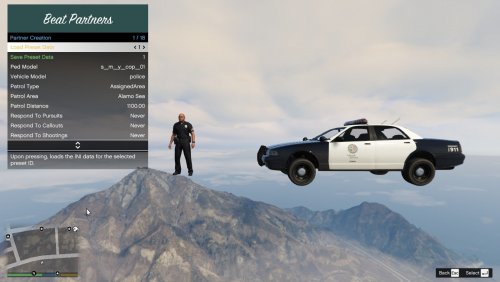
This plugin beta allows you to spawn units that will act as your beat partner. They will persistently patrol given the selected parameters in the creation menu. This allows for further immersion, realism, and ambiance. The goal of this plugin is to create autonomous AIs that will patrol, in a close-to-similar fashion as a human player and eventually eliminate the need of needing to manually request backup units during certain situations.
Scenario Example: You can assign multiple units to patrol Grapeseed while you patrol Sandy Shores. If you get involved in a shooting, the Grapeseed units can automatically respond to assist. Or if you get in a pursuit, the Grapeseed units will only join the pursuit if the suspect enters the Grapeseed area. If the suspect exits the Grapeseed area, then those Grapeseed units will disengage from the pursuit and return to patrol.
Various features and customizations:
Assign a partner to patrol a specific zone (e.g. Vinewood) Give the partner a name and a call sign (call sign will be displayed on the partner's blip on the map) Assign a partner to patrol within a specified distance from the player (partner will try to stay within distance X from the player's position) Assign a partner to respond to pursuits/callouts within their assigned zone Display either the name tag or call sign tag above partners that are driving by the player Have partners always respond to player-involved shootings If a partner gets into a shooting away from the player, they will report it to dispatch If a partner gets severely injured, they will radio "Officer down" If a partner's vehicle is badly damaged or destroyed, they will become "out of service" to go to the nearest police station to retrieve a new vehicle or repair their vehicle, then return back to service Partners will persistently be available to respond to calls / assist the player Take a smoke break with your partner at a specified location
Proximal Pursuit Logic
You can select for each partner to only engage in pursuits if the pursuit passes within their assigned zone (e.g. Vinewood). Once the pursuit leaves their zone, the unit will drop out of the pursuit and return back to patrol. You can also have it where the partner will only engage pursuits when it is within a certain distance of their location (regardless of their assigned zone).
Make sure to put BeatPartners.dll and BeatPartners.ini and BeatPartners.pdb into \Plugins\LSPDFR folder.
Make sure to have the latest version of RageNativeUI installed.
Developer API
Take a look at the INI at least once to make sure you are satisfied with the settings. You can also modify the INI values within the in-game plugin menu.
If you are encountering crash upon ForceDuty, then install the latest version of RageNativeUI.
FYI: This plugin has been tested on vanilla settings (no additional plugins, only LSPDFR). There were minimum amount of crashes experienced. Also, due to a specific lack of feature in the LSPDFR API, units will not respond to callout locations, but will respond to the player's location and follow the player. They should be able to respond to the callout location in a future update.
Special thanks to:
@NoNameSet
LSPDFR Developer Discord
- 14,094 Downloads
- 79 Comments
Updated -
This mod adds enhanced functionality by allowing you to conduct a full felony (high-risk) stop.
Showcase by @DiamondTKG
Much thanks to @DiamondTKG for testing and showcasing the mod. Make sure to SUBSCRIBE to her channel for great LSPDFR content.
Make sure to put FelonyStop.dll and FelonyStop.ini and FelonyStop.pdb into \Plugins\LSPDFR folder.
Take a look at the INI at least once to make sure you are satisfied with the settings.
Make sure to have the latest version of RageNativeUI installed.
Note: There may be some compatibility issues with Stop The Ped. When requesting a prisoner transport during the felony stop and having RecruitNearestCopForTransport=yes in STP's INI, it may cause a crash. This does not occur every time though.
Special Thanks:
@DiamondTKG
@NorthKing
LSPDFR Developers Discord
- 115,814 Downloads
- 242 Comments
Updated -
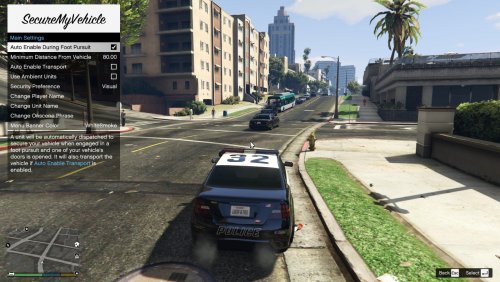
This mod adds enhanced functionality by allowing you to request a unit to secure your vehicle, primarily when you get into a foot pursuit.
Make sure to put SecureMyVehicle.dll and SecureMyVehicle.ini and SecureMyVehicle.pdb into \Plugins\LSPDFR folder.
Make sure to have the latest version of RageNativeUI installed.
Take a look at the INI at least once to make sure you are satisfied with the settings. You can also modify the INI values within the in-game plugin menu.
Special thanks to:
@DiamondTKG
LSPDFR Developer Discord
- 4,559 Downloads
- 11 Comments
Updated -
This mod simulates the workings of the Lojack system. When a lojack-equipped vehicle is stolen, the owner will activate the lojack transmitter on the vehicle remotely. Police cars that are equipped with a Lojack tracker will be able to locate the stolen vehicle via beeping sounds. The closer the police car is near the vehicle, the quicker the beeps get. So again, this mod will fully simulate that experience.
Video Courtesy of @edwardl
This mod is not a callout, but a simple plugin that will search for Lojack-enabled vehicles as an ambient event.
Make sure to put LojackPlugin.dll and LojackPlugin.ini and LojackPlugin.pdb into \Plugins\LSPDFR folder.
Make sure to have the latest version of RageNativeUI installed.
Take a look at the INI at least once to make sure you are satisfied with the settings.
Note: To mark as recovered, you must be on foot and within 5 meters of the vehicle.
Mod suggested by @TWISTEDSCOPES
- 11,842 Downloads
- 25 Comments
Updated -
This mod creates ALPR-enabled traffic cameras around the city of Los Santos. If the traffic camera has a hit, it will notify you just as ALPR+ does. The notification will indicate the cross streets, the direction the vehicle is traveling, the flags, the vehicle model, color, and plates. You will only get hits from nearby traffic cameras. View the INI to edit the range.
Make sure to put ALPR_TrafficCameras.dll and ALPR_TrafficCameras.ini and ALPR_TrafficCameras.pdb into \Plugins\LSPDFR folder.
Make sure to have the latest version of RageNativeUI installed.
Take a look at the INI at least once to make sure you are satisfied with the settings.
Special Thanks:
@DiamondTKG
@NorthKing
LSPDFR Developer Discord
- 29,694 Downloads
- 49 Comments
Updated -
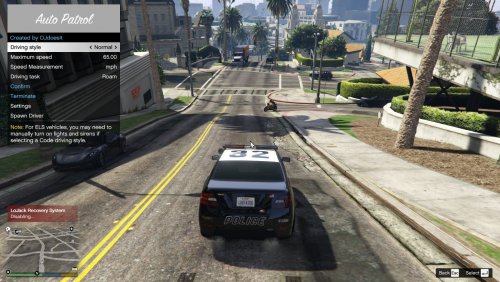
This mod allows the user to autonomously drive their emergency vehicle, from normal to Code driving. I designed this mod specifically for content creators so that they can less focused on the small task of cruising on patrol and more engaged with commentary and/or live stream interaction.
Showcase by @DiamondTKG
Much thanks to @DiamondTKG for testing and showcasing the mod. Make sure to SUBSCRIBE to her channel for great LSPDFR content.
Brief Description of Driving Styles:
Normal - This is the typical driving style for AI traffic. Aggressive - Drives more aggressively with overtaking vehicles and possibly ramming. Urgent - Kind of a hybrid of Normal and Aggressive in that some vehicles will be overtaken. Code 2 - Based upon the common driving behaviors of Code 2 driving across the United States. Code 2 (California style) - A specific Code 2 driving as seen and experienced in California. Through my ride along experiences, officers can only use lights and sirens when authorized. So they typically only, and briefly, use lights and sirens to clear intersections/heavy traffic. They proceed by turning off lights/siren and drive urgently to the scene. Code 3 - The obvious driving behaviors of Code 3 driving as seen across the United States.
Make sure to put AutoPatrol.dll and AutoPatrol.ini and AutoPatrol.pdb into \Plugins\LSPDFR folder.
Make sure to have the latest version of RageNativeUI installed.
Take a look at the INI at least once to make sure you are satisfied with the settings.
Disclaimer:
This mod only functions while driving an emergency vehicle.
To disable the autodriving, you may press and hold either the Accelerate, Brake, or Exit control buttons for one second.
For usage with ELS vehicles, you need to set ElsTrfCtrlOn = false in the ELS.ini
Special Thanks:
@DiamondTKG
@ColonelJim
@RoyceTheFox
@Panos1221
LSPDFR Developers Discord
- 34,572 Downloads
- 126 Comments
Updated -
This callout pack will feature callouts that I was inspired to make at the given moment.
The first callout is Officer In Distress. There are 3 random scenarios that play out. For each, the AI will try to handle everything. No player interaction is necessary. I plan to develop callouts that require little to no player interaction, i.e. the player supplements the call instead of controlling it.
Much thanks to @DiamondTKG for testing and showcasing the mod. Make sure to SUBSCRIBE to her channel for great LSPDFR content.
Make sure to put InspiredCallouts.dll and InspiredCallouts.ini into \Plugins\LSPDFR folder.
Take a look at the INI at least once to make sure you are satisfied with the settings.
Special Thanks:
@DiamondTKG
@AndersForPresident2020
@EchoWolf
LSPDFR Developer Discord
- 14,717 Downloads
- 19 Comments
Updated -
This mod creates random emergency vehicle responses that will come pass the player. The player should shut down any major intersection to let the emergency vehicles pass by.
Courtesy of @lttrbmb
Make sure to put AmbientEmergencyResponse.dll and AmbientEmergencyResponse.ini into \Plugins\LSPDFR folder.
Take a look at the INI at least once to make sure you are satisfied with the settings.
You can enter cheat-code "ambientresponse" to force an ambient response.
Special Thanks:
@Dippa
@Jacobb324
@Quasar
@Sebo
@RealTryphonX
@MintTablett
- 23,140 Downloads
- 93 Comments
Updated -
This callout pack are based upon certain calls/scenarios that do not occur often. They bring another level of immersion, having Youtubers in mind to display some unique content for their viewers.
First Scenario: DUI Checkpoint in Strawberry.
Note: You need to use Callout Manager to activate these calls. You will not get them randomly while on patrol. You may receive an error (red subtitles) when trying to activate a call. This means you are within the spawn radius of the call and you need to drive away and activate again.
Make sure to put OJScenarios.dll and OJScenarios.ini into \Plugins\LSPDFR folder.
Take a look at the INI at least once to make sure you are satisfied with the settings.
If you have a scenario and/or location suggestion, post a comment down below.
Join the LSPDFR Fans Discord: https://discord.gg/hxmvtHE
- 59,781 Downloads
- 53 Comments
Updated -
I present to you callouts scripted by me.
I dedicated a lot of time to each call and hope you enjoy.
Current Calls:
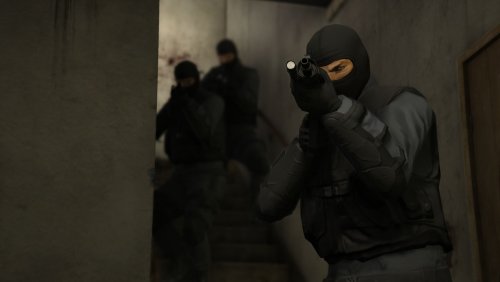
Active Threat (highly lethal assassins, you better call SWAT) Dead Body (someone located a dead person) Disruptive Crowd (provide crowd control to a large group gathering) Fleeing Suspect On Foot (assist officers apprehending a fleeing suspect) Metro Bus Disturbance (someone is bothering passengers on the city metro bus) Person On Fire (this is not a drill) Runaway Vehicle (the brake system of a vehicle has halted, slow down the car) Slow-Speed Pursuit (assist officers in an ongoing slow-speed pursuit) Tracking-Mode Pursuit (stay near pursuit area while helicopter provides you street updates, apprehend when suspect gets on foot) Motor Vehicle Collision (provide assistance to drivers of a traffic collision) Officer Down (uh-oh) Officer In Trouble (aid your fellow comrade) Featured Calls
Felony Stop Assistance (an officer is on a felony stop and is requesting backup) Pursuit Standoff (officers are at the end of a pursuit and need someone to provide instructs to the suspect)
Leave any bugs or suggestions in the comments.
Special thanks to the testers:
@lttrbmb @Ghnty5 @Sereous313 @Twentiez @Starkka15 @Sparryax @shadowboker @BLS501 Spotify @connn911
Topic:
- 110,168 Downloads
- 110 Comments
Updated -
This callout will create an active manhunt within the Grove neighborhood. There will be several perimeter units to which will hold the containment. Therefore, the suspect will be within the containment and you don't have to waste time searching outside. There is also a command post where you will respond to for briefing.
Note: You must be a distance greater than 150 meters from Grove for this call to activate. This is intentionally done to prevent the player from seeing units spontaneously being spawned.
It is advised that you have HeliOrbitPlugin v1.3.6+ installed for best experience.
Make sure to put OJManhunt.dll and OJManhunt.ini into \Plugins\LSPDFR folder.
Take a look at the INI at least once to make sure you are satisfied with the settings.
If you have a location suggestion, send me a PM.
Join the LSPDFR Fans Discord: https://discord.gg/hxmvtHE
Special Thanks:
@lttrbmb - Testing, Video, and Screenshots
@DvHbadger - Testing
- 26,062 Downloads
- 31 Comments
Updated -
Ever wanted to have the Federal Signal Rumbler for AI and use it like the real police do? Well, now you can!!
Please, we would love to see people use this mod in their videos!!!
For anyone willing to test RumblerAddonExtended, please come to our discord channel, https://discord.gg/36HDTvW , this goes for those who want to recommend features as well.
Also join the LSPDFR Discord https://discord.gg/P7ttbrD
Before leaving any negative reviews, make sure to PM @OJdoesIt or @Starkka15 with any problems, we will be there to help!!!
Mod uses Un4Seen's BASS library. Files included in archive.
Contribution by @Starkka15 and @Mr.JonnhyCZG
Known bugs:
Sirens do not pause when game is paused- 1,835 Downloads
- 12 Comments
Submitted -
This skin is based upon Hawthorne, CA police department. Only the skin is a replica of the department's vehicle. There is a 2014 and 2016 FPIU version.
- 309 Downloads
- 7 Comments
Updated -
Ever wanted to have the Federal Signal Rumbler and use it like the real police do? Well, now you can!!
The latest update to FiveM does not work with RumblerAddon.
Please, we would love to see people use this mod in their videos!!!
For anyone willing to test RumblerAddon, please come to our discord channel, https://discord.gg/36HDTvW , this goes for those who want to recommend features as well.
Controller Support is added (switching is not automatic, you must enable or disable the ControllerSupport via INI)
Before leaving any negative reviews, make sure to PM OJDoesIt or Starkka15 with any problems, we will be there to help!!!
Created by OJdoesIt
Contribution by Starkka15
Updated RumblerAddon v1.3.0:
Install everything to the root of GTA V.
There are default sirens in the RumblerAddon/"selected sirens folder".
You may replace them.
All sirens must be a WAV audio file (WAV file was only tested).
Naming convention by default: siren1.wav, siren2.wav, siren3.wav, etc...
Make sure to view the included INI file for configuration and key presses.
Any issues can be reported in the comments or you can message me on LCPDFR (OJdoesIt) or via email otisj16@yahoo.com
You may also contact Starkka15 via Starkka15@gmail.com
BASS.dll and BASS_FX.dll are products of Un4Seen Development
If you enjoy this Standalone Add-on, please tell others about it. Thanks!!!
Feel free to discuss issues and wanted features here:
- 4,774 Downloads
- 55 Comments
Updated
.thumb.png.9d0943161b37f863c291d6d6664edefb.png)







.thumb.png.e2108197eebd2a115a71434e78afdd67.png)