




ineseri
Friends of LSPDFR
-
Joined
Everything posted by ineseri
-
The OP said he had tried that already... Anyway, Hey and welcome to the forums! Watch this video ('?do=embed' frameborder='0' data-embedContent>>) by Break to solve your issue. If that doesn't solve your issue however, make you uncheck the tazer option in the LCPDFR automatic installer. Also, make sure not to link your account during the installation. You will get this error due to the Crime Stats system being down.
-
Welcome to the fora, always nice to see a CVPI in action! Oh, and of course it's nice to see a new member. :)
-
That^. The manual should be your first stop, since almost everything is explained in great detail. However, if you have any issues after reading it, feel free to ask for support.
-
It'll be revealed around the time it's revealed. It's a mystery to all of us :p
-
I would suggest reinstalling LCPDFR, or if that does not work: Reinstall GTA IV and try the mods one by one (starting the game with just LCPDFR, check, install another mod, check and so on...). Because of christmas I won't be able to reply for a while, good luck and merry christmas to you :)
-
Does your issue still persist if removing the ENB and responding to such a call?
-
It's the point of the last one, it forces the game to minimum settings. I would suggest removing your ENB and see if the issue still persists. If yes: Remove the added cars and replace them with less-polygon heavy models.
-
I think you need to be more specific... however, there is this thread to help you ('?do=embed' frameborder='0' data-embedContent>>).
-
It could be that your game doesn't load the world models fast enough. Could you try creating a file called "commandline.txt" in your GTA IV directory and enter the following lines: -novblank -norestrictions -percentvidmem 100 -novsync -frameLimit 0 -nomemrestrictIf that doesn't work, use this instead (replace all contents with this). -renderquality 0 -shadowdensity 0 -texturequality 0 -viewdistance 0 -detailquality 0 -novblank -norestrictions -percentvidmem 100 -minspecaudio -novsync -renderquality 0 -frameLimit 0 -nomemrestrict
-
I actually haven't heard of that glitch before. Does it happen every time?
-
Hey and welcome to the fora! Watch this video ('?do=embed' frameborder='0' data-embedContent>>) by Break to solve your issue. If that doesn't solve your issue however, make you uncheck the tazer option in the LCPDFR automatic installer. Also, make sure not to link your account during the installation. You will get this error due to the Crime Stats system being down.
-
Yes, run the installer as administrator and for the moment, do not link your account to the LCPDFR installation.
-
Then I think you will need to upgrade your computer, it's not a fault with Windows 8, but your hardware.
-
I think that is your answer right there, I do not think you have a powerful enough computer... but, to circumvent a less powerful computer, and maybe get the game up and running, create a txt file called “commandline.txt” (without quotes) in your main GTA IV installation directory and insert the following lines: -renderquality 0 -shadowdensity 0 -texturequality 0 -viewdistance 0 -detailquality 0 -novblank -norestrictions -percentvidmem 100 -minspecaudio -novsync -renderquality 0 -frameLimit 0 -nomemrestrict
-
Try to remove your save files from here (one of the directories) X:Users%username%AppDataLocalRockstar GamesGTA IVsavegames X:Users%username%DocumentsRockstar GamesGTA IVsavegames Note: The AppData-folder is usually hidden, make sure that you can see hidden files. Note 2: “X” is the drive where you have installed GTA IV, and %username% is replaced by your username I will also need your full system specs, not just the amount of RAM.
-
Let me just bring out my mind reading device so I know exactly what error you have :p I need some more info than that. Just a plain CTD without error? Do you have any ELS enabled cars? Did you install the latest version of LCPDFR, and most importantly are you sure your computer is powerful enough to play the game?
-
Yes, you should always use the latest available version of LCPDFR. Read the readme instructions on how to uninstall LCPDFR and then install the newer version, to avoid any issues.
-
It's no problem, we're a community here!
-
What SteelMods said.
-
Uhh, which version of LCPDFR are you using now?
-
... to everyone in this great community. It's been a great year, and a pleasure being here. I've met some great new friends on this site during the year and I can honestly say this is my home away from home. Let's make the next year even better, if possible. Cheers to everyone, especially the developers of LCPDFR :) Special thanks to my newfound friends over the years Original Light, Yard1, Iconography, Olanov, , I probably missed someone, but I love you all equally. I promise.
-
Did it crash immediately when pulling over someone? The pull over key is 'shift'. For realism, you can use the siren at the same time.
-
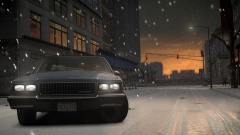 Cool pic. For some reason this reminds me of Midtown Madness 2 (minus the great graphics).
 -
Sure, let us know how it goes :)
-
It's the official microsoft site, I wouldn't recommend downloading those files from any other site. Same goes with the patch.


