




ineseri
Friends of LSPDFR
-
Joined
Everything posted by ineseri
-
Could be so, let me know how it goes if you have the time. And you aren't wasting my time :) Have a good one.
-
And you are sure that 0.95RC2 is removed? http://www.lcpdfr.com/page/tutorials/index.action/_/script-data-file-modification-tutorials/how-to-uninstall-lcpdfr-r19
-
That is weird. Then I am not really sure what could be wrong...
-
Do you have the latest patch?
-
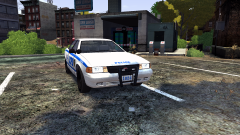 Nice work, once again :D
 -
Try to install this http://www.microsoft.com/en-us/download/details.aspx?id=5549
-
Let me know how that goes :) The manual installation have solved issues for some users before.
-
Try to use the manual installation package instead, follow this tutorial: '?do=embed' frameborder='0' data-embedContent>>
-
Did you install the mod manually, or with the automatic installer? LCPDFR that is.
-
You have bought the game, correct?
-
Running the game as administrator? Latest patch? What other mods are you using?Also, please install these http://www.microsoft.com/en-us/download/details.aspx?id=30679 http://www.microsoft.com/en-us/download/details.aspx?id=30653 http://www.microsoft.com/en-us/download/details.aspx?id=35 http://www.microsoft.com/en-us/download/details.aspx?id=5549 (If you haven’t updated GFWL, use this). Running the game as administrator: Go to the GTA IV folder, right click on GTAIV.exe, Properties, Compatibility and select 'Run this program as administrator', do the same exact thing to the LaunchGTAIV.exe.
-
Let me know how it goes! Crossing fingers over here.
-
Could do attempt to do a clean install? Uninstall it from Steam, remove everything from the GTA IV root directory and reinstall it. I think something is messed up somewhere.
-
and you did set it to run as administrator? Could you try launching it by running it in compability mode for Windows Vista SP1?
-
Are you launching the game from the GTA IV root folder, with the LaunchGTAIV.exe file?
-
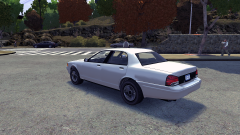 Really nice work, I can see myself cruising around in this.
 -
Are you running the game as administrator? Running the game as administrator: Go to the GTA IV folder, right click on GTAIV.exe, Properties, Compatibility and select 'Run this program as administrator', do the same exact thing to the LaunchGTAIV.exe. Also, download and extract Scripthook.dll and ScripthookDotNet.asi files to your GTA IV directory. (http://www.hazardx.com/details.php?file=83)
-
Thanks, good luck with that :)
-
Okay, so use xlive.dll instead it doesn't really matter. As long as you do not have both xlive and dsound at the same time.
-
You need to sign into xbox live to be able to save when using Dsound.dll.
-
I'm not sure what you mean with that last part, but please go ahead and test it.
-
You are using both xlive.dll and dsound.dll, delete either of those files and try again. They cancel each other out, since they are both ASI loaders.
-
Well, you're not supposed to save while on duty. What is it that you are doing in-game when the error occurs?
-
Hello. Could I see a screenshot of your GTA IV folder to get started?
-
You should never do that. Your savefiles are now corrupted and you will have to delete them. The save files are located in 2 different places. X:Users%username%AppDataLocalRockstar GamesGTA IVsavegames X:Users%username%DocumentsRockstar GamesGTA IVsavegamesNote: The AppData-folder is usually hidden, make sure that you can see hidden files.Note 2: “X” is the drive where you have installed GTA IV, and %username% is replaced by your username

