


Rich
Members
-
Joined
-
Last visited
Everything posted by Rich
-
Glad I was able to help, and thanks for asking the question, this is a good addition!
-
This may be possible with my Scene Manager plugin. If there are game props whose lights are able to be turned on or off (I don't know off the top of my head), you could add them to Scene Manager's .ini and place them in game. Edit: Just confirmed this does work for certain props: prop_worklight_01a prop_worklight_02a prop_worklight_03a prop_worklight_03b prop_worklight_04b prop_worklight_04c prop_worklight_04d Enable Enhanced Barricade Options in the .ini and use the Enable Barrier Lights menu option in the barrier menu to toggle the lights on and off. I've added these to the .ini for the next update.
-
-
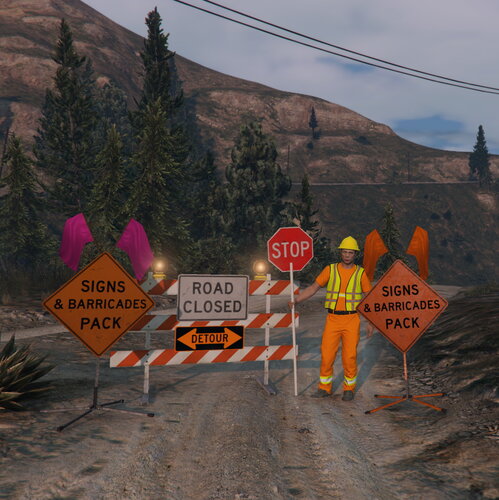 Partnering with Parks to develop Scene Manager in conjunction with this new mod has been a pleasure. Parks is a wealth of knowledge and skill, and I'm glad we were able to do this for the community. This new signs and barricades pack is great for anybody who wants to add realism to their game. The detail of the props are top-notch, and the ability to use the lights on them is fantastic. This pack allows players to roleplay in new ways, which is always refreshing. If you aren't using this pack, you're missing out!
 -
-
-
Here you go:
-
-
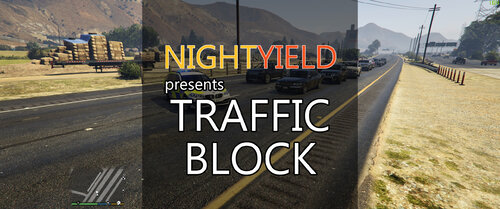 This look heavily inspired by my Scene Manager plugin. Let me know if you need help with anything.
- 113 comments
- 10 reviews
-
-

- 1
-
-
 I'm sorry this free plugin I spent months of my free time working on doesn't do exactly what you want. Send me a DM letting me know how much money you're willing to pay for me to create the feature you want.
- 237 comments
- 24 reviews
-
-
-

- 6
-
-
Albo is not active anymore. For help, please make your own topic in the correct support forum. In your new topic, describe your problem in detail, and upload your RagePluginHook.log (text file) from your GTA V directory.
-
If GTA does not launch normally (without Rage and without a mods folder), then normally I would recommend verifying your game files. Since you mentioned this is happening after a reinstall, I have to wonder if any old files got left behind during the uninstall, and remained during the reinstall. If you decide to reinstall again, make sure all files get deleted after the uninstall. Sorry I can't be of more help.
-
You can still use a lot of Albo's mods. PoliceSmartRadio and Traffic Policer still work (though you'll want to disable Traffic Policer's callouts and ambient events). A lot of people use Bejo's plugins, which are available on a separate website, which Charlie linked. Be advised, his plugins will disable themselves if they are not updated or if you are not connected to the internet.
-
Do you have a mods folder?
-
LSPDFR is not available for FiveM. You can't buy a "premade game," but you can pay people to setup your game for you.
-
-
The README explicitly says the AI will not drive around barriers on their own, and you should use them in conjunction with the main feature of the plugin, which is custom paths. If you read the README, you would have known this.
- 237 comments
- 24 reviews
-
-
- 1
-
-
Unfortunately, the people this topic is aimed at likely won't read this.
-
-
-
So just check if the suspect is in a police vehicle, then?
-
Start by updating LSPDFR and increasing your PluginTimeoutThreshold (in your Rage settings) from 10000 to 60000.
-
I believe it's ElsTrafCtrlOn = true in the ELS.ini, try setting it to false.
-
Since the log doesn't identify a specific plugin causing the problem, lets ask some meaningful questions to try isolating the problem instead of guessing about random plugins. What changes did you make to your game between the last time it worked and now? Have you tried undoing those changes to see if your game works again? Does GTA crash, or just Rage? If GTA is crashing, are you able to play without Rage? If GTA crashes without Rage, do you have a mods folder? If so, disable it by renaming it to _mods and try playing again. If GTA does not crash with your mods folder disabled, then something inside your mods folder is broken. You'll need to figure out what it is and remove it, or create a new mods folder. If GTA crashes with your mods folder disabled, verify your game files. If just Rage is crashing, disable your plugins folder and try playing again If the crashing stops with your plugin folder disabled, then one of your plugins is causing the crash. Re-enable your plugins folder, then drag all of your plugins from the folder to your desktop. Reinstall each plugin one at a time, checking to make sure each one works.
-
Perhaps asking for help in the correct forum would be advantageous.


