


Piarulli246
Members
-
Joined
-
Last visited
Everything posted by Piarulli246
-
Try this:
-
So you were on the summary and clicked next and then it stopped installing and you got that?
-
When do you get this message?
-
This might help: '?do=embed' frameborder='0' data-embedContent>>
-
Yes but its worth it so you don't crash if you set the game up right. After you install it MAKE A BACKUP so you don't have to install the game again if this happens. To make a backup go to your directory after you install the game, copy all the files (with no mods) and just make a folder wherever you want and name it backups, then just paste the files into the backup folder. Its like your gonna have 2 GTA Directorys but the backup one won't ever have mods so you can just copy and paste the backup whenever you need to redo all your files. NEVER GET RID OF YOUR BACKUPS!
-
You should look into a better gaming laptop like an ASUS from best buy or something. I love Asus gaming laptops.
-
I do not know why you can't re-install it. Did you uninstall it in the Control Panel and delete all your files. I do not know why you can't re-install it. Did you uninstall it in the Control Panel and delete all your files.
-
I do not know why you can't re-install it. Did you uninstall it in the Control Panel and delete all your files.
-
ELSv7 is compatible with ELSv6 cars also so that doesn't matter. Some cars just will crash your game.This happened to me yesterday when I was re-installing my mods into the directory, thankfully I had a backup so I just got rid of all the files in my directory and put the files in from the backup and just added my mods back and it worked. It also help to put in one mod at a time to see what crashes your game. Did you make a backup of your game before you added mods?
-
Delete the files in your GTA Directory and just download the game from where ever you bought it off of(gamestop, steam, or disk). If you have a backup from the first time you installed it, then just delete the files in your GTA Directory, copy and paste the new files into your directory. A backup is ONLY when you have new files of GTA with NO mods in it!
-
Sometimes its your cars. Try to download another car and replace thew new one with the old one. Make sure you do not save a police car in your parking spot outside your safe house!!!
-
I would get an Intel processor and a GeForce GTX Graphics Card and make sure the graphics card has at least 2GB in it. Also maybe like a 600w Power Supply. Just my opinion cause I don't AMD things.
-
I had a problem where my game wouldn't let me put up my graphics and one day I was looking for a traffic mod, I downloaded one and it had a commandline in the file that let me change my graphics This is my commandline: -norestrictions -nomemrestrict -percentvidmem 100 -memrestrict 681574400 -memrestrict 629145600 -availablevidmem 2 -noprecache -novblank If this doesn't work, re-install your game and MAKE A BACKUP
-
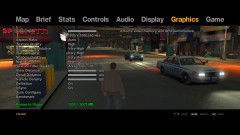 Intel i7-3770 CPU @ 3.90 GHz 8GB Ram 2TB HDD Nvidia GeForce GTX 660 ti 3GB Liquid Cooling 800w PS and a beautiful Cooler Master case
 -
Okay. That just made it so much easier Download this and add it into the Directory. Link: http://www.gta-downloads.com/en/gta4/tools/10295-gtaiv-yaasil-yet-another-asi-loader.html That should help it not crasand if you still want to bring up your graphics tell me.
-
Yes that's only if you didn't make a backup the first time. Have you tried the GTA:IV Diagnostics Tool yet? I would go download that and run it then copy and paste the summary it gives you into here so I can see it.
-
Can you just tell me what mods you have installed because it makes it 100 times more easier to explain when we know what your using. If you don't have any mods installed, the best thing to do is to re-install your game if you didn't make a backup in the first place. If you don't know how to make a backup all you have to do is go into your GTA:IV directory after you installed a fresh copy and copy all the files and paste them into a folder you have to make naming it backups. Backups help because if your game crashes after installing a mod, the backup allows you to get rid of the file(s) that made you crash. Do you have the 1.0.7.0 patch for GTA?
-
Can you please add your Computer Specs!
-
Well to take a pic, you can get Fraps or Dxtory. So your problem is, your on the graphics tab on your GTA and it won't let you put the graphics up to high or something? Will it let you change you screen resolution? Write back to me after you try that and be sure to include your computer specs and your monitor resolution so it helps me more.
-
I'm pretty sure the HP will run GTA smooth on Medium-High settings. If you know the Makinith29, he makes LCPDFR videos on YouTube, I'm pretty sure he has a HP laptop and it runs GHTA good. I have a question. How much are you looking to spend on a PC?
-
I want a GTX 690 because it has the best performance in GeForce cards but I don't have the money for that now and yes we are :)
-
-
What are you trying to do? I can't really understand what you wrote.
-
Yea haha. I love Nvidia Graphics cards. I have a Nvidia GeForce 660 ti 3gb and it runs GTA:IV on max settings. Check out the picture I put up off my graphics in my album.
-
I would pick the HP because I personally think HP is a better brand just because I have 3 HP laptops in my house and we have no problems. Also GeForce video cards are better then AMD. I would also prefer the numberpad because you are probably going to use Simple Native Trainer(SNT) to spawn vehicles, change characters, etc. and the keys to work that are used on the numberpad. Get the HP!!

