


Piarulli246
Members
-
Joined
-
Last visited
Everything posted by Piarulli246
-
Re-install your game and put the mods you want in the game one by one and see which one makes it crash.
-
-
That is true.
-
Looks so stupid, obnoxious, unnecessary, and ugly.
-
-
Run as administrator and make sure its the right log in.
-
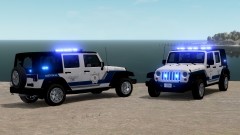 OH...MY...God... My favorite truck in Grand Theft Auto with sexy lights on it. IM SPEECHLESS!!! Just get rid of those rims, there ugly. I LOVE YOU! (no homo)
 -
Didn't even notice that. Lmao!
-
Yea my friends dad had a Suburban also all nice and lit up but I just think they are to big to be police vehicles. His Suburban was to transport the Commissioner and his crew around from point A to point B.
-
Dude those are great specs! Those are like my specs but I have a desktop and not a piece of crap Alienware. I know a lot of people that had an Alienware and they said they suck. I would get and Asus laptop with the same specs. That is my opinion.
-
Eh. I'm not a fan of them. They are weirdly shaped and I don't see them driving around normally around in NY.
-
No problem sir.
-
Lol that's nice to know.
-
Yea it would be very cool to get all the features put into it for the game like the real life one.
-
Lol!!
-
Okay well I'm glad your game is working good now. If you need anything else, just shoot me over a PM and I will try to help with anything I can.
-
Yes lol. The best!
-
Yes
-
So Whelen came out with a new light not to long ago. It is called the V Series Multi Purpose Super LED. It is flat but in the middle it is 180 degree angle. It is a very cool light! This LED a three-in-one light. 1. The light is like a normal flashing light. 2. It has a TakeDown light mode. 3. It has a puddle light to light up the bottom of the car. I think these are very cool and if someone could make these, that would be epic. Check this video out to see how they are. Video: http://www.strobesnmore.com/Whelen-V-Series-Multi-Purpose-Super-LEd-Warning-Light.html
-
Yea but make a new one, that one was old.
-
Haha they are very ugly.
-
I didn't mean problem but some kids would have a different graphics cards then what it comes up on the benchmark. So it came out good?
-
Okay when you are in game under Graphics when you press esc. and where you go to change all your graphics, under all that it should say benchmark. Click on that and it will run through some gameplay so let it do its magic and then it will give you results on what your fps is at and all that good stuff. Write down what you get on the benchmark and then send me them on this post. Also why would it say GeForce driver is up to date when you a intel graphics card? I've seen kids have this problem but I forgot what they did to fix it. Hopefully one of the moderators sees this post because I think one of them knows how to fix it but for now, run that benchmark.
-
Like the screen size. Mines on 1920x1080 because that is the size of my screen. Also try to see if your driver is up to date with everything. When you go back in game, put the settings you want and run the benchmark and tell me the results.
-
Yea I do agree they have a lot of power and yes like I said, the new ones are beauties but I still love my Crown Vics

