




Bxbugs123
Members
-
Joined
Everything posted by Bxbugs123
-
.thumb.jpg.61de846de400ca98f85d205992527de1.jpg) Be sure to rebuild all your vehicles.rpf archives, rebuild all your .rpf archives. Download this file, open it up with notepad change "sheriff" to "police3" save & import in to your game. http://www.lcpdfr.com/files/file/10498-use-bxbugss-charger-in-sheriff-slot/ Or just add this to you carvariations.meta
Be sure to rebuild all your vehicles.rpf archives, rebuild all your .rpf archives. Download this file, open it up with notepad change "sheriff" to "police3" save & import in to your game. http://www.lcpdfr.com/files/file/10498-use-bxbugss-charger-in-sheriff-slot/ Or just add this to you carvariations.meta- 265 comments
- 83 reviews
-
Could try contacting this guy.
-
-
You could also try changing the liveries to others from the community. update/x64/dlcpacks/patchday9ng/dlc.rpf/x64/levels/gta5/vehicles.rpf I don't use the latest update, but that should work. btw I like your avatar.
- 265 comments
- 83 reviews
-
Try installing the vehicle files in the latest patchday's vehicle.rpf What are the specs of your computer & what graphic settings do you play at ?
- 265 comments
- 83 reviews
-
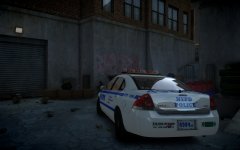 Yes it does.
 -
.jpg.1c3c6dff8abaa45b1f39802096b399f2.jpg) It's on my latest charger release if you wantto download it & look at it your self.
It's on my latest charger release if you wantto download it & look at it your self. -
I know but i wanted to see what it would come out to if i went for high poly.
-
Be sure the vehicle slot you using for this charger uses SirenSettings "1" Sheriff by default uses "13". Umm how odd I I thought it was correct according to this.
- 265 comments
- 83 reviews
-
-

- 2
-
-
-
From the album: Bxbugs123's V Images
© HighSpeed Designs 2016
-
.jpg.b8d0bcd55b7543825bf9e74af36a9f5b.jpg)
From the album: Bxbugs123's V Images
© HighSpeed Designs (2016)
-
.thumb.jpg.f806c60e0c1d78a95eab5871f9ce94dc.jpg) This work is licensed under a Creative Commons Attribution-NonCommercial-NoDerivatives 4.0 International License. By downloading this file you agree to the TERMS OF USE AND DISTRIBUTION, If you can not abide by those terms then do not download this file.
This work is licensed under a Creative Commons Attribution-NonCommercial-NoDerivatives 4.0 International License. By downloading this file you agree to the TERMS OF USE AND DISTRIBUTION, If you can not abide by those terms then do not download this file.- 23 comments
- 11 reviews
-
-
- 21
-
-
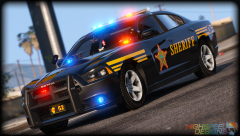
From the album: Bxbugs123's V Images
© HighSpeed Designs / Initiative Gaming (2016)
-
Update your WinRaR, WinZip or 7-Zip. The compression method that i use is from WinRaR V5.20 from 2014 so if you're using an older version of WinRaR it will not understand what it is & just say it's corrupt or broken.
-
It looks like this.
-
Here try this, http://www.lcpdfr.com/files/file/10498-use-bxbugss-charger-in-sheriff-slot/ Could you post some pictures of what its doing as I don't use the spotlight mod.
- 265 comments
- 83 reviews
-
-
If you are using my sheriff's CVPI's & want to put in slot "police2" you will need to edit the carvariations.meta file that those CVPI's came found in mpchristmas2 common/data, you will need to edit it with notepad or another program find the "police2" line & change "police2" to "sheriff" or another slot you will moving the CVPI too. The charger will now work on "police2" slot. Use the option in the trainer keep vehicle running. That's very odd be sure to rebuild your vehicles.rpf & also make sure that it's not corrupting the file. This is caused by the car carvariations.meta file depending what slot you put it over from the looks of it "police" or "sheriff" if you would like to use one of those slots you will need to make a new line in the carvariations.meta file & add in "police" & for the "SirenSettings" line will need to make sure it uses value "1" such as the "police4", "police2" & the "fbi" slots use by default. Yes, there are 2 ways this can be done. One you can just replace the same livery over all 4 slots or you can edit the vehicles.meta file under flags & remove this line "FLAG_HAS_LIVERY" for the vehicle slot you replaced it over. Yes sorry about that the plan was 8 and in the update it will have 8. (What favorite skin do you want to see on it let me know via PM.)
- 265 comments
- 83 reviews
-
-
- 1
-
-
You must be still have my LASD CVPI in over police2, try installing it over police4 or fbi. There is a LAPD / LSPD based skin on it already from Lt.Caine.
- 265 comments
- 83 reviews
-
-
- 1
-
-
There is no auto installer for this vehicle ? Try updating your WinRaR or WinZip or 7Zip. That's make sure you have done everything right, using that template should work.
- 265 comments
- 83 reviews
-
Well you can but you will need to go in all your patchday's & delete the files overlaying the vehicle you replace it with, by putting it in a newer or latest patchday vehicles.rpf it will overlay all the other vehicles.
- 265 comments
- 83 reviews
-
-
- 1
-
-
-
This work is licensed under a Creative Commons Attribution-NonCommercial-NoDerivatives 4.0 International License. By downloading this file you agree to the TERMS OF USE AND DISTRIBUTION, If you can not abide by those terms then do not download this file.
- 265 comments
- 83 reviews
-
-
- 44
-
-
.jpg.d6287927d21c49ec3e9627a9404a034f.jpg)
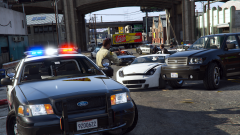
From the album: Bxbugs123's V Images
© HighSpeed Designs 2016

.thumb.jpg.61de846de400ca98f85d205992527de1.jpg)
.jpg.1c3c6dff8abaa45b1f39802096b399f2.jpg)
.jpg.b8d0bcd55b7543825bf9e74af36a9f5b.jpg)
.thumb.jpg.f806c60e0c1d78a95eab5871f9ce94dc.jpg)
.jpg.d6287927d21c49ec3e9627a9404a034f.jpg)