


Sentinel55
Members
-
Joined
-
Last visited
Everything posted by Sentinel55
-
It's absolutely no wonder to get that error with your hierarchy. Is there any reason to have so many parts called extra_1?
-
Open up the ELS menu and set the primary lights to E-33.
-
My favorite! Used it for a very long time. I use this car here since a week now.
-
Welcome to the forums! Take a look at this topic: '?do=embed' frameborder='0' data-embedContent>> Have fun!
-
You can still use the megaphone of the cars by pressing shift. I miss the coffee and radio too, it was a very nice feature!
-
These pics were uploaded on this site too a few hours ago. The cars are private!
-
No problem!
-
Here you go.
-
Happy Birthday!!
-
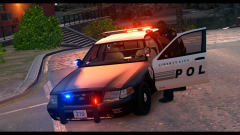 I did not say that the car will not get released! Maybe I'll do it. Who knows?
 -
Unreleased.
-
From the album: LCPD
"We kill those who kill others" - LCPD -
You're welcome!! :)
-
Change these 3: Color_Light7L = 3 Color_Light8C = 3 Color_Light9R = 3 to this: Color_Light7L = 1 Color_Light8C = 1 Color_Light9R = 1
-
I'm pretty sure it has to do something with this: :)
-
-
The mod works fine for me! Make sure you've installed the newest Patch, that you have an asi loader and wait a few seconds to let the mod start.
-
You need to install this: http://www.hazardx.com/details.php?file=83 Then you have a working script folder!
-
If you want a helpful response, try it in english! :)
-
It's only a show car and will not be used for patrol.
-
You can't turn off the engine with activated lights.
-
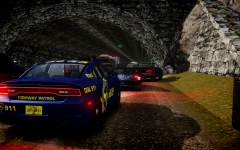 Peds + no blips = Perfect!
 -
You're welcome!
-
One last thing, make sure to replace all 3 ped files!
-
It works exactly like that!


