




Pavy
Members
-
Joined
Everything posted by Pavy
-
I noticed you have a folder named EMF. I'm not familiar with that feature from gta5mods.com I can only suggest to you to put the models into your latest patchday folder which would be patchday19.
-
-
https://www.ausgamer.net/files/file/18-police-partner/
-
Press Left Ctrl+P ingame while in the police vehicle. Does a panel show up in the bottom right corner?
-
Did you put the vcf file the vehicle comes with into the ELS folder? Do you have scripthookV in your main directory?
-
That means your mods folder was corrupted. You installed something incorrectly or didn't update it properly.
-
Rename mods to mods_ test your game out
-
-
Post a screenshot of the vehicle in-game Link what model you downloaded and installed Say the exact location of where you installed it and screenshot the files
-
Desktops will always be better than laptops. Laptops are extremely overpriced and overheat and are limited most of the time. You can use youtube to benchmark the performance. Just type in the graphics card and processor and look up gameplay videos to best decide.
-
What EXACT location did you put the vehicle in? Also link the vehicle model.
-
If it autodeletes that means your Antivirus is deleting it or quarantining it. What Antivirus do you have? Add the entire Gta V folder as an exclusion. If you have McAfee is must be uninstalled.
-
Its impossible to convert a ped model uniform into a EUP outfit. EUP has it's limitation. The NYPD EUP version by cadmiomred is fairly accurate.
-
Pictures please
-
Rename your mods folder to mods_ See if that works.
-
Albo includes a template for each meta you would need. You simply copy the lines for any police model that fits the custom model.
-
 That is part of Arrest Manager not police radio. In the Arrest manager cfg file. //The Coroner Vehicle Model must have at least 2 seats. CoronerVehicleModel=SPEEDO
- 1,196 comments
- 127 reviews
You are missing a LOT of audio files so its fair to say you didn't install it correctly. Also remove Bribe plugin because it IS the reason you were crashing. Reinstall ALL your plugins to get the audio files they come with. They come with a folder titled "lspdfr" all lowercase. That contains the police scanner files.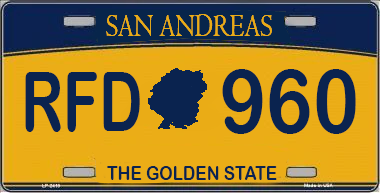 Why "The Sunshine State" ? The Font is incorrect. I like what you did with the map in the middle, pretty cool.I recommend Deleting your mods folder and starting from scratch. RDE Changes A LOT of things, going back to put backups in is just too much work. I've attached the assembly file. You would need to go to those locations and put in your backups. assembly.xmlhttps://parksmods.com/donate/Yes that definitely will. Just mute one file and rename it to the useless audio files you want to mute. So you can simply copy and paste it, rather than going to edit each individual one.No it's nothing new. It has always been like that. Its 16mbWhat sirens are you trying to install? By not working do you mean muted? If so, if the vehicles.awc file size is greater than 16mb then the sounds will be muted. I can't remember if its 16 or 17 but there is a limit.


