


NickieB
Members
-
Joined
-
Last visited
Everything posted by NickieB
-
Haha, thats cool. I don't patrol there a lot but I've never noticed it before...cool find
-
No one should give you anymore assistance until you get a legal purchased copy of the game. Like unr3al said, we frown upon anything to do with piracy here. Plus LCPD:FR is designed not to work on cracked versions. Its theft...
-
Don't hold your breath for the model but the skin someone could probably make for you. The chance of that exact model being made is about 0.015%
-
You answered your own question: "GTA does not do this when I use non ELS cars, so I think it has something to do with that." so stop using modded cars or try turning down your graphics settings because your computer can't handle it now. Thats why its doing what you described
-
You need to give more information than that. All your doing now is telling us that you have a problem. Do you have all your .net framework updated, the latest GTA patch, the Microsoft C++ reddistributable's, an ASI loader. Did GTA work before you installed LCPDFR? Run the G17 Diagnostic tool and see what it says.
-
I don't have a problem with it either but the line I posted is the same as yours. Not sure if the slot you have the car in makes a difference or not but I have mine in "police". I'll see if I can find a different line that might work better. Whiteboyofus - there are a ton of lines by Sgt.Kanyo on GPM, you might be able to find one that works on there.
- 24 comments
- 6 reviews
-
Yeah are you serious? It takes 30 seconds to copy and past the blue texture and move it over top of the red one. you can even use paint like he said, you don't need photoshop or skills for a procedure like this
-
-
-
Thats the same one I use ninkanji. I was just about to post it. I'll update above
- 24 comments
- 6 reviews
-
Lol, exactly. Anywhere you see them selling it will be just fine. Amazon, Walmart, Your local game store, Ebay but I would buy it new though
-
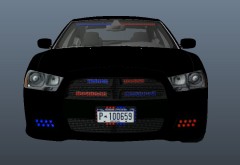 Yeah I know, the car is no where near ready for a public release. Just wanted to put up some teaser shots
 -
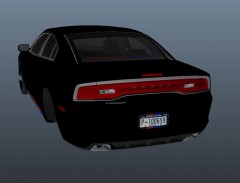
From the album: WIP
Just a little something that's been in the works for awhile.... -
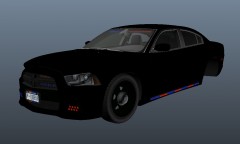
From the album: WIP
Just a little something that's been in the works for awhile.... -
From the album: WIP
Just a little something that's been in the works for awhile.... -
I use SgtKanyos handling lines and never have a problem. I have a CVPI one installed for this car I think
- 24 comments
- 6 reviews
-
Don't tell him to chill out, hes trying to help you. This question gets asked all the time and thats one of the reasons you can't post in the FR support section. If the video doesn't help then you simply can't use the tazer. So uninstall LCPDFR and when you go to reinstall it, uncheck taser. Then the taser wont be installed and you wont have any problems.
-
Yeah me to. Its next in line now that this is released all my attention will go to that car. I'm actually excited to get that car in-game and see how its turns out. Were maybe looking at a release of the middle of next week depending on how the testing goes and provided we don't run into any problems.
- 24 comments
- 6 reviews
-
-

- 1
-
-
-
Crown Victoria with Code 3 x2100 There are two versions in the file, one with the spotlight pointed down. The other with the spotlight turned up. Also two textures are included to change the color of the light bar glass. If you want all blue you'll have to make that yourself. Car does have primary and secondary ELS. Thanks for downloading! Rambar version to come *******Some of you mentioned problems with the car rolling over. Use the handling line below from Sgt.kanyo 1777.0 0.33 85 0.0 0.0 -0.25 0.0 4 0.128 1.0 250 0.52 0.67 0.7 33.0 1.45 0.95 14.0 0.11 0.47 2.5 1.7 1.7 0.1 -0.08 0.0 0.49 2.0 1.0 2.2 2.5 0.0 25000 400010 0 0 * CREDITS * - Model is original Forrd Crown Victoria by Driver SF, modified for and converted to GTAIV by F5544. Main skins and textures by F5544/Lt.Caine. Edited by Sgt.Kanyo - Ripping from driver SF: RacingFreak - Wheels, Radar, Dashcam, Laptop, Spotlights by BxBugs123 - Code 3 x2100 Lightbar made by Bxbugs123 and penguin2254, modified and converted by gfxle - Misc ELS Lighting by BxBugs123 edited by NickieB - Whelen Avenger Modules by TheThinBlueLine - Liveries by NickieB - BETA testers - gsp318, EFox, Dhruv, Firesheriff343 - CVPI Honeycome grill - I'm not 100% sure who made this. I got it from SgtKanyos CHP slicktop. (If you know I'll change it) - Handling line - Sgt Kanyo ** You do not have permission to upload or distibute this file or vehicle without my written consent. * Spotlight Coordinates * [Police] spot-x=-0.9 spot-y=+0.8 spot-z=+0.4 * Installation * (I recommend using OpenIV) Launch OpenIV, Click "Edit Mode" on the top and then navigate to Models>Cdimages>Vehicles.img Find "Police.wft" and "Police.wtd", extract (EDIT>Extract) both files to make a backup(ALWAYS Backup!) Then click EDIT>Replace and import the WTD/WFT included in this file. To change Lightbar glass color, open the WTD, find "emerglights" and import the color you want from the Glass Textures folder In-Game Screenshots can be seen here: http://www.lcpdfr.co...-3-x2100/large/
- 24 comments
- 6 reviews
-
Stevos custom lightbar
-
Well you get an A+ for grammar.... what are you talking about? The game? Problems with the skin?
- 5 comments
- 4 reviews
-
-
- 2
-
-
Haha I have the same surfboard modem as you unr3al... My computer isn't anything special to take a picture of. Its just a normal stock desktop computer which runs GTA IV and Flight Sim X and does everything else I ask of it so I'm happy. I would love a super nice setup like most of you have so I could play my games on full settings and have a nice computer but I would be clueless as where to start plus its expensive.
-
Mapping all the ELS like that is a lot of extra work. Especially with a lot of lights like this car will have. I don't know about that on this car. Update screenshots below.. -Grill lights added, rear deck lights added, rambar modified to better fit the car + pushbar lights, added various antennas
-
Yeah its a justice

