


Olanov
Members
-
Joined
-
Last visited
Everything posted by Olanov
-
There's still retailers that sell it in stores, and I don't know what you mean by a 'regular' version.
-
Have you read the community guidelines? If so, then you should know better not to double post. It's considered as spam and breaks the guidelines. Please edit your posts instead to avoid it in the future. For now, I merged your posts.
-
This ain't an issue with LCPDFR, moved. Please post in the correct section next time or you will probably get infractioned.
-
I merged your posts, thought I'd let you know.
-
Not few days ago, a Sheriff's Deputy was killed in a car accident at Milwaukee County as well: http://www.wisn.com/Fellow-officers-emotionally-hit-hard-by-Deputy-Aleman-s-death/-/9374034/15934526/-/117plxcz/-/index.html I didn't know the guy, but I have a friend who knew him. It's a shame stuff like this is happening in the very county...
-
BRAVO, avoid double posting please. It's against the community guidelines and will get you infractioned. I merged your posts.
-
This ain't an issue with LCPDFR. Topic moved.
-
I'd suggest you to download this mod: http://www.gtagaming.com/downloads/gta-iv/player-mods/13785 It gives your cops things such as an armor, short sleeves, sergeant patches and cut from the PC version white head.
-
Wrong section. Nothing to see here! This topic has been closed by G17 Media staff. If you feel that this topic has been closed in error, please report this post.
-
Wrong section. This has nothing to do with LCPDFR. Nothing to see here! This topic has been closed by G17 Media staff. If you feel that this topic has been closed in error, please report this post.
-
Look, don't hijack a topic. If you've got a problem, please make your own topic about it, don't hijack others or you will get infractioned.
-
Awesome, thanks. Glad you've enjoyed the ride so far. :)
-
Feel free to check out some of my work on my channel: www.youtube.com/user/Olanov No, early sneak peek of the mod is not essential for me.
-
You still have supposed to read the community guidelines. Please be sure to review them again to avoid any problems such as this.
-
Don't draw attention away from others topic, make your own.
-
WrongfulCopper, do not double post. It's considered as spam and is against the community guidelines. Edit your posts instead or you will get infractioned in the future. I merged your posts.
-
Demi, do you mean walking in the checkpoint and thus getting teleported inside or just teleporting?
-
Yeah, of course it ain't real. Even my momma could call that out. Still funny.
-
Mulder, do not hijack topics. If you've got a problem(s), please make your own topic about them in the correct section, do not draw attention away from the OP. I've hid your post from the public.
-
Hey, this has nothing to do with LCPDFR, you've posted in the wrong section. Closed.
-
You've posted in the section. In the forums, please take your time before you go posting, can't you see the "support" section? Also, follow these steps to make a support topic: http://www.lcpdfr.com/forum-20/announcement-5-need-support-read-this-first/ Closed.
-
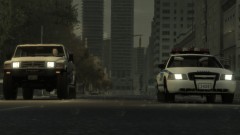
From the album: Olanov's Pics
Seems surprisingly quiet today, huh? Special thanks to Trooper Bird for helping out with the scenario. Higher resolution picture here. http://cloud.steampowered.com/ugc/955013318204089679/5066EF2229F61C5A25EF43F139E76FD55BCC4886/ -
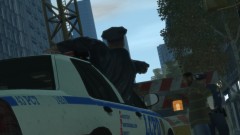
From the album: Olanov's Pics
When we get back to the station I'm going to beat you with a phonebook! I swear to god, me and Bird pulled off some super troopers shit right there. Struck the perp, painted hood red with blood and then moved in to make the arrest while one leans out of the window with gun aimed at his head... Higher resolution picture here. http://cloud.steampowered.com/ugc/955013318204000736/B2A29E21FBD10C21198A8FEE9A8C88A56BFB97A5/ -
Riqitch811, please do not doublepost. You need to be more patient, seriously. Couple of hours ain't that big deal. Edit your posts in the future to avoid this or you WILL get infractioned, since double posting is considered as spam and it breaks the community guidelines. I merged your posts for now.
-
@jayloc. Please do not doube post. To avoid this in the future, edit your posts instead or you WILL get infractioned, thank you. Merged your posts.


