Illusionyary
Members
-
Joined
-
Last visited
Everything posted by Illusionyary
-
Now that you mention it, they do sound like my siren tones. I compared them using GTAIVaud, and they are the exact same sound, length and file size. Coincidence?
-
You can't "join" the police force in GTA V, you can however steal their vehicles and with the random world events do a bit of roleplay.
-
Didn't you make it? lol http://www.gta4-mods.com/misc/gta-v-siren-with-improved-firetruck-horn-f24240 MODERATOR NOTICE Moving to GTA IV Discussion.
-
Firstly, please don't write in full caps. Secondly, don't hijack other people's topics, create your own.
-
Nothing to see here! This topic has been closed by LCPDFR.com staff. If you feel that this topic has been closed in error, please report this post.
-
Please refer to this video on how to solve this issue: '?do=embed' frameborder='0' data-embedContent>>
-
-
Got to love the Highway Patrol FPVs.
-
I think Buckley sums this up quite nicely. http://www.youtube.com/watch?v=DmuJtKcisiA
-
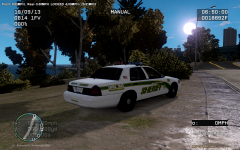 It's pointing the wrong way, the stars should face the front of the car. The other side is fine, but it needs to be flipped on this side. I'm pretty sure anyway.
 -
-
Flip that flag around and you're good to go! The stars should always face the front of the car. ;)
-
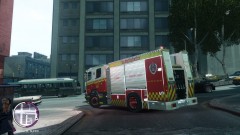 I've been following the Australian Emergency Textures thread for about a year now and there was quite a bit of hype about this pumper and then it just disappeared, not sure what happened to it. I'd love to get my hands on it too since it's the closest thing to the units over here in my state.
 -
I'm yet to see a lot of these cars. I agree about the liveries, I'm a little disappointed but I think the lighting system makes up for them.
-
I've been playing for a couple of hours now and so far I haven't seen a single Ambulance respond through the city/countryside. I'm really not sure about wounded victims, I haven't seen any yet. I did however notice that sometimes the cops would enter a "last stand" stance after being shot a few times only to get back up once the suspect is taken down.
-
The cops in V are really aggressive lol. Earlier today I found a parked up sheriff's vehicle on a highway so I stopped to admire it and next minute the cops got out of the car and shoved guns in my face. So I just got back in my car and floored it before they had a chance to arrest me.
-
MODERATOR NOTICE Topic belongs in GTA V media, moving.
-
I never said it did, but I thought that I'd mention that because of the laws over here we haven't had major shooting for almost 20 years (when the gun laws were introduced). Yes, nothing can stop someone from going and killing a bunch of people but certain laws and such can be put in place to at-least limit the amount of these attacks taking place. I completely agree with you in terms of the media, about half of these shooters do it just so they can become "famous" on TV and the internet.
-
Who says Iraq isn't civilized? They have their issues with terrorism and such but that's not to say you can't make something of yourself there. I really don't understand the motive behind all these attacks, we haven't had a major shooting in 20 years here in Australia possibly because we have strict gun laws. Now I don't want to start up a gun laws debate because quite frankly even with gun laws in place, America will continue to have these shootings because there is already too many guns out there. RIP to the victims and I hope they catch that alleged second suspect.
-
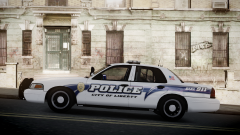 Thanks MoonShine, it's apart of my CVPI mini texture pack found here: '?do=embed' frameborder='0' data-embedContent>>
 -
Thanks strike! :)
-
Thank you strike, that made my night!
-
-
From the album: Illusions
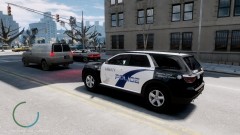
Those rims. -
 Hmm, I'm not sure what font that is myself. Perhaps someone else knows, if not try uploading it to WhatTheFont.