


tee
Members
-
Joined
Everything posted by tee
-
Hello, what should my graphic settings be in order to run LSPDFR smoothly? before LSPDFR is loaded I only get 50-60 FPS and after I load LSPDFR I only get 30-35. I have a Dell G15 5590 Laptop Processor Intel(R) Core(TM) i7-9750H CPU @ 2.60GHz, 2592 Mhz, 6 Core(s), 12 Logical Processor(s) Graphics Card Nivida Geforce GTX 1660TI 6GB RAM: 16GB
-
its not its an addon vehicle Does this option work for addon vehicles?
-
How do I enable the multi_livery option? I've been trying to get it to work, but all liveries still show up. For example: <Vehicle chance="50" is_dlc="true" use_modkit_liveries="true" livery_multi="1,3">vpdcharger</Vehicle> doesn't allow only livery 1 and livery 3 to appear on this vehicle.
-
I receive callouts from North Yankton sometimes, but I always end up in the middle of the ocean. Is there a stable Map or mod that allows me to play in North Yankton and Cay Perico?
-
What corrupts your vehicle handling lines? The reason I'm asking is because my sheriff tahoe & charger handling lines (named TAHOE & CHARGER) were working now they are not. Every time I spawn them they crash back to desktop. How can I fix this?
-
My game has been crashing since last night. I was able to play for about an hour last night so I thought it was a random crash. I get on to play this morning and now ragepluginhook has crashed 3 times after the 1st callout. Each time it was a different 1st callout? What could be m issue? Sorry the log is not the latest log it is from the 2nd time it crashed. As I have tried to find and fix the crash RagePluginHook_19102023_134247.log
-
It worked once i removed the openiv.asi & opencamera.asi out. I reinstalled it then I put the dlc pack in directly from the zip into openiv and it worked. thanks
-
.thumb.png.5bb0b0bdbcb0774e82fbe0d5e84d5964.png)
.thumb.png.d06e1218cabadd5b31b0d7d4ffbc2203.png)
.thumb.png.73611d2fa85671d1e22c7cc972743241.png)
.thumb.png.ab1ac1532ce407b332f9f99fbf197880.png)
.thumb.png.0e7761a3d0b35209ccda0d3912f8c6d5.png)
.thumb.png.18173745342547b069cf6946421fcd3e.png)
.thumb.png.da3f5194e9a72c7915ce792d3a34689d.png)
-
yes I also tried to extract it directly from the zip file into openiv and got the same result.
-
I asked because I did that and that particular DLC pack is still corrupted.
-
I have the latest Scripthook V, but what is the process to reinstall the asi loader?
-
The GTA Title update.
.thumb.png.6194e92c4449224a07b1f42a119f6518.png)
.thumb.png.31d9285e5c675052a1b3eaba4d806ae6.png)
.thumb.png.fa2d832c80c913b6d9782bb97849cb2a.png)
-
I'm having an install issue with installing Trp. Keaton's FHP pack after the update. It was working perfectly before the update now when i try to view them in open iv it says corrupted file. I've redownloaded this pack and restarted my computer and it still says corrupted file. What am I doing wrong.
-
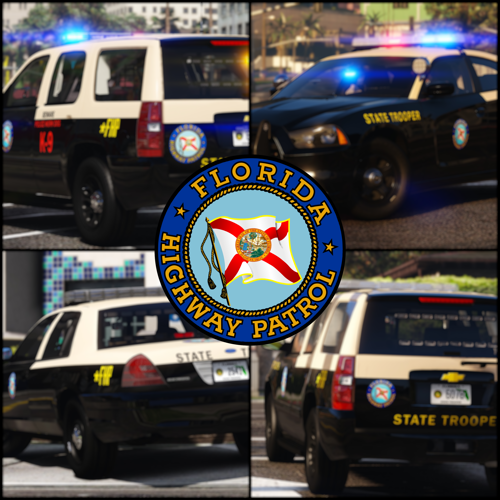 I love the pack but in addition to what is already listed. FHP24 grill lights, sidrunners, bumper lights, and the lights on the side of the license plate are not working.
- 300 comments
- 22 reviews
-
-

- 1
-
-
Hello, I wanted some traffic variety around San Andreas so I downloaded and installed a T660 Semi-Truck cab. I have the correct Flags such as FLAG_ATTACH_TRAILER_ON_HIGHWAY and FLAG_ATTACH_TRAILER_IN_CITY in the vehicles.meta file. I also have the trailers it can attach to listed in the meta file. I added the T660 Semi to the addedtraffic.xml file, but it does not spawn with a trailer. Is there another way for it to spawn in traffic with the trailer? Can I add it to the popgroup.ymt? if so where do I find the correct popgroup file?
-
Hi, I am trying to use non-els cars as backup in my Ultimate Backup files. I set the vehicle extras for what I want them to respond with, but when they spawn the extras are missing. I have to manually fix and clean each car to see the vehicle extras I assigned. Is there something I can change so that I don't have to fix and clean each responding unit to see the vehicle extras?
-
When i startup Ragepluginhook, as soon as it hooks it crashes. this is a fresh install of GTA so i have not added any mods. RagePluginHook.log
-
I have been dealing with the Slow system or insufficient permissions error since yesterday morning. My lspdfr was working fine the day before this. Now, I can't get passed the rage plugin Hook startup menu, and when I do, it takes more than 2-5 tries for it to load in-game and crash back to desktop without an error crash log appearing seconds later. RagePluginHook_12062023_121328.log
-
Before I begin, I have a lot of plugins loaded, but yesterday I was able to play just fine with all of them. Today is a different story. I took out an outdated version of Lore Callouts in favor of the latest and now I'm crashing a lot. Could this be the reason or do I have another issue? RagePluginHook_29052023_224507.log
-
I've been crashing around Zancudo River/ Route 68 lately. I have a gameconfig and heap adjuster installed but I still crash. Is there something within my log that identifies the crash? RagePluginHook.log LSPDFR spawned me in the game in the same spot and it crashed again RagePluginHook.log
-
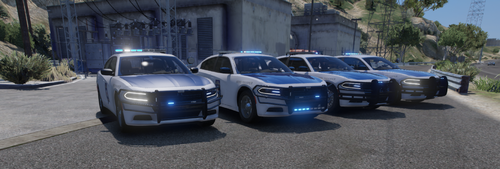 @rcsd2007will you be making update where the Chargers have the rims like the ones in this picture? It'd really be awesome if you did
- 33 comments
- 5 reviews
-
How do I get a car livery to show up with a specific color? For example I have a car set up like this: Its spawning the colors but not on the correct liveries
-
-
When I call for a tow truck lspdfr first reponse .dll crashes immediately RagePluginHook.log sorry wrong section
-
ok just trying to make sure.

.png.2870f2e1a1614bf6bb1a41dea0a67c04.png)
.png.8e501e8e410a8250e7294e47650969a1.png)
.png.123957dc848e5d0e8874a8d6255c518c.png)
.png.4839ea3b773062c7b67eba83c8b74d51.png)
.png.76dacf80b6bcf00b0694eabd0d76e8c2.png)
.png.11df9bdc1a973945131fa1db611698ed.png)
.png.ad7a912a8bfe26a5ed6ce1abad16bef3.png)
.png.1189d780e280f67d8431076fd1b3e969.png)
.png.14c8cc2fa54b6cd4f1b05945c197cc5a.png)
.png.10a6f85ff1b8f527fab5508ea66fb527.png)
